EasyManua.ls Logo

Sony IT-A100 - Turning the Answering Function on or off; Setting a Beep For.incoming Messages

Sony IT-A100
58 pages
Print Icon
To Next Page IconTo Next Page
To Previous Page IconTo Previous Page
Loading...
Turning
the
answering
function
on
or
off
To
set
the
phone
to
answer
incoming
calls,
turn
on
the
answering
function.
-\_
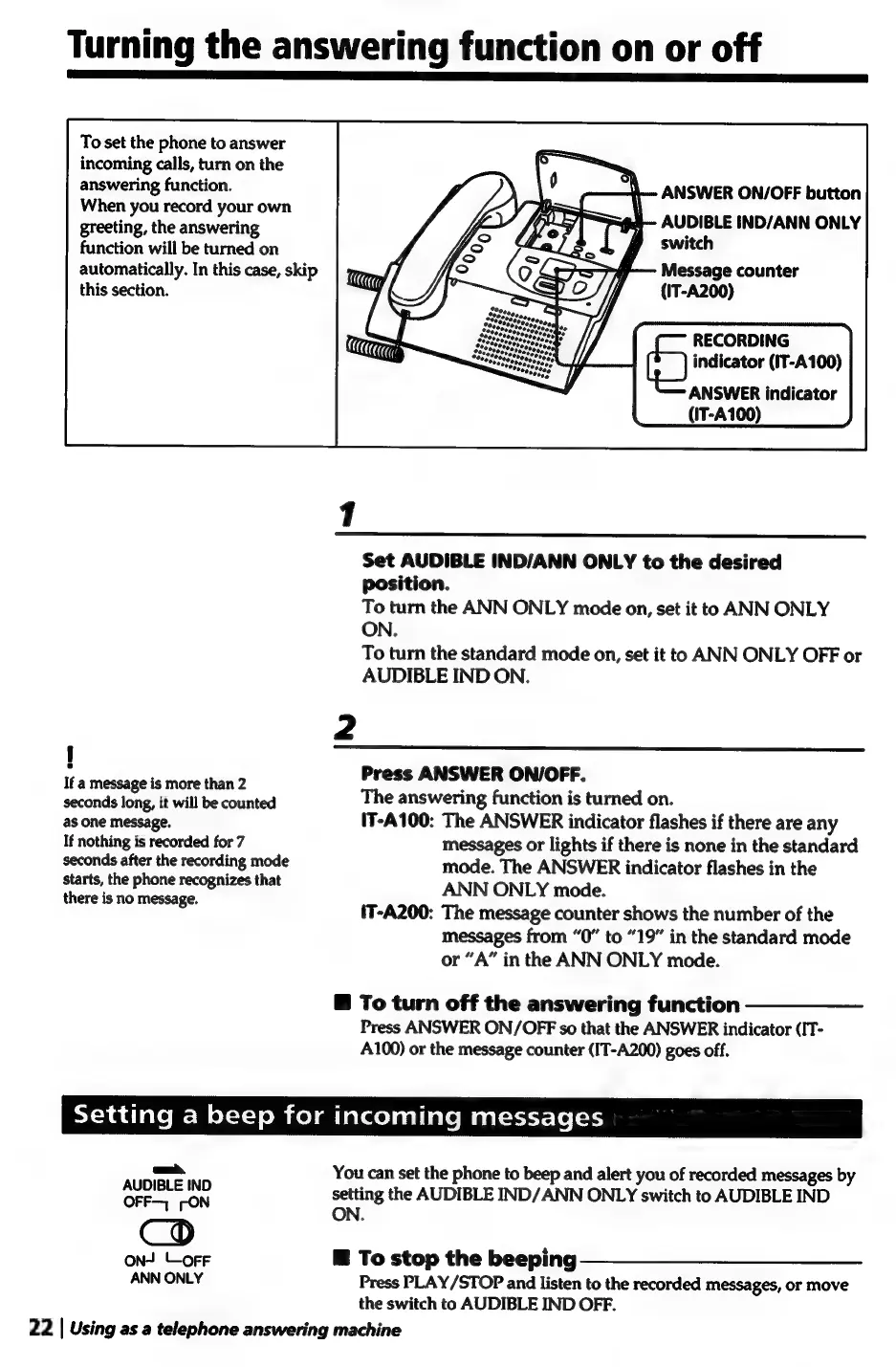
ANSWER
ON/OFF
button
When
you
record
your
own
greeting,
the
answering
a
IND/ANN
ONLY
function
will
be
turned
on
automatically.
In
this
case,
skip
:
f
Message
counter
this
section.
:
(IT-A200)
RECORDING
0
indicator
(IT-A100)
ANSWER
indicator
(IT-A100)
Set
AUDIBLE
IND/ANN
ONLY
to
the
desired
position.
To
turn
the
ANN
ONLY
mode
on,
set
it
to
ANN
ONLY
ON.
To
turn
the
standard
mode
on,
set
it
to
ANN
ONLY
OFF
or
AUDIBLE
IND
ON.
2
1
Ita
ficscauatetnore
than
Press
ANSWER
ON/OFF.
seconds
long,
it
will
be
counted
The
answering
function
is
turned
on.
as
one
message.
(T-A100:
The
ANSWER
indicator
flashes
if
there
are
any
If
nothing
is
recorded
for
7
messages
or
lights
if
there
is
none
in
the
standard
seconds
after
the
recording
mode
mode.
The
ANSWER
indicator
flashes
in
the
starts,
the
phone
recognizes
that
ANN
ONLY
mode.
there
i
.
ee
ree
(T-A200:
The
message
counter
shows
the
number
of
the
messages
from
“0”
to
“19”
in
the
standard
mode
or
“A”
in
the
ANN
ONLY
mode.
To
turn
off
the
answering
function
Press
ANSWER
ON/OFF
so
that
the
ANSWER
indicator
(IT-
A100)
or
the
message
counter
(IT-A200)
goes
off.
ST
=hadlale
MoM
ol-1-)
oMcolmiarcelealiole
Maatsett-\6
[21
oh,
You
can
set
the
phone
to
beep
and
alert
you
of
recorded
messages
by
aEDIELE
IND
setting
the
AUDIBLE
IND/ANN
ONLY
switch
to
AUDIBLE
IND
OFF
ON
ON
on!
LoFF
®
To
stop
the
beeping
———@$—@$
—__
ANN
ONLY
Press
PLAY/STOP
and
listen
to
the
recorded
messages,
or
move
the
switch
to
AUDIBLE
IND
OFF.
22
|
Using
as
a
telephone
answering
machine

Related product manuals