EasyManua.ls Logo

Sony IT-A100 - Recording a Greeting

Sony IT-A100
58 pages
Print Icon
To Next Page IconTo Next Page
To Previous Page IconTo Previous Page
Loading...
stereo]
collate
MMe
la-t-a
dials!
You
can
record
your
own
greeting.
If
you
want
to
use
the
pre-recorded
greetings,
skip
this
section.
Your
own
greeting
will
be
used
for
both
the
standard
and
ANN
ONLY
modes.
The
pre-
recorded
greetings
cannot
be
used
unless
you
erase
your
own
recorded
greeting.
s
If
more
than
15
seconds
elapse
between
pressing
buttons
(except
when
recording),
the
operation
canceled
and
you
must
start
over
again.
On
{T-A100:
The
RECORDING
indicator
flashes.
On
IT-A200:
The
message
counter
shows
“19”
flashing.
On
IT-A100:
When
the
amount
of
remaining
time
becomes
3
seconds,
the
RECORDING
indicator
flashes
faster.
On
IT-A200:
The
message
counter
counts
down
from
“19”
to
“0”.
If
the
19-second
message
limit
is
exceeded,
recording
automati-
cally
ends.
The
user-recorded
greeting
is
used
for
both
the
standard
and
ANN
ONLY
modes.
If
you
turn
the
ANN
ONLY
mode
on,
no
messages
will
be
recorded
even
if
your
greeting
says
“Leave
a
message.”
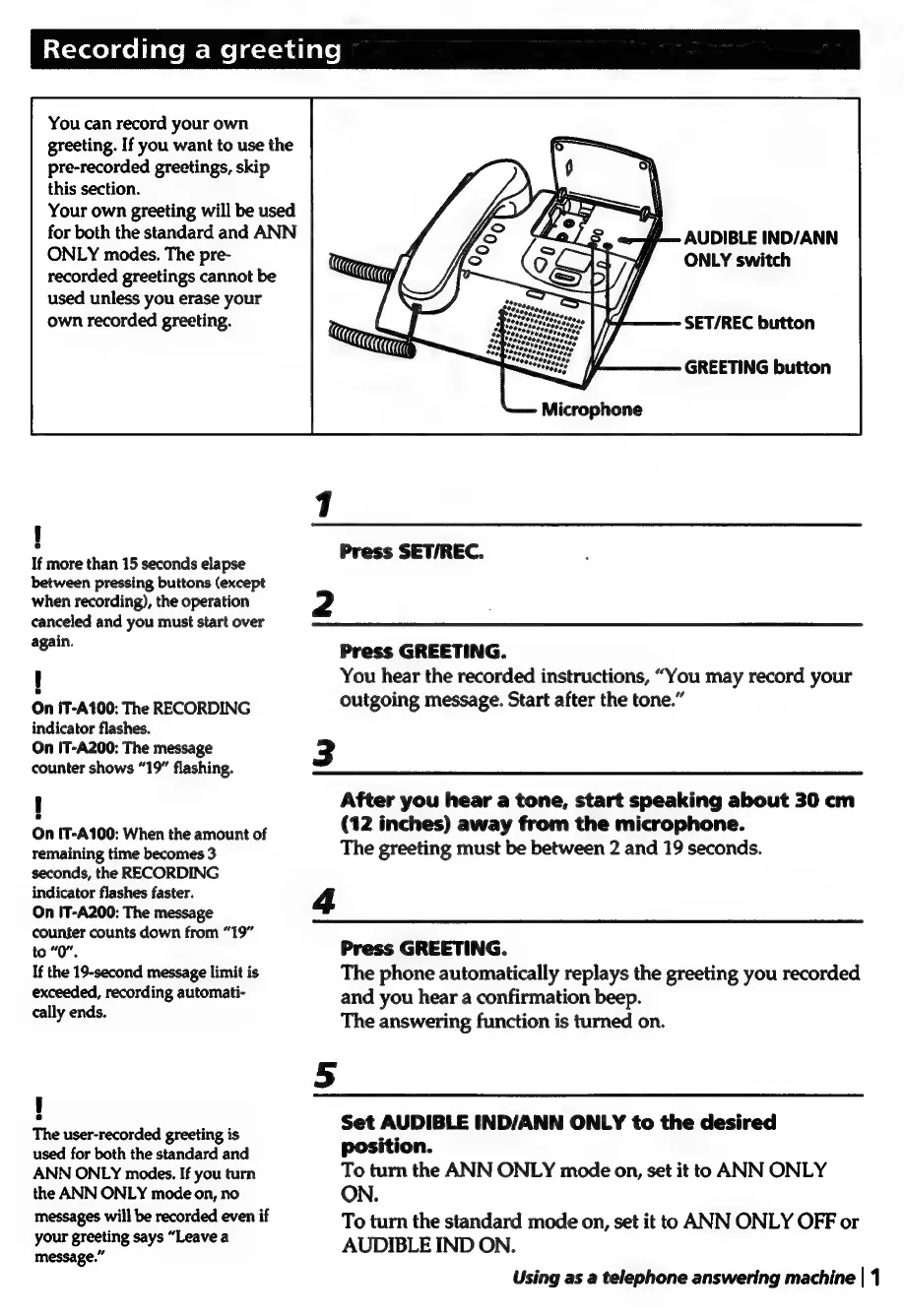
AUDIBLE
IND/ANN
ONLY
switch
SET/REC
button
GREETING
button
Microphone
1
Press
SET/REC.
2
Press
GREETING.
You
hear
the
recorded
instructions,
“You
may
record
your
outgoing
message.
Start
after
the
tone.”
3
After
you
hear
a
tone,
start
speaking
about
30
cm
(12
inches)
away
from
the
microphone.
The
greeting
must
be
between
2
and
19
seconds.
4
Press
GREETING.
The
phone
automatically
replays
the
greeting
you
recorded
and
you
hear
a
confirmation
beep.
The
answering
function
is
turned
on.
Set
AUDIBLE
IND/ANN
ONLY
to
the
desired
position.
To
turn
the
ANN
ONLY
mode
on,
set
it
to
ANN
ONLY
ON.
To
turn
the
standard
mode
on,
set
it
to
ANN
ONLY
OFF
or
AUDIBLE
IND
ON.
Using
as
a
telephone
answering
machine
|
1

Related product manuals