Operating Instructions
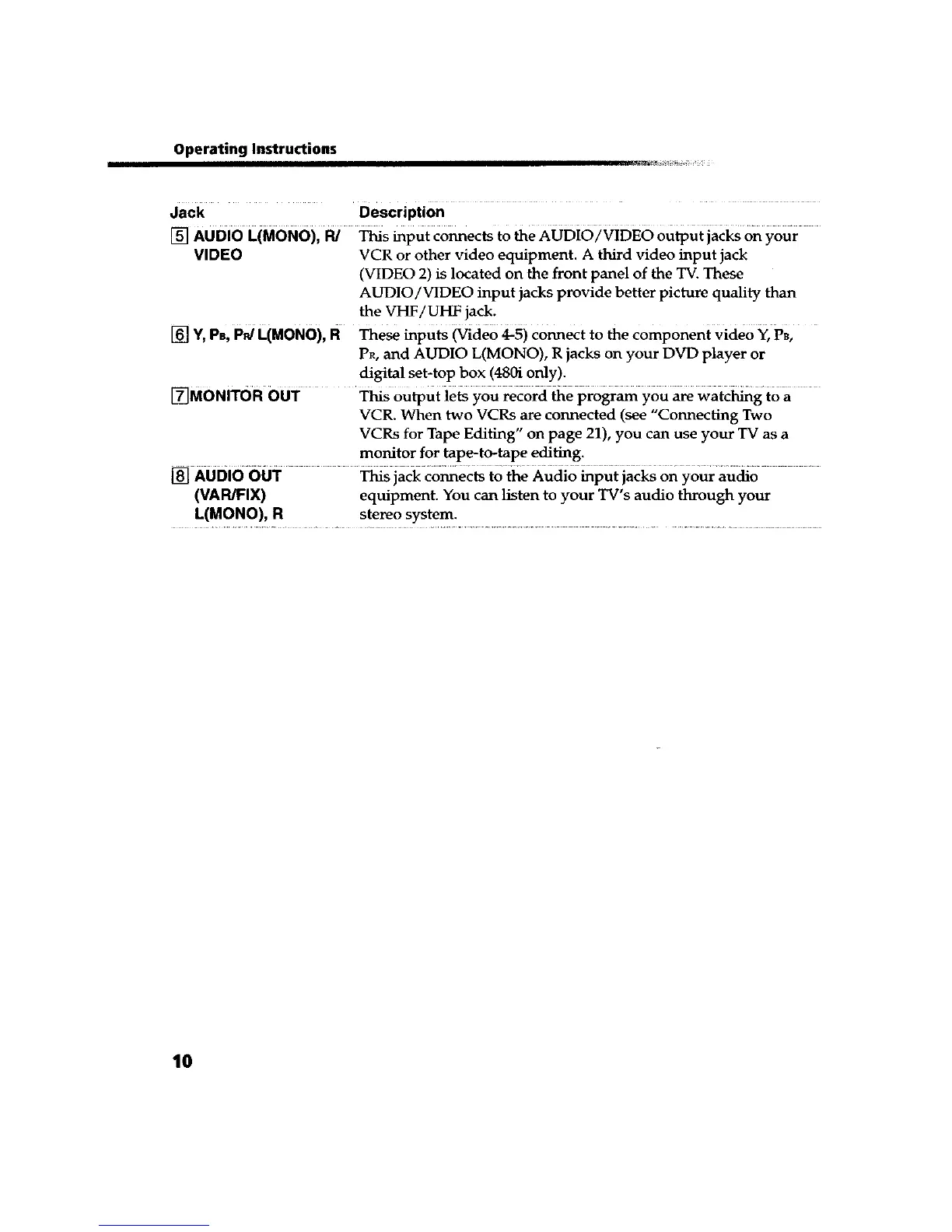
Jack Description ....
[] AUDIO L(MONO), R/ _s input connects to the AuDi6/v[DE6 output jarks on your
VIDEO VCR or other video equipment. A third video input jack
(VIDEO 2) is located on the front panel of the TV. These
AUDIO/VIDEO input jacks provide better picture quality than
the VHF/UHF jack.
[] Y,PB,Pd L(MON0), R These inputs _ideo 4-5) Connect to the component Vide0 Y, PB,
PR, and AUDIO L(MONO), R jacks on your DVD player or
digital set-top box (480i only).
[]MONITOR OUT _ OutpUt ie_ you _cord 6e pro_ you are waic_g to a
VCR. When two VCRs are connected (see "Connecting Two
VCRs for Tape Editing" on page 21), you can use your TV as a
monitor for tape-to-tape editing.
[] AUDIO OUT This jack connects to the Audio input jacks on your audio
(VAPJFIX) equipment. You can listen to your TV's audio through your
L(MONO), R stereo system.
10









 To Next Page