Operating Instructions
Cable Box Connections
Some cable TV systems use scrambled or encoded signals that require a cable box to view all
channels. If you subscribe to that kind of cable service, use this connection. Scrambled signals
coming in to the TV through the cable box cannot be viewed in PIP. If some, but not all, of your
channels are scrambled, consider using the cable box and cable connection.
W and Cable Box
Cable box
]
From cable/
antenna
Rear of TV
2
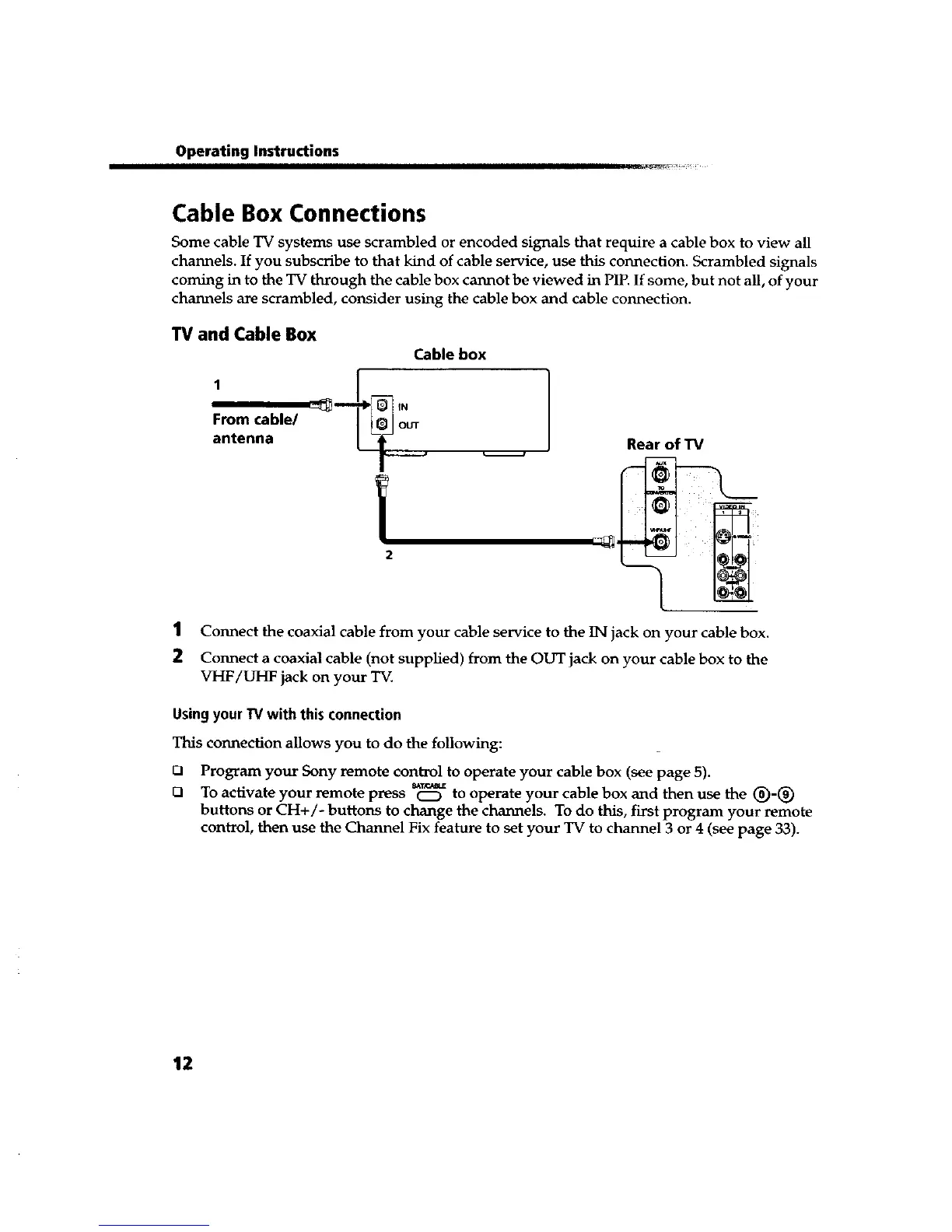
1 Connect the coaxial cable from your cable service to the IN jack on your cable box.
2 Connect a coaxial cable (not supplied) from the OUT jack on your cable box to the
VHF/UHF jack on your TV.
UsingyourW with this connection
This connection allows you to do the following:
O
Q
Program your Sony remote control to operate your cable box (see page 5).
To activate your remote press _ to operate your cable box and then use the (_)-(_)
buttons or CH+/- buttons to change the channels. To do this, first program your remote
control, then use the Channel Fix feature to set your TV to channel 3 or 4 (see page 33).
12









 To Next Page