Connecting Your TV
Read this section before setting up your TV for the first time. This section explains how to
make the basic connections and how to connect optional equipment.
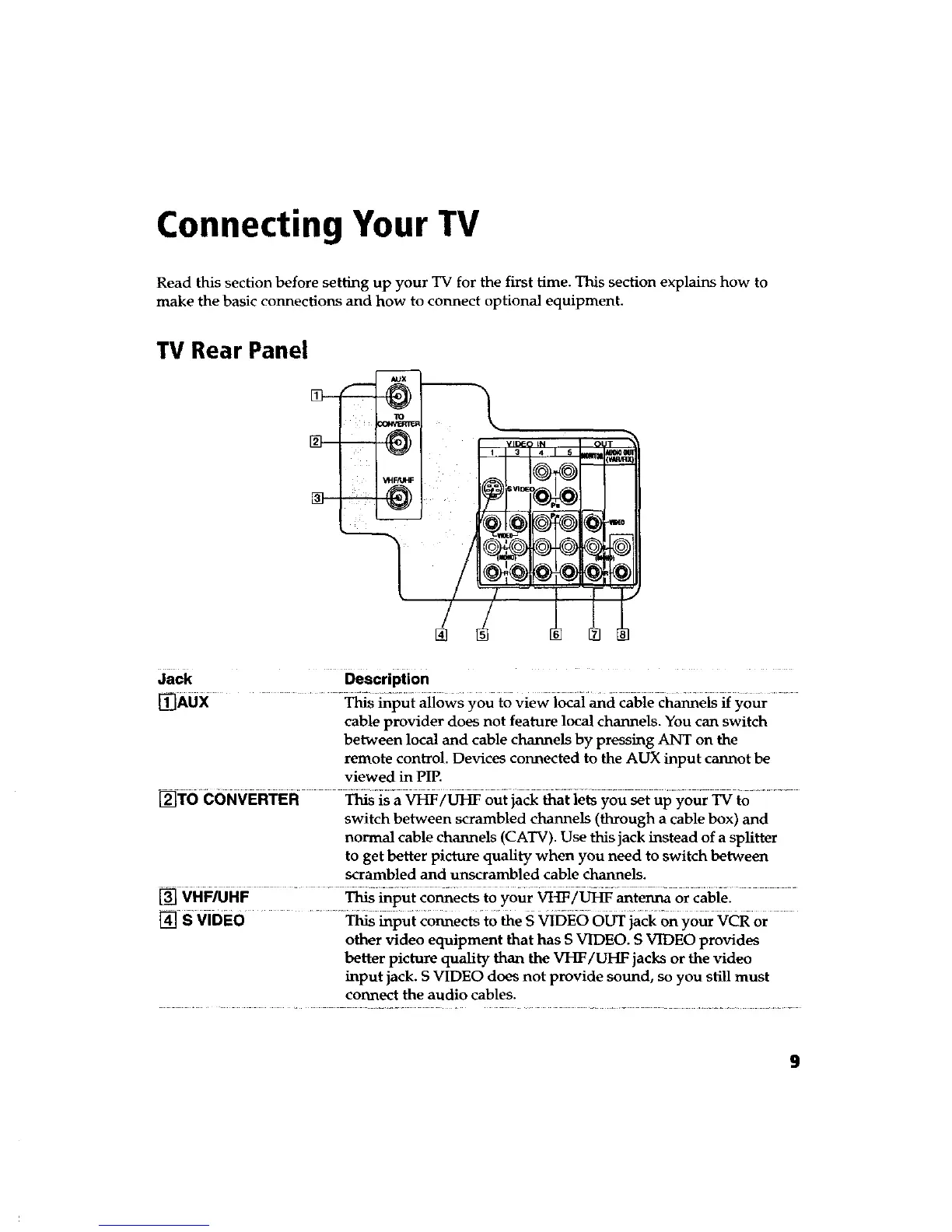
TV Rear Panel
5
JaCk _scription ....
mAux ...............................................
This input allows you to view local and cable channels if your
cable provider does not feature local channels. You can switch
between local and cable channels by pressing ANT on the
remote control. Devices connected to the AUX input cannot be
viewed in PIP.
[]TO cONvER'I'ER _2_ out jack _at ie_ you_t up your_ to .............
switch between scrambled channels (through a cable box) and
normal cable channels (CATV). Use this jack instead of a splitter
to get better picture quaUty when you need to switch between
scrambled and unscrambled cable channels.
] ..........................................................................................................
VHF/UHF This input connects to your VHF/UHF antenna or cable.
_ S viDEo .............................................................................This input connects to the S VIDEO OUT jack on your VCR or
other video equipment that has S VIDEO. S VIDEO provides
better picture quality than the VHF/UHF jacks or the video
input jack. S VIDEO does not provide sound, so you still must
connect the audio cables.
9









 To Next Page