Using the Remote Control
Remote Control Description
[]
[]
[]
®®®1
®®®/
®®
SONY
[TV!
Button Description
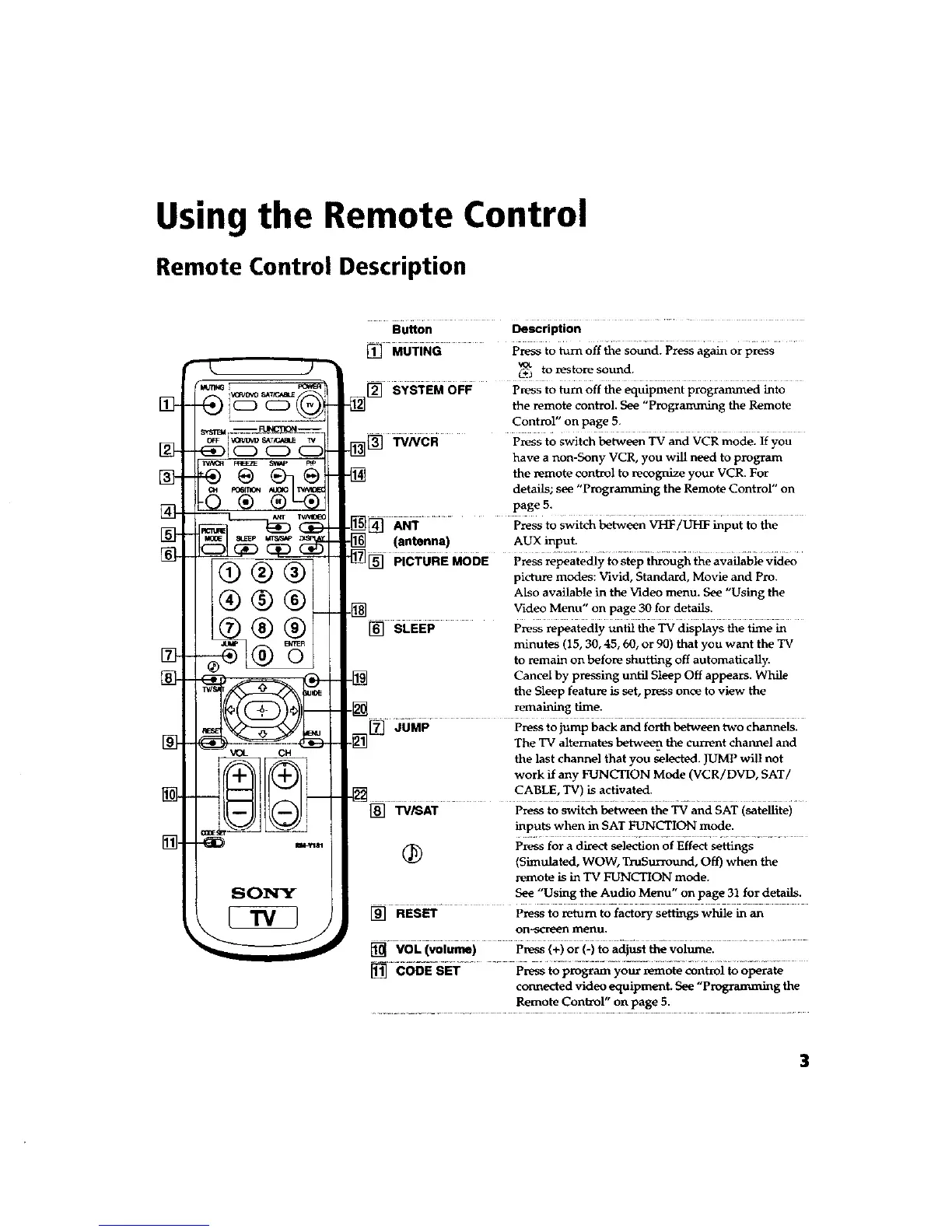
[] MUTING press to turn off the sound. Press again or press
VOL
C_J to restore sound.
. [_ SYSTEM OFF press to turn off the equipment prograrnmed into
the remote control. See "Progranunmg the Remote
Control" on page 5.
_[] TV/VCR Press to switch between TV and VCR mode. If you
have a non-Sony VCR, you will need to program
-_ the remote control to recognize your VCR. For
details; see "Programming the Remote Control" on
page 5.
-[_ [] ANT ............ Press to Switch between VHT/UHF input to the
-[] (antenna) AUX input.
"[]_ PiCT6REM00E P_s _atedly iosiep i_o._ theavailable vid_
picture modes: Vivid, Standard, Movie and Pro.
Also available in the Video menu. See "Using the
[] Video Menu" on page 30 for details.
[] SLEEP Press repeatedly until the TV displays the time in
minutes (15, 30, 45, 60, or 90) that you want the TV
to remain on before shutting off automatically.
.[_ Cancel by pressing until Sleep Off appears. While
the Sleep feature is set, press once to view the
._ remaining time.
.[_[_ JUMP Press to jump back and forth between two channels.
The TV alternates between the current channel and
the last channel that you selected. JUMP will not
work if any FUNCTION Mode (VCR/DVD, SAT/
[] ...... CA_LE__! _a_vat_:.........
[] TV/SAT Press to switch between the TV and SAT (satellite)
inputs when in SAT FUNCTION mode.
Press for a dizect selection of Effect settings
(_ (Simulated, WOW, TruSurround, Off) when the
remote is in TV FUNCTION mode.
See "Using the Audio Menu" on page 31 for details.
[] RESET Press to return to factory settings while in an
on.-scro_n menu,
[] VOL (volume) press (+) or (-) to adjust the vohime.
[] CODE SET Pressto program your remote control to operate
connected video equipment. See "Progranu_ing the
Remote Control" on page 5.
3









 To Next Page