Connecting Your TV
Connecting Two VCRs for Tape Editing
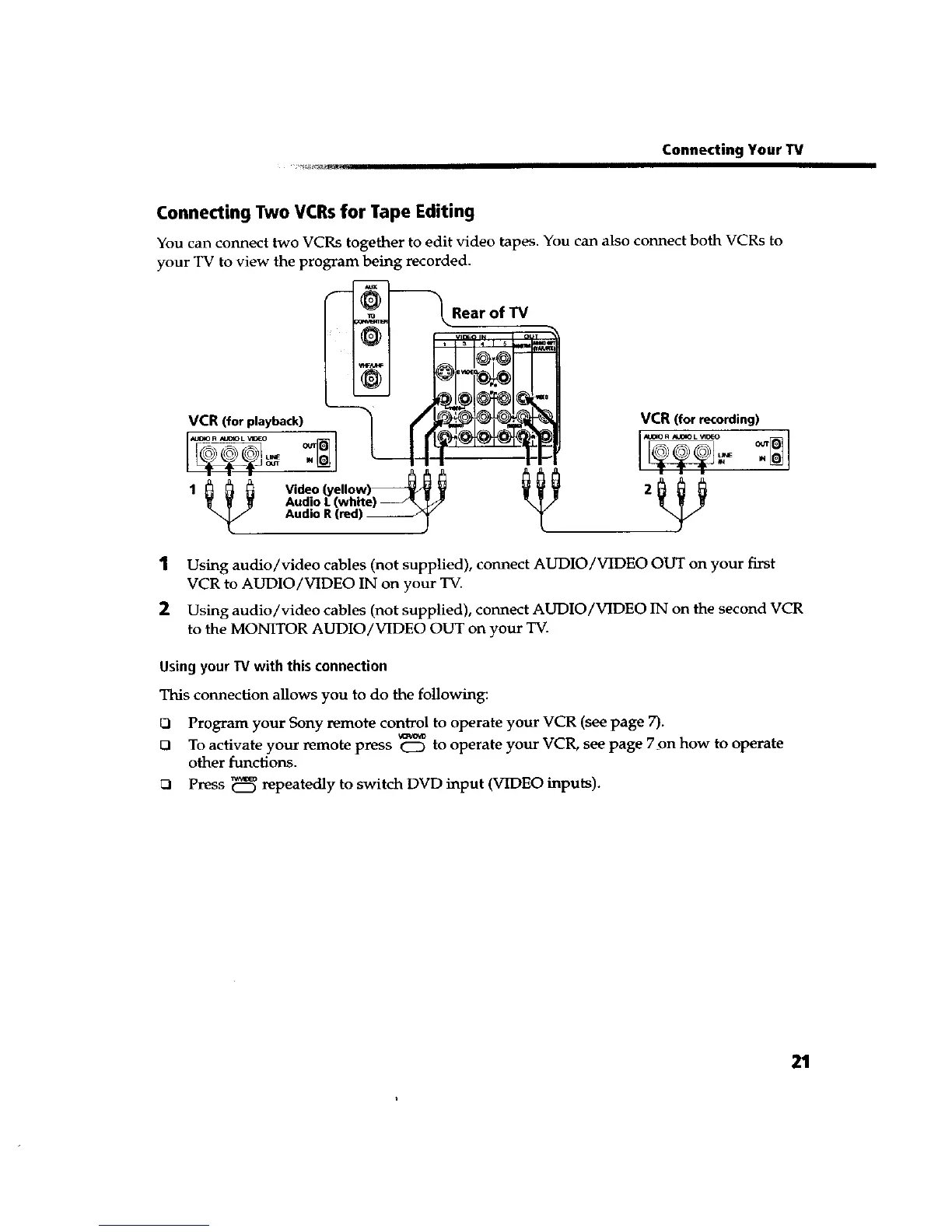
You can connect two VCRs together to edit video tapes. You can also connect both VCRs to
your TV to view the program being recorded.
_Rear of TV
VCR (four p,av_oyback, VCR (for recording)
1
2
Using audio/video cables (not supplied), connect AUDIO/VIDEO OUT on your first
VCR to AUDIO/VIDEO IN on your TV.
Using audio/video cables (not supplied), connect AUDIO/VIDEO 1N on the second VCR
to the MONITOR AUDIO/VIDEO OUT on your TV.
Using your W with this connection
This connection allows you to do the following:
O Program your Sony remote control to operate your VCR (see page 7).
D To activate your remote p_ss CZ) to operate your VCR, see page 7on how to operate
other functions.
Press _ repeatedly to switch DVD input (VIDEO inputs).
21









 To Next Page