EasyManua.ls Logo

Sony SLV-340 - Presetting All Receivable Channels Automatically

Sony SLV-340
41 pages
Print Icon
To Next Page IconTo Next Page
To Previous Page IconTo Previous Page
Loading...
This
VCR
is
capable
of
receiving
VHF
channels
2
to
13,
UHF
channels
14
Presetti
ng
channels
to
69
and
unscrambled
CATV
channels
1
to
125.
First,
we
recommend
that
you
preset
the
receivable
channels
in
your
area
using
automatic
presetting.
Then,
if
there
are
any
unwanted
channels,
disable
them
manually.
If
you
have
decided
which
channels
you
wish
to
preset,
set
them
directly
using
manual
presetting.
Before
you
start...
ve
e
Turn
on
the
VCR
and
the
TV.
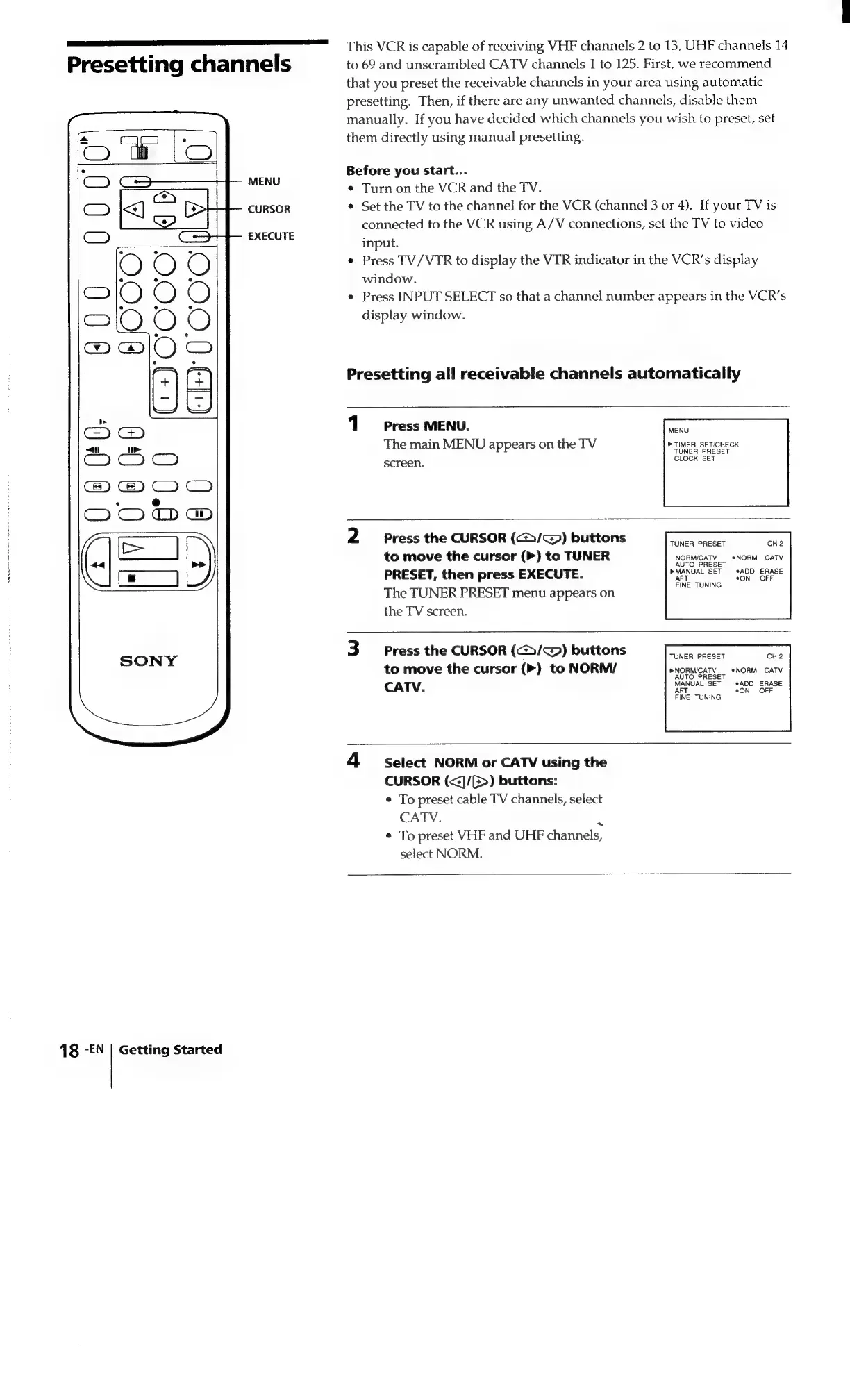
CURSOR
¢
Set
the
TV
to
the
channel
for
the
VCR
(channel
3
or
4).
If
your
TV
is
connected
to
the
VCR
using
A/V
connections,
set
the
TV
to
video
EXECUTE
y
input.
¢
Press
TV/VTR
to
display
the
VTR
indicator
in
the
VCR’s
display
window.
¢
Press
INPUT
SELECT
so
that
a
channel
number
appears
in
the
VCR’s
display
window.
Presetting
all
receivable
channels
automatically
1
Press
MENU.
7S
The
main
MENU
appears
on
the
TV
»
TIMER
SET/CHECK
TUNER
PRESET
CLOCK
SET
screen.
2
Press
the
CURSOR
(C/<)
buttons
TUNER
PRESET
CH2
to
move
the
cursor
(>)
to
TUNER
NORMICATY
_
*NORM
CATV
PRESET,
then
press
EXECUTE.
PMANUAL
SET
ADD
ERASE
The
TUNER
PRESET
menu
appears
on
pane
the
TV
screen.
3
Press
the
CURSOR
(@>/~@)
buttons
TUNER
PRESET
CH2
to
move
the
cursor
(>)
to
NORM/
PNORWCATY
sNORM
CATV
CATV.
MANUAL
SET
Saee.
ene
AFT
FINE
TUNING
4
Select
NORM
or
CATV
using
the
CURSOR
(<]/(>)
buttons:
¢
To
preset
cable
TV
channels,
select
CATV.
:
¢
To
preset
VHF
and
UHF
channels,
select
NORM.
18
-EN
|
Getting
Started

Related product manuals