EasyManua.ls Logo

Sony SLV-340 - Presetting;Disabling Channels Manually

Sony SLV-340
41 pages
Print Icon
To Next Page IconTo Next Page
To Previous Page IconTo Previous Page
Loading...
j
f
i:
{
Se)
DO
CO
:
e
Co)
CO oD
ab
Ces)
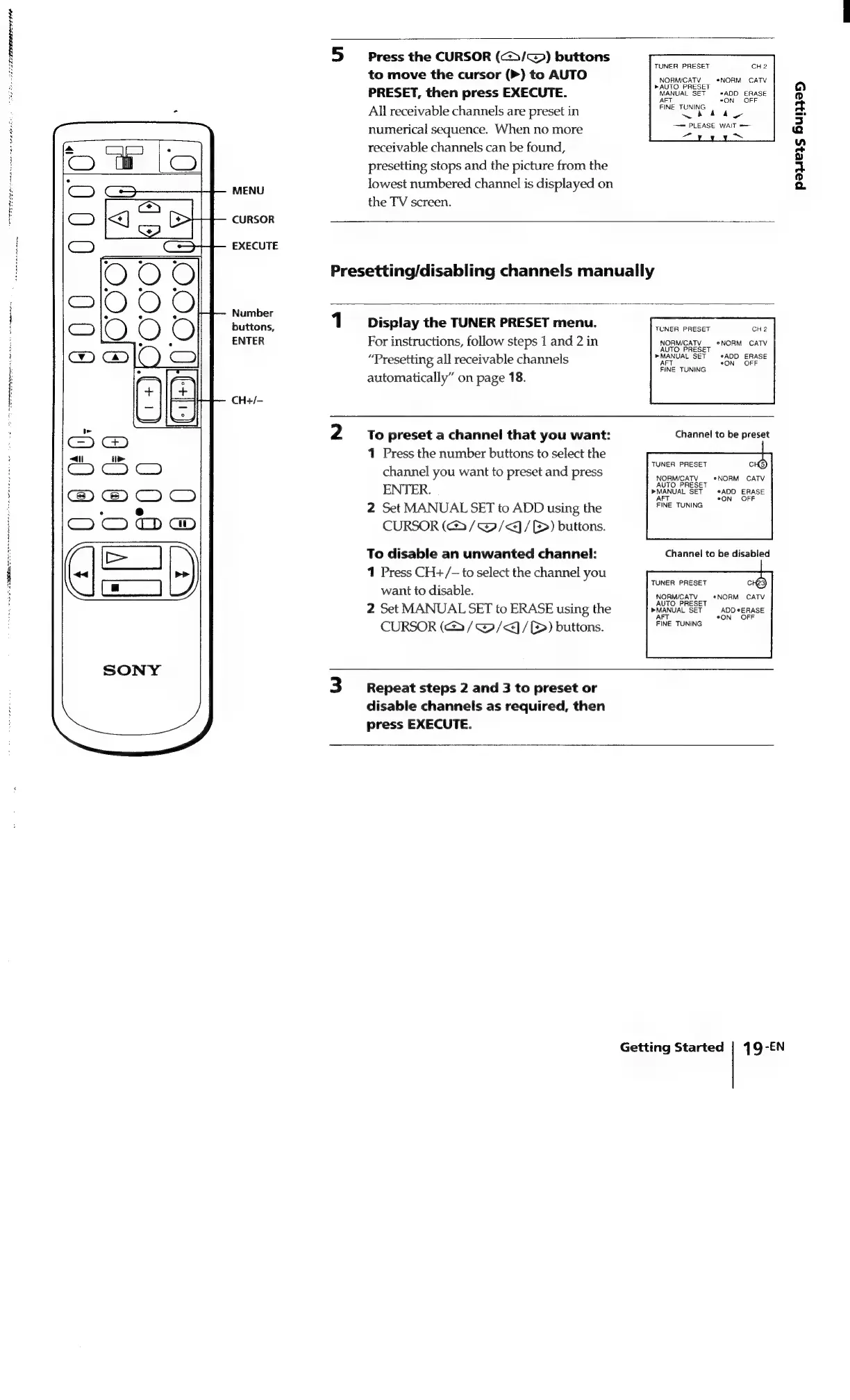
MENU
CURSOR
EXECUTE
Number
buttons,
ENTER
CH+/—
Press
the
CURSOR
(c>>/~)
buttons
to
move
the
cursor
(>)
to
AUTO
PRESET,
then
press
EXECUTE.
All
receivable
channels
are
preset
in
numerical
sequence.
When
no
more
receivable
channels
can
be
found,
presetting
stops
and
the
picture
from
the
lowest
numbered
channel
is
displayed
on
the
TV
screen.
TUNER
PRESET
CHe2
NORMICATV
_
*NORM
CATV
»AUTO
PRESET
MANUAL
SET
*ADD
ERASE
.
OFF
AFT
FINE
TUNING
~
ea
ay
—~=
PLEASE
WAIT
=—-
an
~
pees
6unza5
Presetting/disabling
channels
manually
1
Display
the
TUNER
PRESET
menu.
For
instructions,
follow
steps
1
and
2
in
“Presetting
all
receivable
channels
automatically”
on
page
18.
To
preset
a
channel
that
you
want:
1
Press
the
number
buttons
to
select
the
channel
you
want
to
preset
and
press
ENTER.
2
Set
MANUAL
SET
to
ADD
using
the
CURSOR
(3
/@/<]/B)
buttons.
To
disable
an
unwanted
channel:
1
Press
CH+/-—
to
select
the
channel
you
want
to
disable.
2
Set
MANUAL
SET
to
ERASE
using
the
CURSOR
(>
/
@/<j/()
buttons.
Repeat
steps
2
and
3
to
preset
or
disable
channels
as
required,
then
press
EXECUTE.
Getting
Started
TUNER
PRESET
CH2
NORM/CATV
eNORM
CATV
AUTO
PRESET
»MANUAL
SET
eADD
ERASE
AFT
°ON
OFF
FINE
TUNING
Channel
to
be
preset
TUNER
PRESET
NORM/CATV
eNORM
CATV
AUTO
PRESET
»MANUAL
SET
*ADD
ERASE
°
OFF
FINE
TUNING
Channel
to
be
disabled
TUNER
PRESET
NORM/CATV
«NORM
CATV
UTO
PRESET
A
»MANUAL
SET
ADD
*
ERASE
AFT
°ON
OFF
FINE
TUNING
19-EN

Related product manuals