EasyManua.ls Logo

Sony SLV-340 - Step 4: Setting the Clock

Sony SLV-340
41 pages
Print Icon
To Next Page IconTo Next Page
To Previous Page IconTo Previous Page
Loading...
Step
4:
Setting
the
clock
Note
¢
The
menu
disappears
automatically
if
you
don’t
proceed
for
more
than
a
few
minutes.
16
-EN
|
Getting
Started
MENU
CURSOR
EXECUTE
Set
the
time
and
date
to
use
the
timer
feature
for
recording
programs.
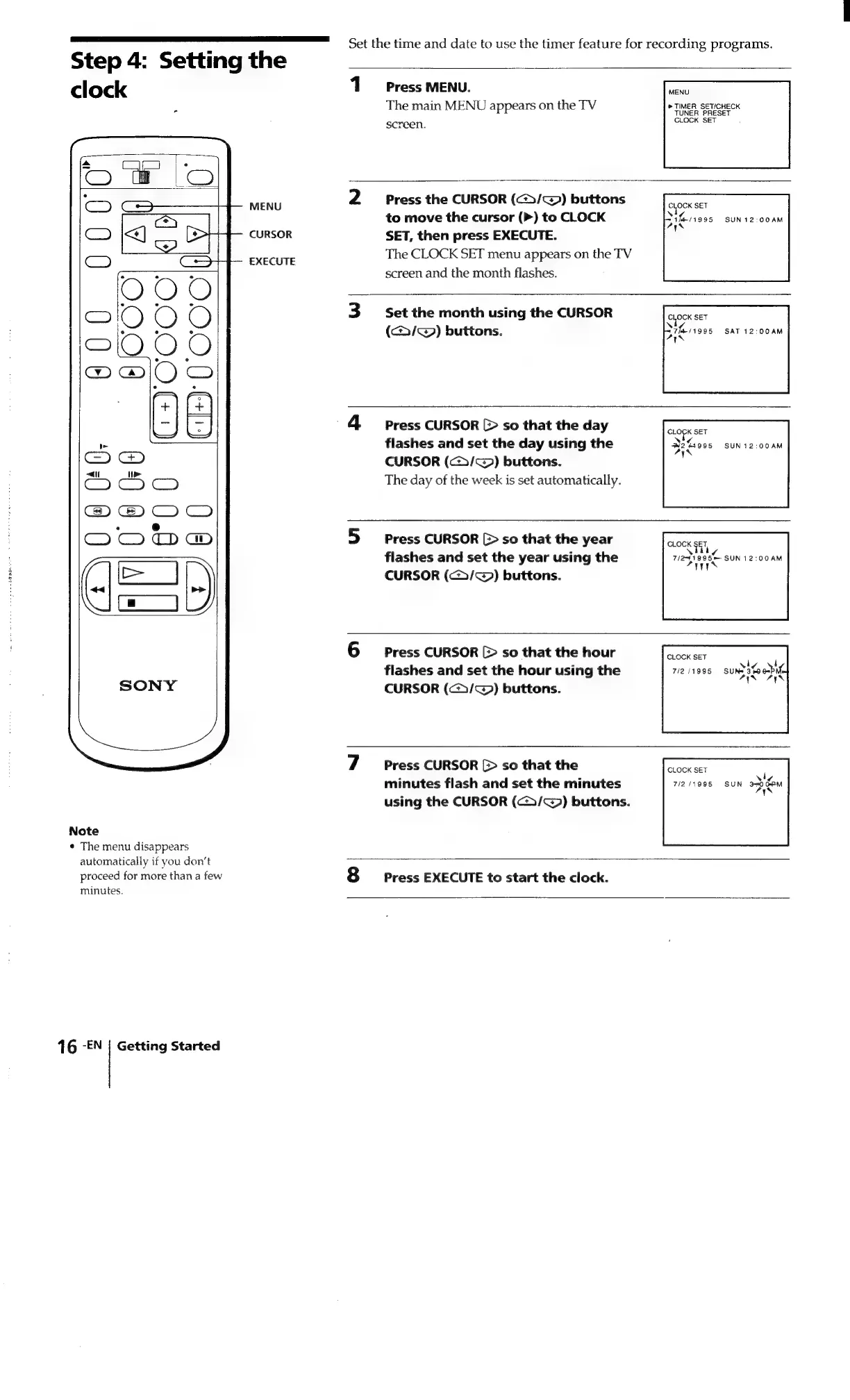
1
Press
MENU.
The
main
MENU
appears
on
the
TV
screen.
MENU
®
TIMER
SET/CHECK
TUNER
PRESET
CLOCK
SET
Press
the
CURSOR
(<>/~@)
buttons
to
move
the
cursor
(>)
to
CLOCK
SET,
then
press
EXECUTE.
The
CLOCK
SET
menu
appears
on
the
TV
screen
and
the
month
flashes.
Set
the
month
using
the
CURSOR
(/@)
buttons.
eee
SET
aera
Wt
/1995
SUN12:00AM
Ps
LOK
SET
37h
Tit
/1995
SAT
12:00AM
AWS
Press
CURSOR
[>
so
that
the
day
flashes
and
set
the
day
using
the
CURSOR
(c>>/~)
buttons.
The
day
of
the
week
is
set
automatically.
Press
CURSOR
[>
so
that
the
year
flashes
and
set
the
year
using
the
CURSOR
(cG>/c))
buttons.
SLOPISET.
Nog
W264995
SUN12:00AM
AYN
CLOCK
$57,
\
¢
7/291995—
SUN
12:00AM
AITYN
Press
CURSOR
[>
so
that
the
hour
flashes
and
set
the
hour
using
the
CURSOR
(c>/~@)
buttons.
Press
CURSOR
[>
so
that
the
minutes
flash
and
set
the
minutes
using
the
CURSOR
(<>/@))
buttons.
CLOCK
SET
viv
7/2/1995
SUN*
3-0
AYN
CLOCK
SET
\i
71211995
SUN
3s060M
AYN
Press
EXECUTE
to
start
the
clock.

Related product manuals