EasyManua.ls Logo

Sony SLV-340 - Checking;Changing; Cancelling Timer Settings

Sony SLV-340
41 pages
Print Icon
To Next Page IconTo Next Page
To Previous Page IconTo Previous Page
Loading...
cake
nic
eassr
ep
hedh
2
phhe
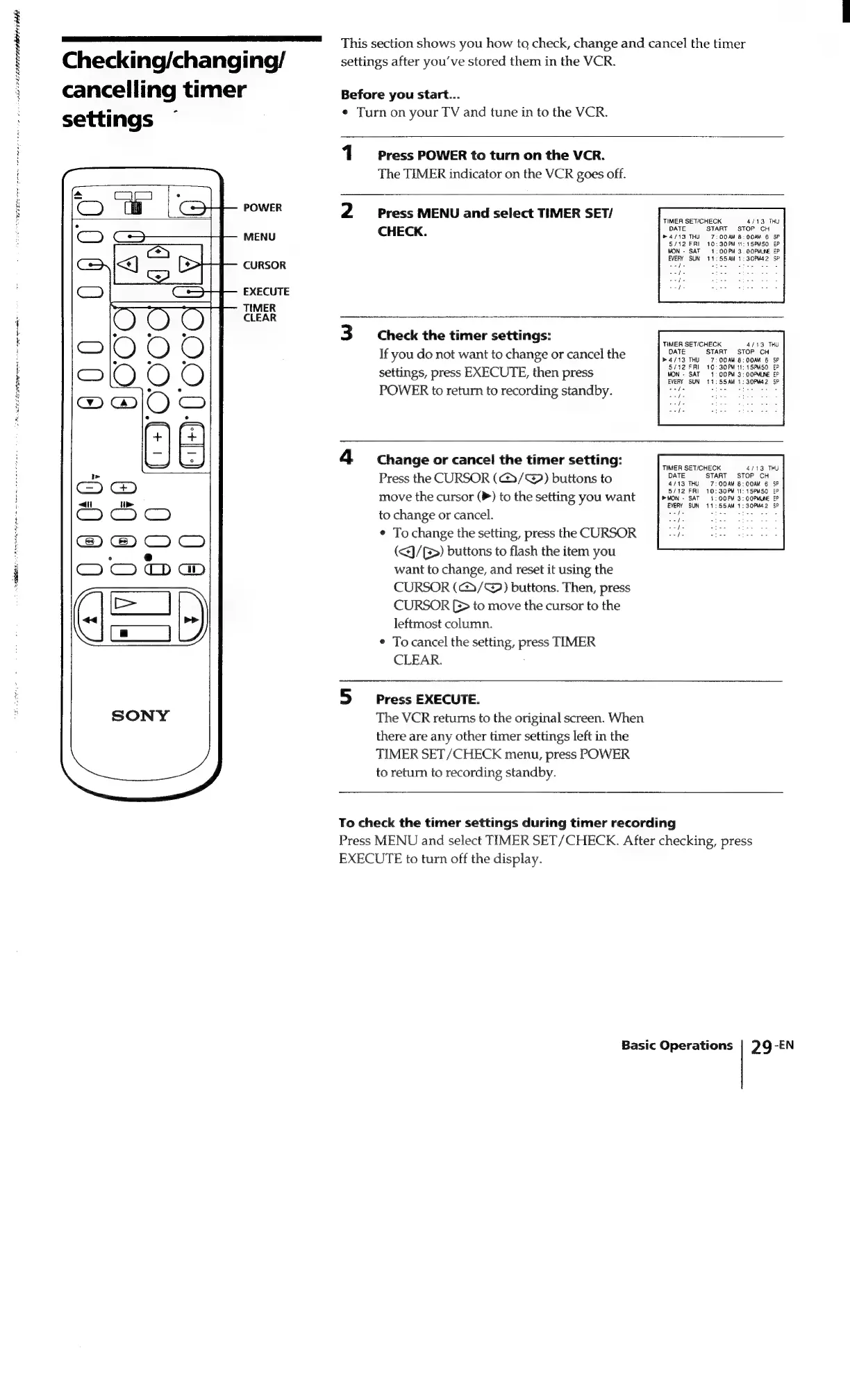
Checking/changing/
cancelling
timer
settings
POWER
MENU
CURSOR
EXECUTE
TIMER
CLEAR
This
section
shows
you
how
to
check,
change
and
cancel
the
timer
settings
after
you've
stored
them
in
the
VCR.
Before
you
start...
¢
Turn
on
your
TV
and
tune
in
to
the
VCR.
1
Press
POWER
to
turn
on
the
VCR.
The
TIMER
indicator
on
the
VCR
goes
off.
Press
MENU
and
select
TIMER
SET/
CHECK.
Check
the
timer
settings:
If
you
do
not
want
to
change
or
cancel
the
settings,
press
EXECUTE,
then
press
POWER
to
return
to
recording
standby.
Change
or
cancel
the
timer
setting:
Press
the
CURSOR
(G@3/@)
buttons
to
move
the
cursor
(P)
to
the
setting
you
want
to
change
or
cancel.
¢
To
change
the
setting,
press
the
CURSOR
(<J/G>)
buttons
to
flash
the
item
you
want
to
change,
and
reset
it
using
the
CURSOR
(c/@)
buttons.
Then,
press
CURSOR
>
to
move
the
cursor
to
the
leftmost
column.
¢
To
cancel
the
setting,
press
TIMER
CLEAR.
Press
EXECUTE.
The
VCR
returns
to
the
original
screen.
When
there
are
any
other
timer
settings
left
in
the
TIMER
SET/CHECK
menu,
press
POWER
to
return
to
recording
standby.
TIMER
SET/CHECK
4/13
THY
DATE
START
STOP
CH
®
4/13
THU
7:00AM
B:
OOAM
6
SP
5/12
FRI
10:30PM
11:
15PMSO
EP
MON
-
SAT
=
1,
OO
PM
3.
OOPMLNE
EP
EVERY
SUN
11:55AM
1:
30PM42
SP
oefe
«te-
vies
ses
ys
ae
As
ey
TIMER
SET/CHECK
4/13
TRU
DATE
START
STOP
CH
h4/13
THU
7:00AM
8:00AM
6
SP
5/12
FRI
10:30PM
11:
15PM50
EP
MON
-
SAT
1:
OO
PM
3:
OOPMLINE
EP
EVERY
SUN
11:55AM
1:
30PM42
SP
Saye
pe
ons
TIMER
SET/CHECK
4113
THU
DATE
START
STOP
CH
4/13
THU
7:00AM
8:00AM
6
SP
5/12
FRI
10:30PM
11:
15PM50
EP
®MON
-
SAT
1:
OOFM
3:
OOPMUNE
EP
EVERY
SUN
11:55AM
1:
30PM42
SP
aeopt,
ops
athe
To
check
the
timer
settings
during
timer
recording
Press
MENU
and
select
TIMER
SET/CHECK.
After
checking,
press
EXECUTE
to
turn
off
the
display.
Basic
Operations
29-EN

Related product manuals