EasyManua.ls Logo

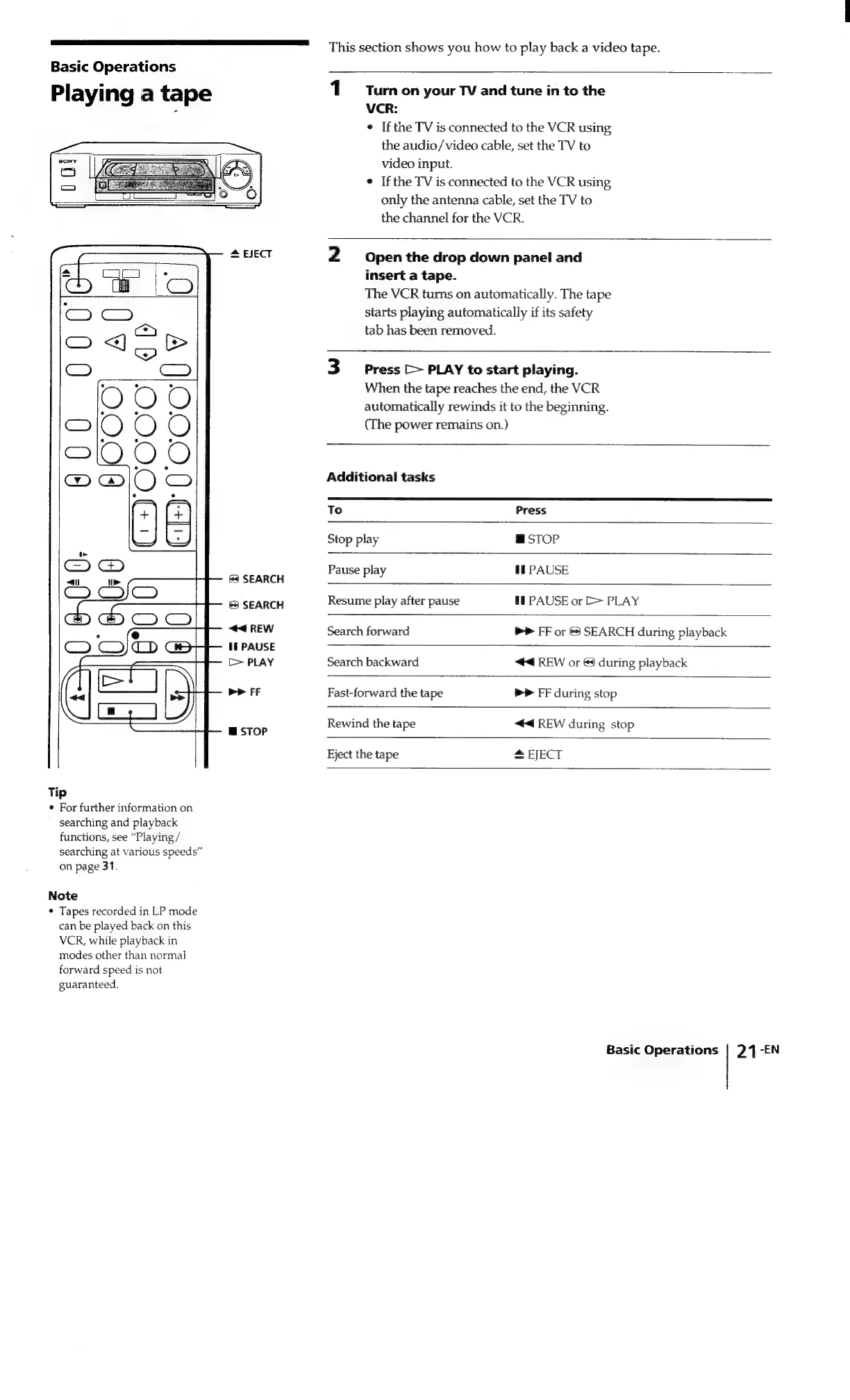
Sony SLV-340 - Basic Operations; Playing a Tape

Sony SLV-340
41 pages
Print Icon
To Next Page IconTo Next Page
To Previous Page IconTo Previous Page
Loading...
This
section
shows
you
how
to
play
back
a
video
tape.
Basic
Operations
I
1
Turnon
your
TV
and
tune
in
to
the
Playing
a
tape
ee
¢
Ifthe
TV
is
connected
to
the
VCR
using
the
audio/video
cable,
set
the
TV
to
video
input.
¢
Ifthe
TV
is
connected
to
the
VCR
using
only
the
antenna
cable,
set
the
TV
to
the
channel
for
the
VCR.
=
=
EJECT
2
Open
the
drop
down
panel
and
ES
i
insert
a
tape.
es
Gr
iC.
The
VCR
turns
on
automatically.
The
tape
-
Cy)
starts
playing
automatically
if
its
safety
(<>)
tab
has
been
removed.
an
<4)
=
>
Cy)
C_)
3
Press
[>
PLAY
to
start
playing.
° y .
When
the
tape
reaches
the
end,
the
VCR
OOo
a
:
b :
automatically
rewinds
it
to
the
beginning.
Cy)
O
O ©
(The
power
remains
on.)
COO
O
GD
@
O
=
Additional
tasks
To
Press
&
Stop
play
@
STOP
fe
<
Pause
play
I
PAUSE
ai!
>
&?
SEARCH
&
SEARCH
Resume
play
after
pause
Il
PAUSE
or
E>
PLAY
:
r
44
REW
Search
forward
b>
FF
or
&
SEARCH
during
playback
CO)
CO)
(>
awe
11
PAUSE
TN
[>
PLAY
Search
backward
44
REW
or
©
during
playback
Ea
PP
FF
Fast-forward
the
tape
PP
FF
during
stop
m
STOP
Rewind
the
tape
<4
REW
during
stop
Eject
the
tape
#
EJECT
Tip
*
For
further
information
on
searching
and
playback
functions,
see
“Playing
/
searching
at
various
speeds”
on
page
31.
Note
*
Tapes
recorded
in
LP
mode
can
be
played
back
on
this
VCR,
while
playback
in
modes
other
than
normal
forward
speed
is
not
guaranteed.
Basic
Operations
|
24
-EN

Related product manuals