Changing menu options
1
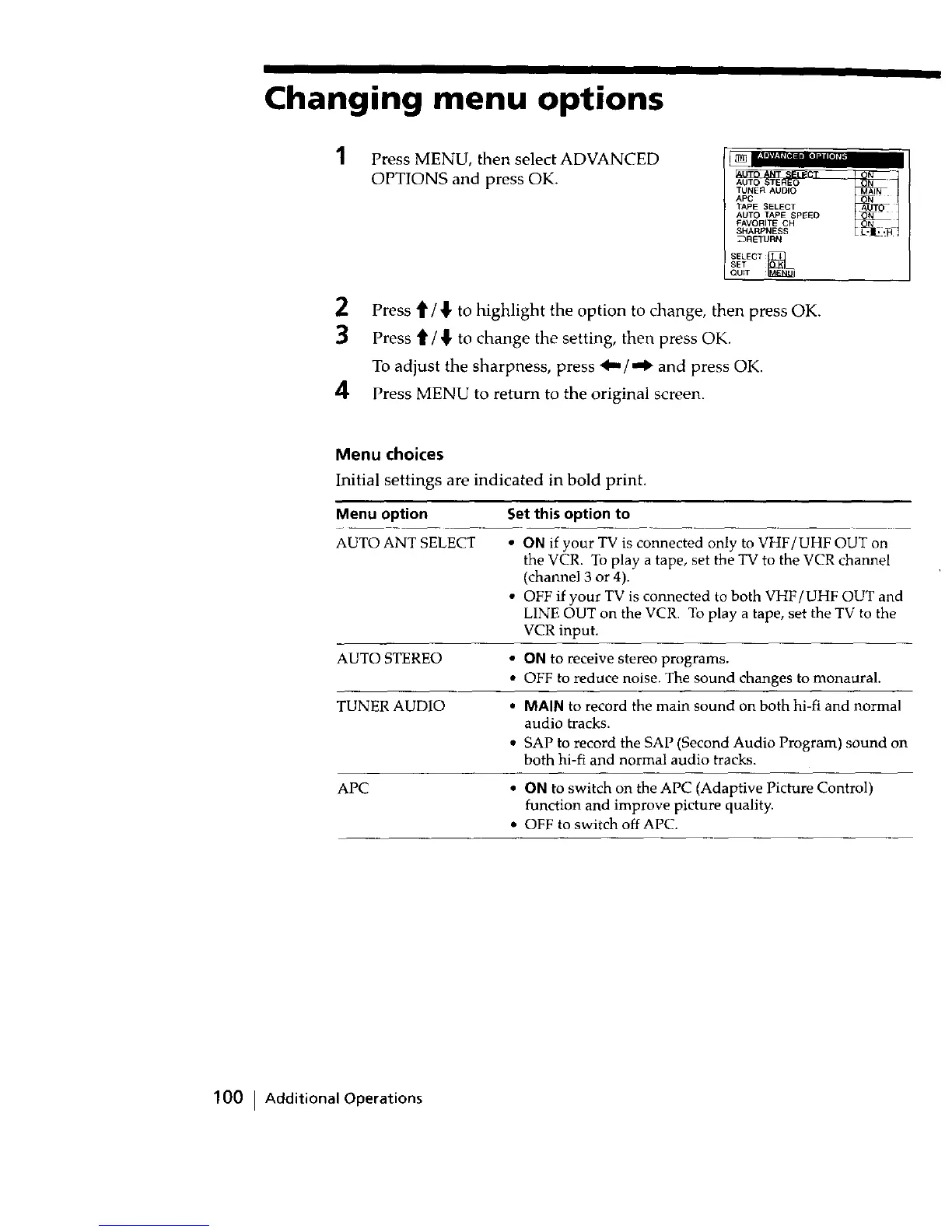
Press MENU, then select ADVANCED
OPTIONS and press OK.
AUTO N
TUNER AUDIO AIN
APC N
TAPE SELECT
AUTO TAPE SPEED N
FAVORITE CH N
_RETURN
SELECT
SET
QUiT :
2 Press t1'/_!" to highlight the option to change, then press OK.
3 Press t[ / { to change the setting, then press OK.
To adjust the sharpness, press 4,,,/,,,1_ and press OK.
4 Press MENU to return to the original screen.
Menu choices
Initial settings are indicated in bold print.
Menu option Set this option to
AUTO ANT SELECT • ON if your TV is connected only to VHF/UHF OUT on
the VCR. To play a tape, set the TV to the VCR channel
(channel 3 or 4).
• OFF if your TV is connected to both VHF/UHF OUT and
LINE OUT on the VCR. To play a tape, set the TV to the
VCR input.
AUTO STEREO • ON to receive stereo programs.
• OFF to reduce noise. The sound changes to monaural.
TUNER AUDIO • MAIN to record the main sound on both hi-fi and normal
audio tracks.
• SAP to record the SAP (Second Audio Program) sound on
both hi-fi and normal audio tracks.
APC • ON to switch on the APC (Adaptive Picture Control)
function and improve picture quality.
• OFF to switch off APC.
100 I Additional Operations



 To Next Page