1
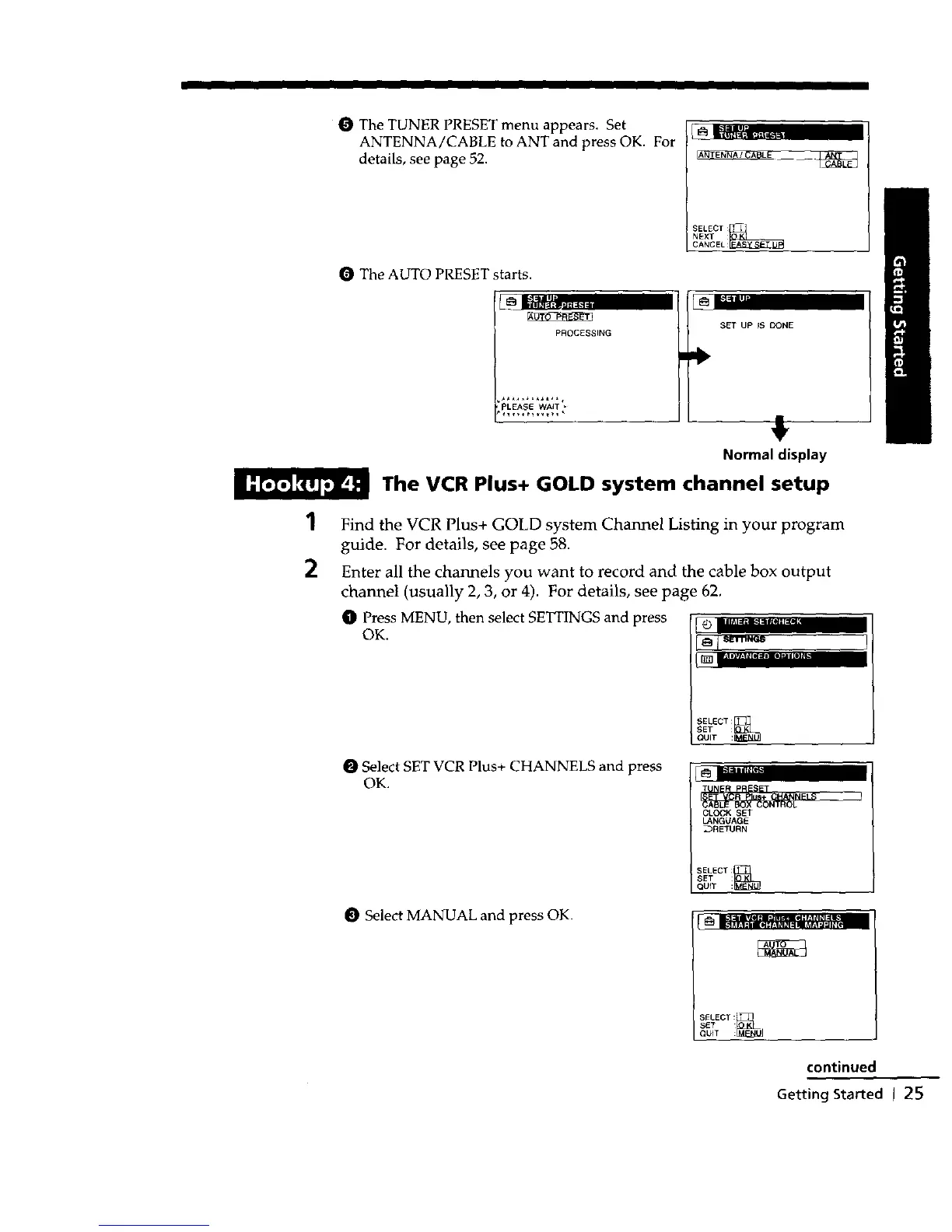
O The TUNER PRESET menu appears. Set
ANTENNA/CABLE to ANT and press OK. For
details, see page 52.
O The AUTO PRESET starts.
SELECT_._
NEXT :
CANCEL:
2
PROCESSING
'PLEASE WAIT *
SET UP IS DONE
,!,
Normal display
The VCR Plus+ GOLD system channel setup
Find the VCR Plus+ GOLD system Channel Listing in your program
guide. For details, see page 58.
Enter all the channels you want to record and the cable box output
channel (usually 2, 3, or 4). For details, see page 62,
O Press MENU, then select SETTINGS and press [ "O='";;_;".........
OK.
[_ I-'lllvl*l_ _= _2= am[I],11
SELECT :_
SET :
I QUIT :
O Select SET VCR Plus+ CHANNELS and press
OK.
_Z31p_€,
CLOCK SET
LANGUAGE
_RETURN
SELECT:
Select MANUAL and press OK.
SELECT:*
QUIT :_
SET
continued
Getting Started I 25



 To Next Page