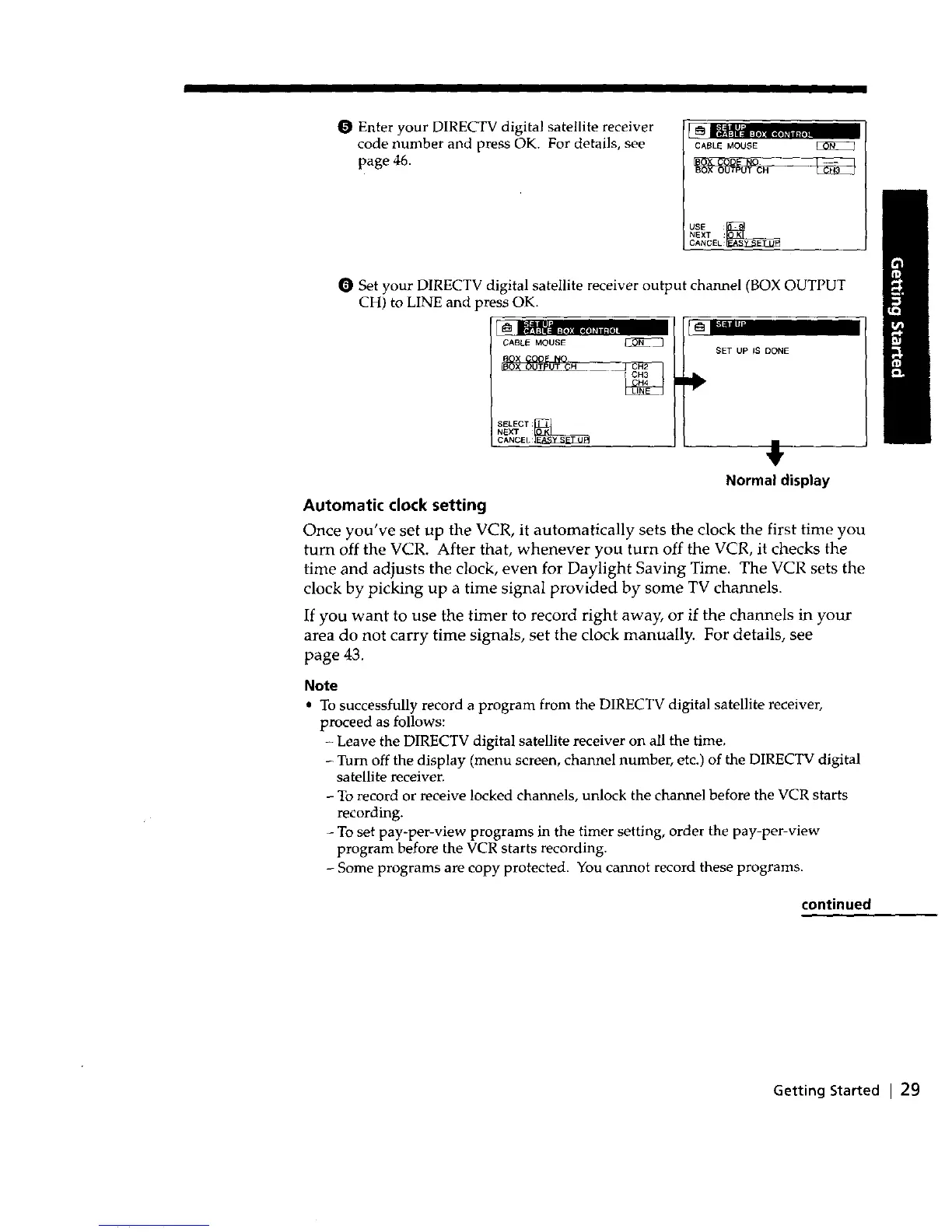
O Enter your DIRECTV digital satellite receiver
code number and press OK. For details, see
page 46.
_ waall_
CABLE MOUSE
BOX OUTPUT CH
USE :_
NEXT :
CANCEL
0 Set your DIRECTV digital satellite receiver output channel (BOX OUTPUT
CH) to LINE and press OK.
CABLE MOUSE _
SELECT:_
NEXT
CANCEL
Automatic clock setting
SET UP IS DONE
,!,
Normal display
Once you've set up the VCR, it automatically sets the clock the first time you
turn off the VCR. After that, whenever you turn off the VCR, it checks the
time and adjusts the clock, even for Daylight Saving Time. The VCR sets the
clock by picking up a time signal provided by some TV channels.
If you want to use the timer to record right away, or if the channels in your
area do not carry time signals, set the clock manually. For details, see
page 43.
Note
• To successfully record a program from the DIRECTV digital satellite receiver,
proceed as follows:
Leave the DIRECTV digital satellite receiver on all the time.
- Turn off the display (menu screen, channel number, etc.) of the DIRECTV digital
satellite receiven
- To record or receive locked channels, unlock the channel before the VCR starts
recording.
- To set pay-per-view programs in the timer setting, order the pay-per-view
program before the VCR starts recording.
- Some programs are copy protected. You cannot record these programs.
continued
Getting Started I 29



 To Next Page