1
2
3
VCR setup
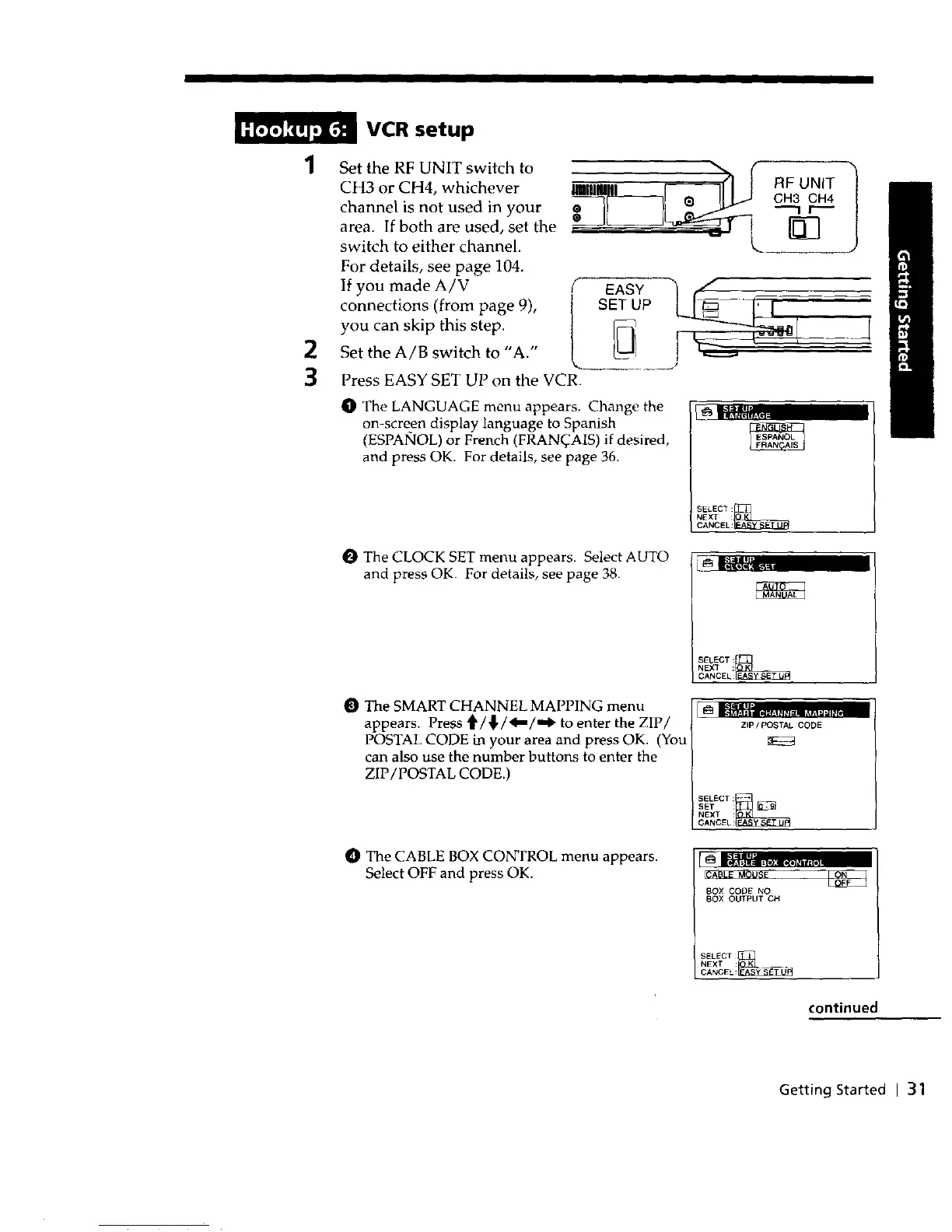
Set the RF UNIT switch to
CH3 or CH4, whichever
channel is not used in your
area. If both are used, set the
switch to either channel.
For details, see page 104.
If you made A/V
connections (from page 9),
you can skip this step.
Set the A/B switch to "A."
EASY
SET UP
Press EASY SET UP on the VCR.
O The LANGUAGE menu appears. Change the
on-screen display language to Spanish
(ESPANOL) or French (FRANqAIS) if desired,
and press OK. For details, see page 36.
C_ It;l_';,;;.....
SELECT:_]_
NEXT :
CANCEL:
O The CLOCK SET menu appears. Select AUTO
and press OK. For details, see page 38.
SELECT:_
NEXT :
CANCEL:
The SMART CHANNEL MAPPING menu
appears. Press '_/_,/_l_/,,_ to enter the ZIP/
POSTAL CODE in your area and press OK. (You
can also use the number buttons to enter the
ZIP/POSTAL CODE.)
ZIP/POSTAL CODE
SELECT:
SET :_
NEXT :
CANC_L:_
O The CABLE BOX CONTROL menu appears.
Select OFF and press OK.
BOX CODE NO
BOX OUTPUT CH
SELECT
CANCEL:_I_/!_
NEXT __.
continued
Getting Started I 31



 To Next Page