Step 3: Hookups (continued)
VCR Plus+ GOLD channel setup for scrambled channels
To set the program guide channels for scrambled channels, enter all the
scrambled channels you want to record and the cable box output channel
(usually 2, 3, or 4) after finishing smart channel mapping. For details; see
page 62.
O Find the VCR Plus+ GOLD Channel Listing in
your program guide. For details, see page 58.
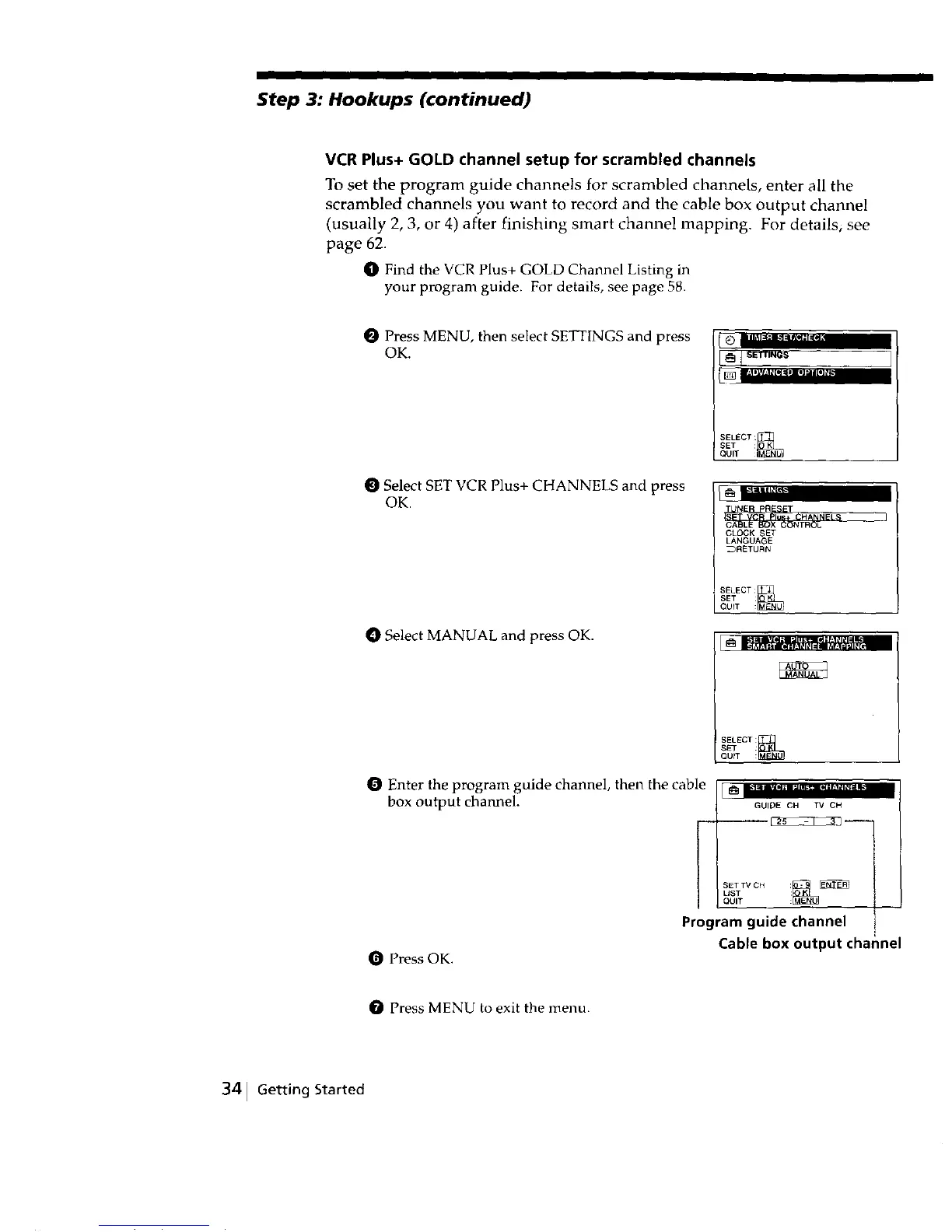
O Press MENU, then select SETTINGS and press
OK.
Select SET VCR Plus+ CHANNELS and press
OK.
O Select MANUAL and press OK.
Enter the program guide channel, then the cable
box output channel.
Press OK.
i o ..........1111i11"
SELECT :_
SET :
QUIT
CABLE BOX CONTROL
CLOCK SET
LANGUAGE
_RETURN
SELECT:_
SET
QUIT :
SELECT:_]
S_q" :
QUfT :
_ _'lmll*l II*._lll_'lE_ 11 i b
GUIDE CH l_t CH
I SETTV OH
UST
QUIT
Program guide channel
Cable box output channel
Press MENU to exit the menu.
341 Getting Started



 To Next Page