1
2
3
The VCR Plus+ GOLD system channel setup
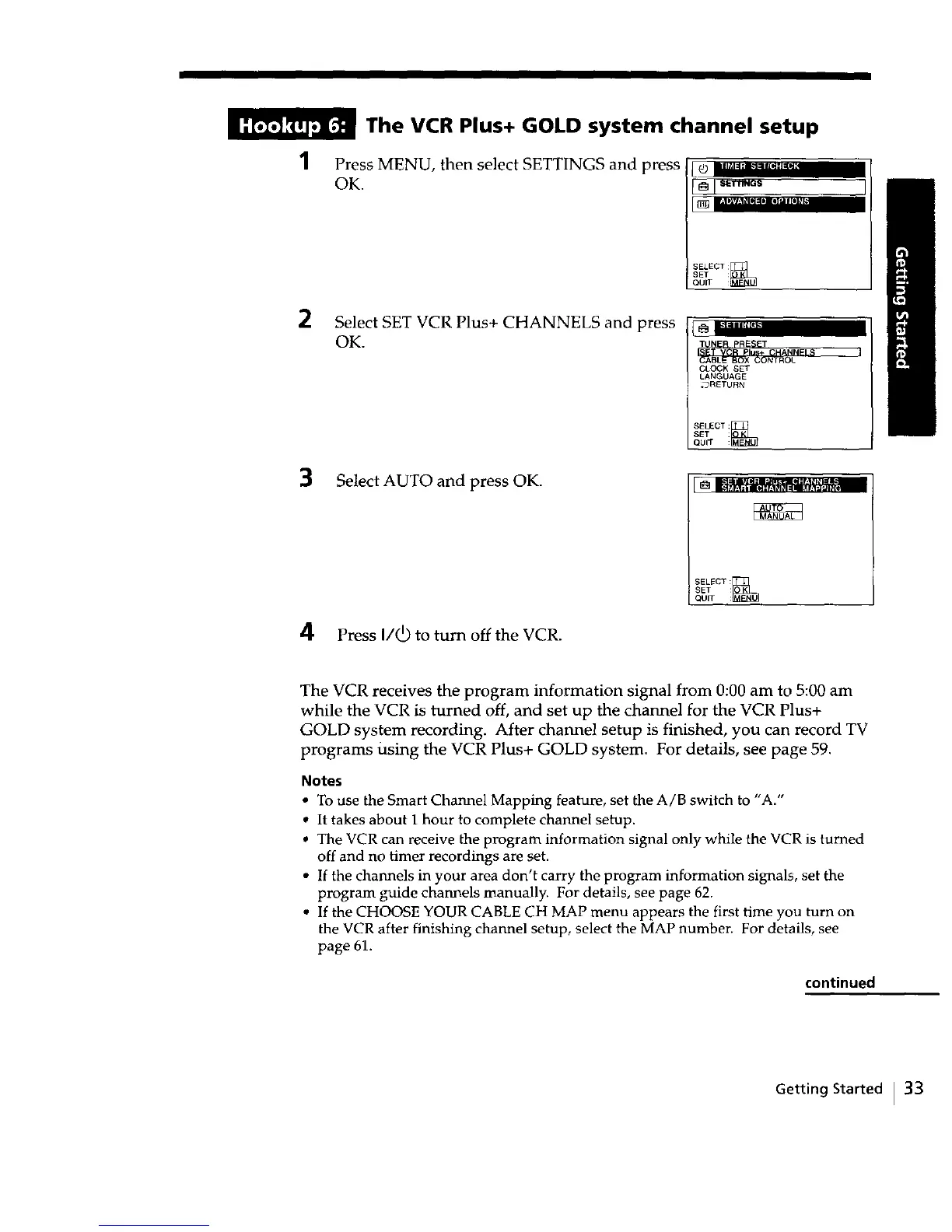
Press MENU, then select SETTINGS and press
OK.
_ 8_T'I'ING$
SELECT
SET
QUIT :
Select SET VCR Plus+ CHANNELS and press
OK.
CLOCK SET
LANGUAGE
*_RETURN
SELECT:_
SET
QUIT :
Select AUTO and press OK.
SELECT:
I SET :
QUIT :_
4 Press I/(_ to turn off the VCR.
The VCR receives the program information signal from 0:00 am to 5:00 am
while the VCR is turned off, and set up the channel for the VCR Plus+
GOLD system recording. After channel setup is finished, you can record TV
programs Using the VCR Plus+ GOLD system. For details, see page 59.
Notes
• To use the Smart Channel Mapping feature, set the A/B switch to "A."
• It takes about 1 hour to complete channel setup.
• The VCR can receive the program information signal only while the VCR is turned
off and no timer recordings are set.
• If the channels in your area don't carry the program information signals, set the
program guide channels manually. For details, see page 62.
• If the CHOOSE YOUR CABLE CH MAP menu appears the first time you turn on
the VCR after finishing channel setup, select the MAP number. For details, see
page 61.
continued
Getting Started I 33



 To Next Page