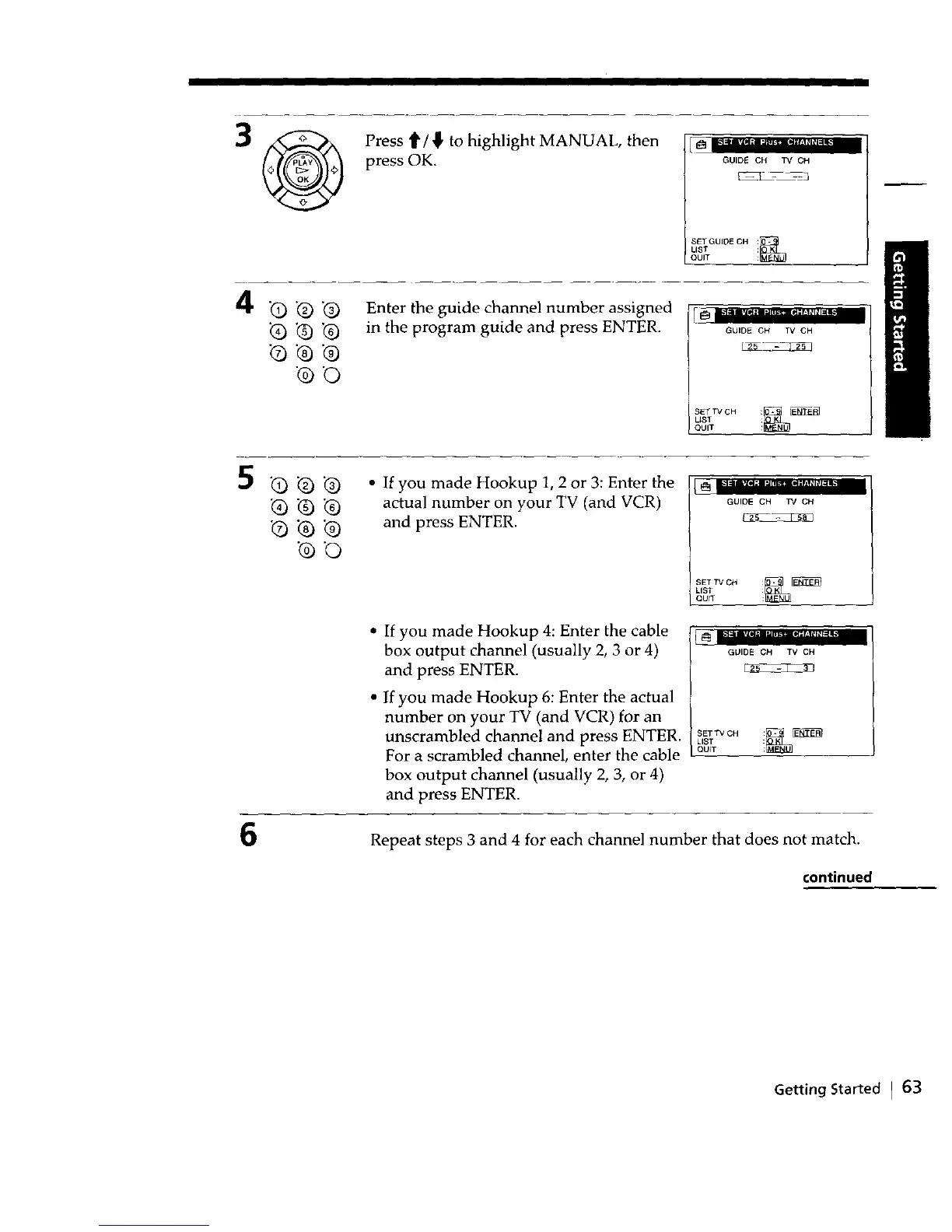
Press t/_' to highlight MANUAL, then
press OK.
GUIDE CH TV CH
LISTSETGUIDE CH
QUIT
4
•Q .@.@
_b Q @
@O
Enter the guide channel number assigned
in the program guide and press ENTER.
GUIDE CH TV CH
SET TV CHLIST _Zr'_
I QUIT
5
6
G_@
_-@.@
•Q .Q .@
@0
• If you made Hookup 1, 2 or 3: Enter the
actual number on your TV (and VCR)
and press ENTER.
If you made Hookup 4: Enter the cable
box output channel (usually 2, 3 or 4)
and press ENTER.
If you made Hookup 6: Enter the actual
number on your TV (and VCR) for an
unscrambled channel and press ENTER.
For a scrambled channel, enter the cable
box output channel (usually 2, 3, or 4)
and press ENTER.
= • iz _,,
GUIDE CH TV CH
QUITLISTSETTV CH _
GUIDE CH TV CH
SET TV CH _
LIST
QUIT
Repeat steps 3 and 4 for each channel number that does not match.
continued
Getting Started I 63



 To Next Page