Recording TV programs using the VCR Plus+ GOLD system
(continued)
2
3
Q 0
Q.Q®
CLEAR
(ZD
SP/EP
CD
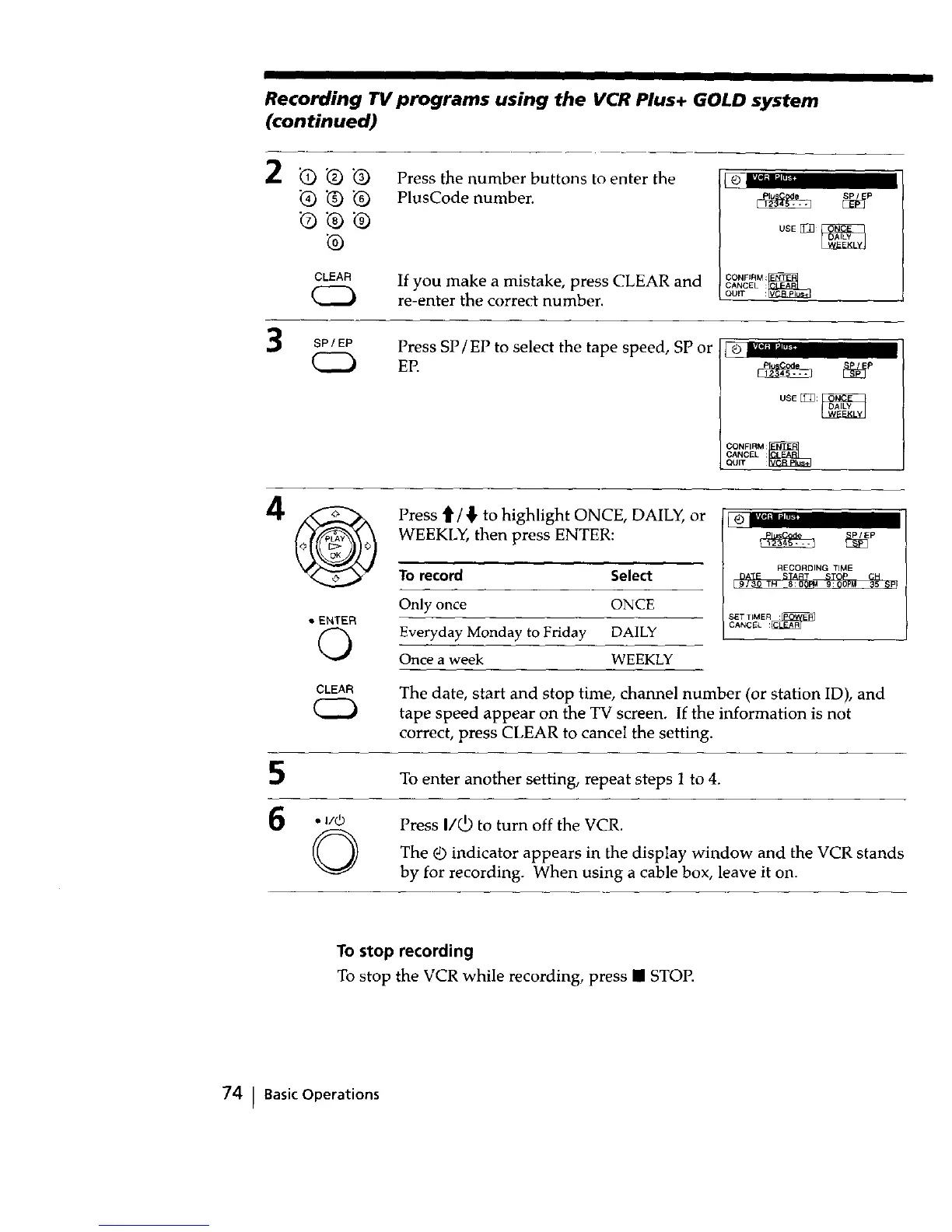
Press the number buttons to enter the
PlusCode number.
If you make a mistake, press CLEAR and
re-enter the correct number.
CONFIRM :_
CANCEL :
QUIT
Press SP/EP to select the tape speed, SP or
EP.
I LTI_: lUJ,_
CONFIRM :_
CANCEL :
QUIT
Press t1'/'!" to highlight ONCE, DAILY, or
WEEKLY, then press ENTER:
To record Select
Only once ONCE
• ENTER
O Everyday Monday to Friday DAILY
Once a week WEEKLY
CLEAR
(ZD
_ _P
RECORDING TIME
T 8:0 Ffd 9: 5 P
SET T_MER :
CANCEL
The date, start and stop time, channel number (or station ID), and
tape speed appear on the TV screen. If the information is not
correct, press CLEAR to cancel the setting.
To enter another setting, repeat steps 1 to 4.
6 . I/4_ Press I/(b to turn off the VCR.
O _ indicator appears in display window and VCR stands
The the the
by for recording. When using a cable box, leave it on.
To stop recording
To stop the VCR while recording, press • STOP.
74 ! BasicOperations



 To Next Page