Troubleshooting
If you have any questions or problems not covered below, please consult your nearest Sony
dealer. (For customers in USA)
General Troubleshooting
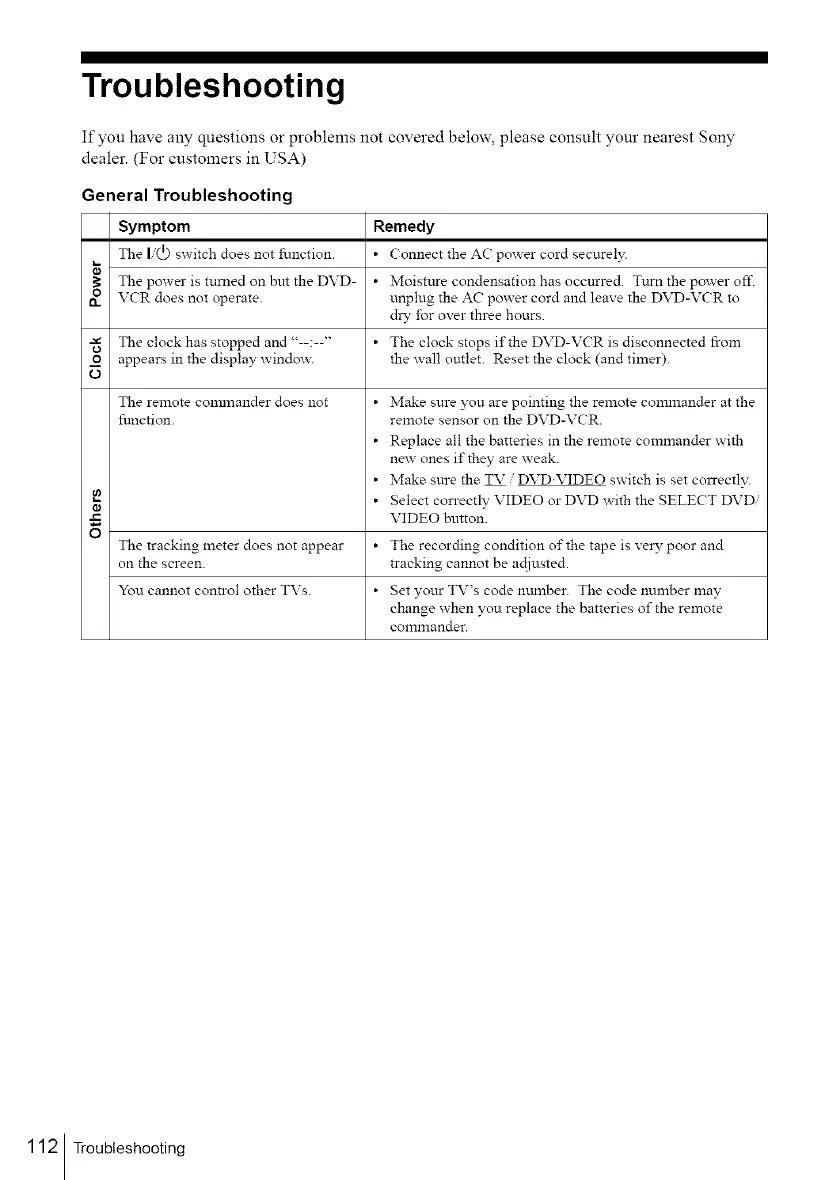
Symptom Remedy
The I(_) switch does not function. • Connect the AC power cord securel?_
The po_er is turned on but the DVD- • Moistttre condensation has occurred. Tttrn the power off,
n VCR does not operate, unplug the AC power cord and leave the DVD-VCR to
dry for over three hours.
-_ The clock has stopped and "--:--" • The clock stops if the DVD-VCR is disconnected from
o appears in the display windo_, the wall outlet. Reset the clock (and timer).
O
¢a
O
T_qe remote colrtlnander does not
function.
• Make sm-e you are pointing the remote commander at the
remote sensor on the DVD-VCR.
• Replace all the batteries in the remote commander with
new ones if they are weak.
• Make sure the TV / DVD.VIDEO switch is set col:cectl_5
• Select correctly VIDEO or DVD with the SELECT DVDi
VIDEO button.
The tracking meter does not appear • The recording condition of the tape is ve W poor and
on the screen, tracking cannot be actiusted.
You cannot conn-ol other TVs. • Set your TV's code number. The code number may
change when you replace the batteries of the remote
commander.
112 Troubleshooting



 To Next Page