[] Use this hookup if your TV has component video input jacks
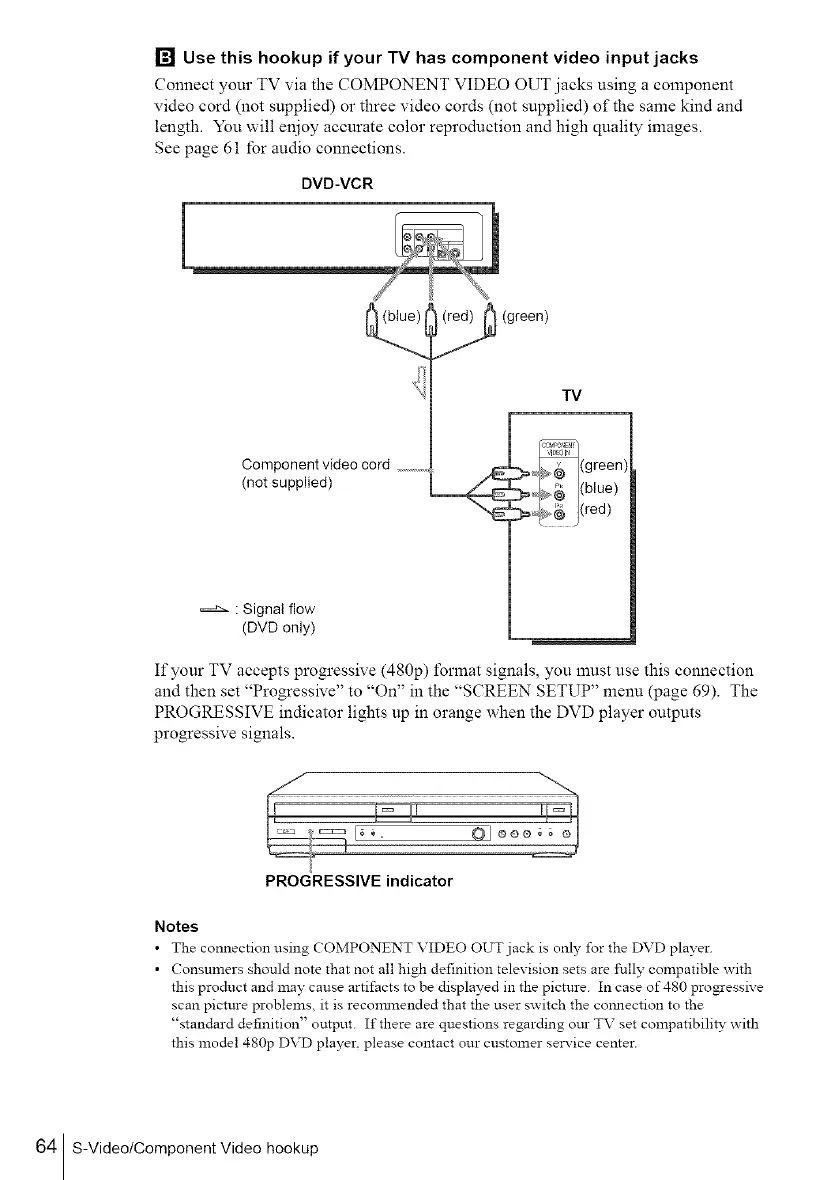
Connect your TV via the COMPONENT VIDEO OUT jacks using a component
video cord (not supplied) or three video cords (not supplied) of the same kind and
length. You will enjoy accurate color reproduction and high quality images.
See page 61 for audio connections.
DVD-VCR
Component video cord ...........
(not supplied)
: Signal flow
(DVD only)
_ (green)
TV
If your TV accepts progressive (480p) format signals, you must use this connection
and then set "Progressive" to "On" in the "SCREEN SETUP" menu {page 69). The
PROGRESSIVE indicator lights up in orange when the DVD player outputs
progressive signals.
PROGRESSIVE indicator
Notes
• The connection using COMPONENT VIDEO OUT jack is only for the DVD player.
• Consumers should note that not all high definition television sets are fully compatible with
this product and may cause artifacts to be displayed in the picture. In case of 480 pro_essive
scan picture problems, it is recmranended that the user switch the connection to the
"standard definition" output. If there are questions regarding ore- TV set compatibili_' with
this model 480p DVD player, please contact our customer service center.
64 S-Video/Component Video hookup



 To Next Page