S-Video/Component Video hookup
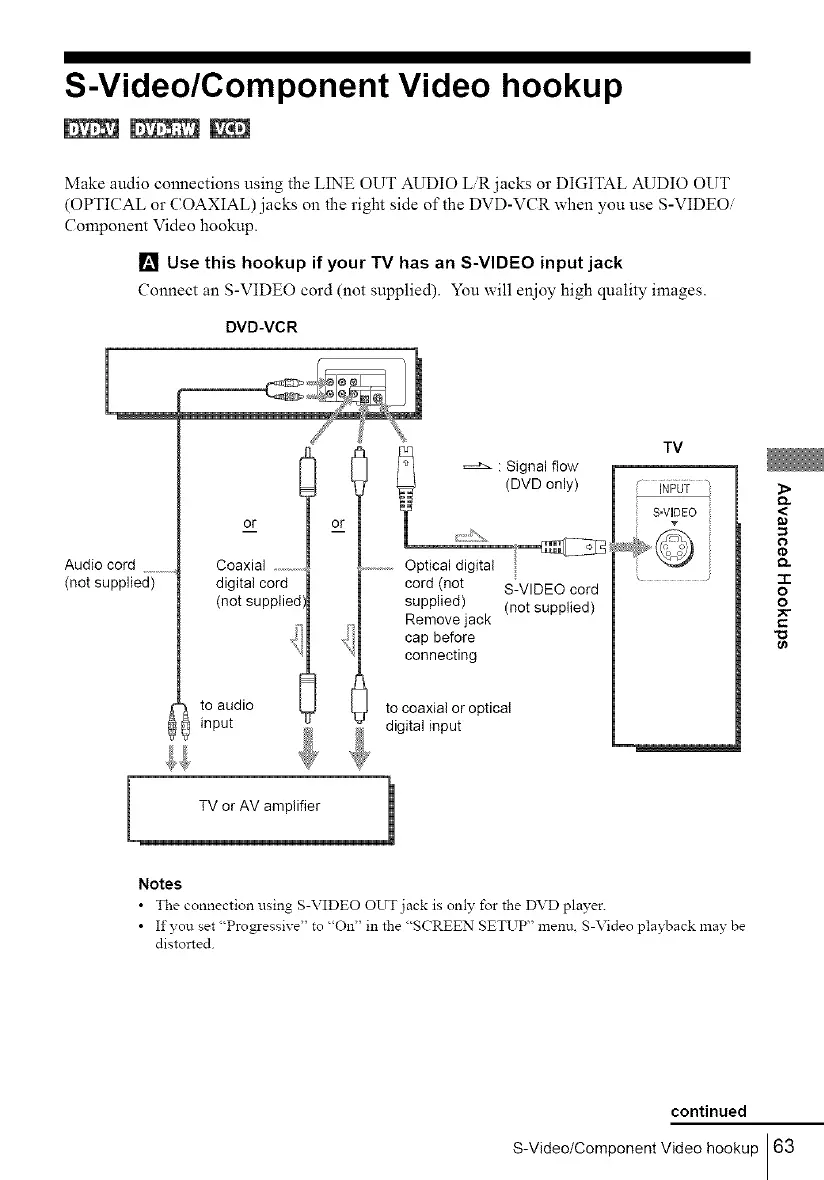
Make audio connections using the LINE OUT AUDIO LiR jacks or DIGITAL AUDIO OUT
(OPTICAL or COAXIAL) jacks on the right side of the DVD-VCR when you use S-VIDEO/
Component Video hookup.
[] Use this hookup if your TV has an S-VIDEO input jack
Connect an S-VIDEO cord (not supplied). You will enioy high quality images.
DVD-VCR
Audio cord ...........
(not supplied)
or
Coaxial .........
digital cord
(not supplied',
to audio
input
: Signal flow
(DVD only)
or _:::::b_,
...............Opticaldigital
cord (not S-VIDEO cord
supplied) (not supplied)
Remove jack
cap before
connecting
to coaxial or optical
digital input
TV
NPUT
S-VUDEO
Notes
• The connection using S-VIDEO OUT jack is only for the DVD player.
• If you set "Progressive" to "On" in the "SCREEN SETUP" menu. S-Video playback lnay be
distorted.
<
=
o
-1-
o
o
continued
S-Video/Component Video hookup 63



 To Next Page