3
4
SP/EP
O
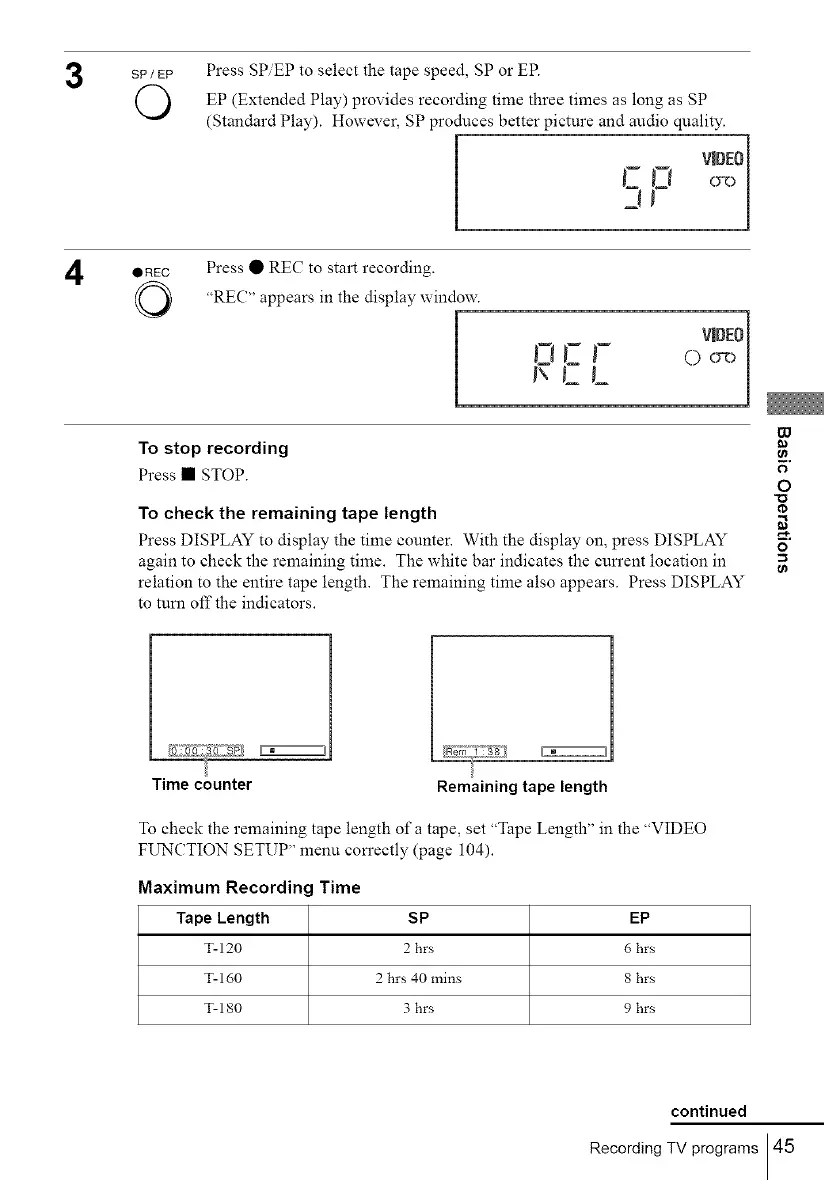
Press SP.EP to select the tape speed, SP or EP.
EP (Extended Play) provides recording time three times as long as SP
(Standard Play). However, SP produces better picture and audio quality.
QREC
O
Press • REC to start recording.
"REC" appears in the display window.
_mD[O
I', CL
To stop recording
Press • STOP.
To check the remaining tape length
Press DISPLAY to display the time counter. With the display on, press DISPLAY
again to check the remaining time. The white bar indicates the cun'ent location in
relation to the entire tape length. The remaining time also appears. Press DISPLAY
to turn off the indicators.
W
o
O
o
EEZZZ3
Time counter Remaining tape length
To check the remaining tape length of a tape, set "Tape Length" in the "VIDEO
FUNCTION SETUP" menu con'ectly (page 104).
Maximum Recordin(
Tape Length
T-120
T-160
T-180
Time
SP
2 hrs
2 hrs 40 mins
3 hrs
EP
6 hrs
8 hrs
9 hrs
continued
Recording TV programs 45



 To Next Page