Playing JPEG image files
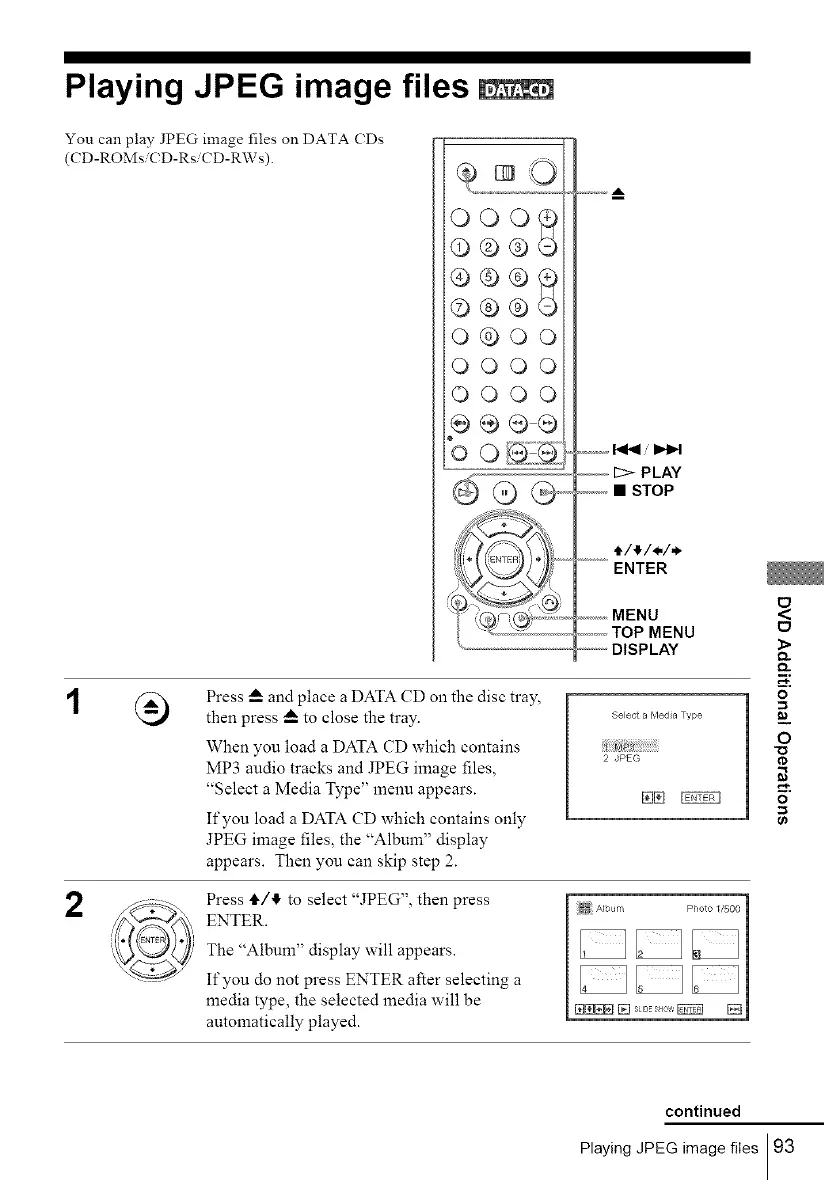
You can play JPEG image files on DATA (Ds
(CD-ROMs.( D-Rs. CD-RWs).
QO0_
@©®
©®®
0®0o
QQOQ
O00O
p÷®®
_f...............
0
,,'? :,,
@ @',
'Y' ' ,-= Z_,,,
_@,,,@!
1_ PLAY
_,,,,_,,,,,,,• STOP
_...... t/_,/*/,*.
ENTER
,,.,,.,.,,.,MENU
............TOP MENU
"DISPLAY
2
Press _-- and place a DATA CD on the disc tray,
then press _-- to close the tray.
When you load a DATA CD which contains
MP3 audio tracks and JPEG image files,
"Select a Media Type" menu appears.
If you load a DATA CD which contains only
JPEG image files, the "Album" display
appears. Then you can skip step 2.
Select a Meda Type
2 JPEG
Press t1_/!1" to select "JPEG", then press
ENTER.
The "Album" display will appears.
If you do not press ENTER after selecting a
media type, the selected media will be
automatically played.
<
tD
o
=_
O
o
0_
continued
Playing JPEG image files 93



 To Next Page