3
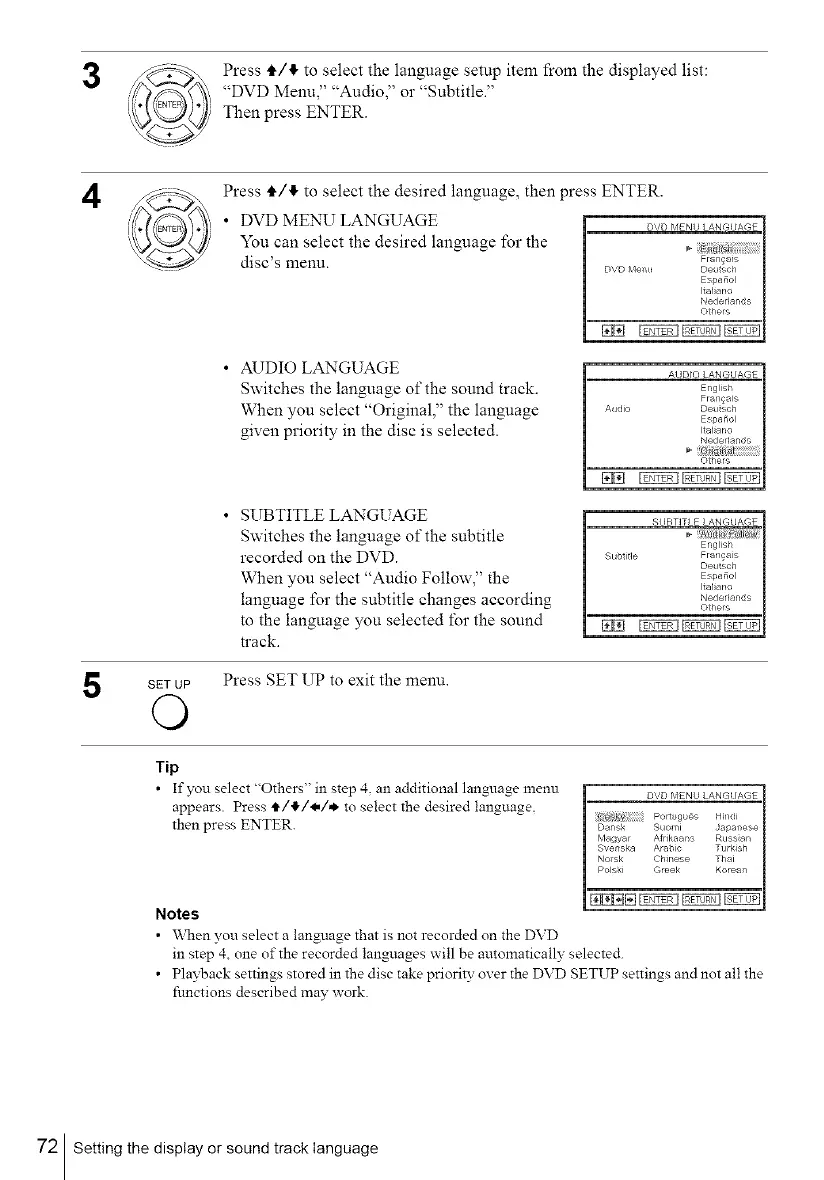
Press tl,/!1, to select the language setup item from the displayed list:
"DVD Menu," "Audio," or "Subtitle."
Then press ENTER.
4
Press tl,/!1, to select the desired language, then press ENTER.
• DVD MENU LANGUAGE
You can select the desired language for the
disc's menu.
• AUDIO LANGUAGE
Switches the language of the sound track.
When you select "Original," the language
given priority in the disc is selected.
DVD MENU LANGI/AGE
Fran_ais
DVD Me_L_ Deu_sch
Espafiol
i_al_ano
Neder_ands
©thers
INN __
AUDIO LANGUAGE
English
Fran_ais
A_ldie Deutsch
Espafiol
Italiano
NederJands
Others
INN __
• SUBTITLE LANGUAGE
Switches the language of the subtitle
recorded on the DVD.
When you select "Audio Follow," the
language for the subtitle changes according
to the language you selected for the sound
track.
SETUP Press SET UP to exit the menu.
O
SUBTITLE LANGUAGE
English
Subtitle Fran_a_s
Deutsch
Espafiol
Italiano
Nederlands
Others
INN __
Tip
• If you select "Others" in step 4. an additional language menu
appears. Press t/l!,/4,/,*, to select the desired language,
then press ENTER.
Notes
• \Vhen you select a language that is not recorded on the DVD
in step 4, one of the recorded languages will be automatically selected.
• Playback settings stored in the disc take priority over the DVD SETUP settings and not all the
functions described may work.
72 Setting the display or sound track language



 To Next Page