2
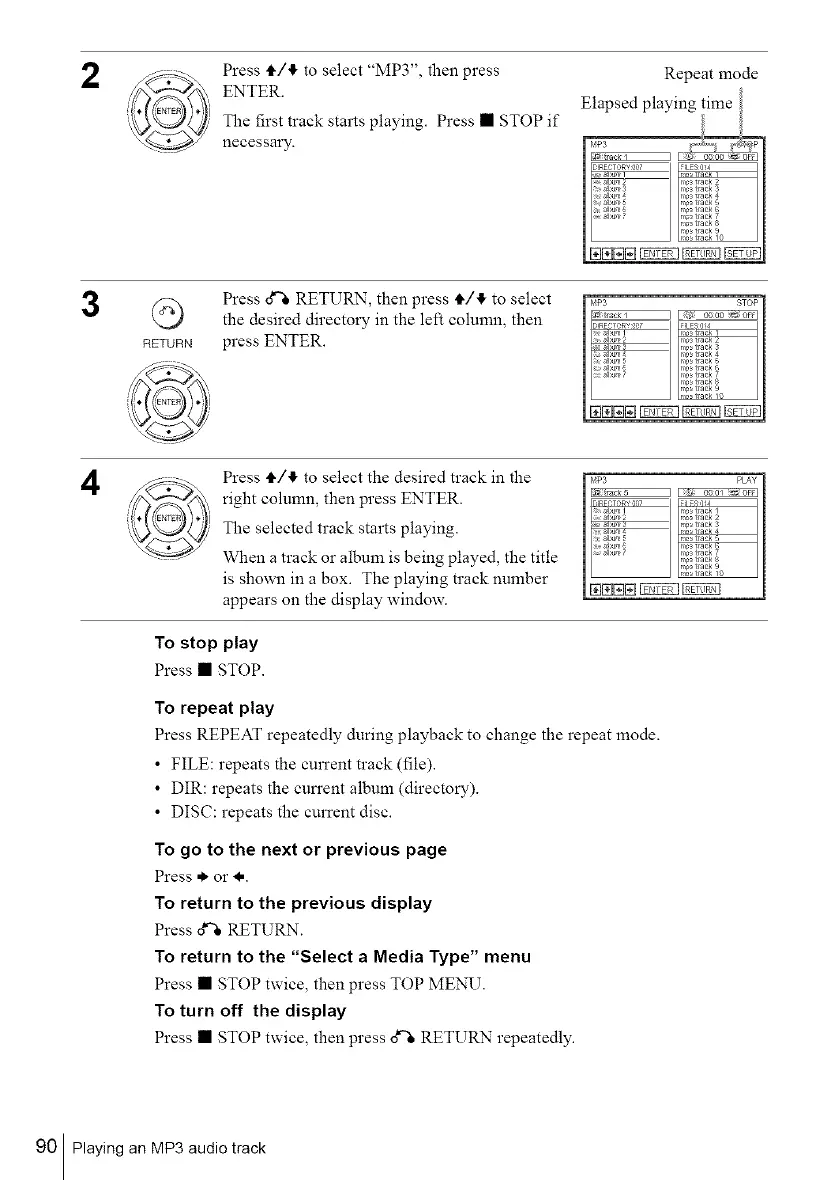
Press t_/I, to select "MP3", then press
ENTER.
The first track starts playing. Press • STOP if
necessary.
Repeat mode
3
RETURN
Press d% RETURN, then press i,/4 to select
the desired directory in the left column, then
press ENTER.
b_P3 STOF I
qa_ I _kk2F2_1f9 gooo _ t)F_
D REC ,gRY ¢.0 FILES 0!4
. n _ tlaek4
_,_a_l)um5 n _ tlaek 5
_ a_l)um7 n/_nn_ tlaek_ traektlaek 987
4
Press i,/4 to select the desired track in the
right column, then press ENTER.
The selected track starts playing.
When a track or album is being played, the title
is shown in a box. The playing track number
appears on the display window.
F_MP3 F'5_PLAY I
InlRFCT,"R n,S7 I ilFSq14
_ a_bumI m_ tlaek 1
. _,_ tlaek 4
_ _,_a_l)um7 n_n_stlaekn_stit1aaekek987
[N[N[N[N_
To stop play
Press • STOP.
To repeat play
Press REPEAT repeatedly during playback to change the repeat mode.
• FILE: repeats the current track (file).
• DIR: repeats the cun'ent album (directory).
• DIS(:: repeats the current disc.
To go to the next or previous page
Press * or I..
To return to the previous display
Press d% RETURN.
To return to the "Select a Media Type" menu
Press • STOP twice, then press TOP MENU.
To turn off the display
Press • STOP twice, then press g'_ RETURN repeatedly.
90 Playing an MP3 audio track



 To Next Page