32
Changing/disabling programme positions
Disabling unwanted
programme positions
After presetting channels, you can disable
unused programme positions. The disabled
positions will be skipped later when you
press the PROG +/– buttons.
Before you start…
• Turn on the VCR and the TV.
• Set the TV to the video channel.
1
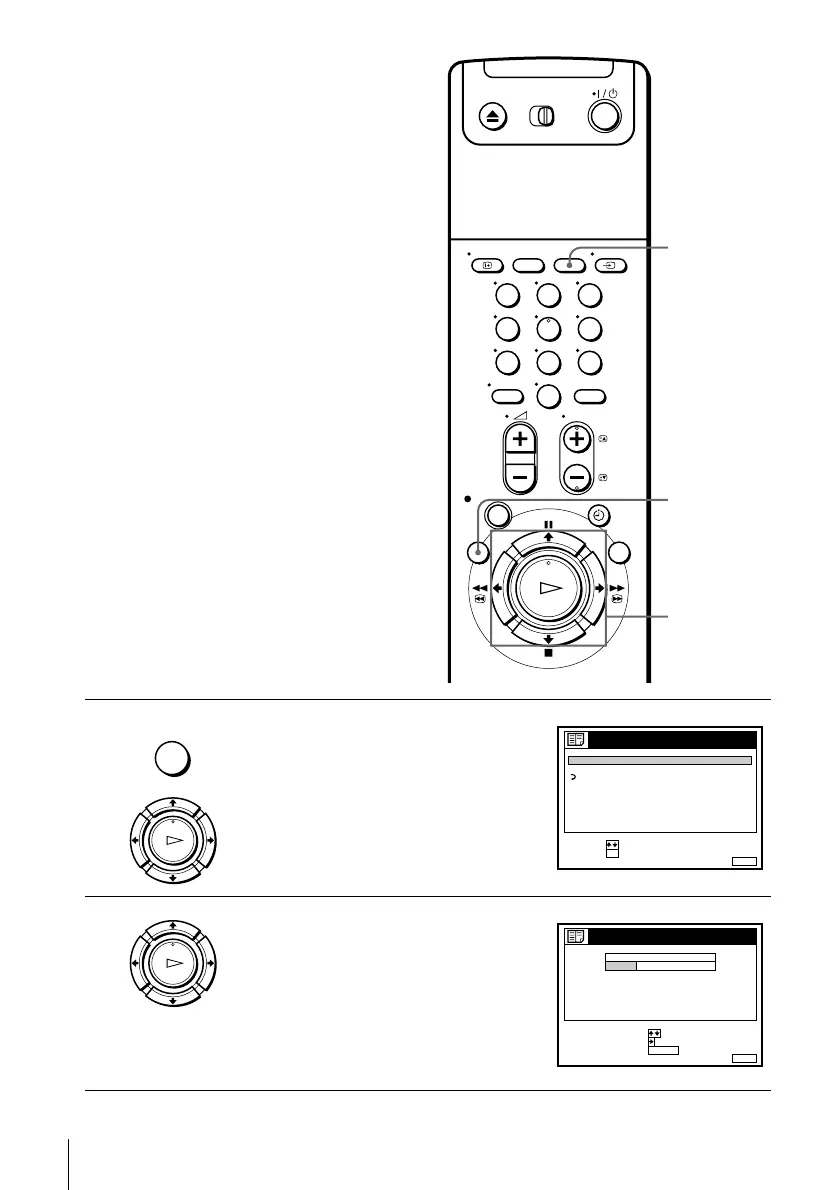
Press MENU, then press M/m to highlight
LISTS, and press OK.
2
Press M/m to highlight CHANNEL LIST,
then press OK.
123
456
789
0
CLEAR
MENU
M/m
OK
MENU
OK
PLAY
RETURN
SET :
SELECT :
OK
MENUEXIT :
LISTS
CHANNEL LIST
TIMER LIST
OK
PLAY
MENUEXIT :
CHANNEL LIST
PROG
1
2
3
4
5
AAB
CDE
FGH
C
C
C
C
1
0
5
0
2
3
6
9
NAME
CH
C
27
ERASE PROGRAM
MOVE PROGRAM
:
:
SELECT :
CLEAR


 To Next Page