Getting Started
33
Changing/disabling programme positions
Tip
• If you want to return to the previous menu, highlight RETURN and press OK.
Notes
• The menu disappears automatically if you don’t proceed for more than a few minutes.
• Be sure to select the programme position you want to disable correctly. If you disable a
programme position by mistake, you need to reset that channel manually.
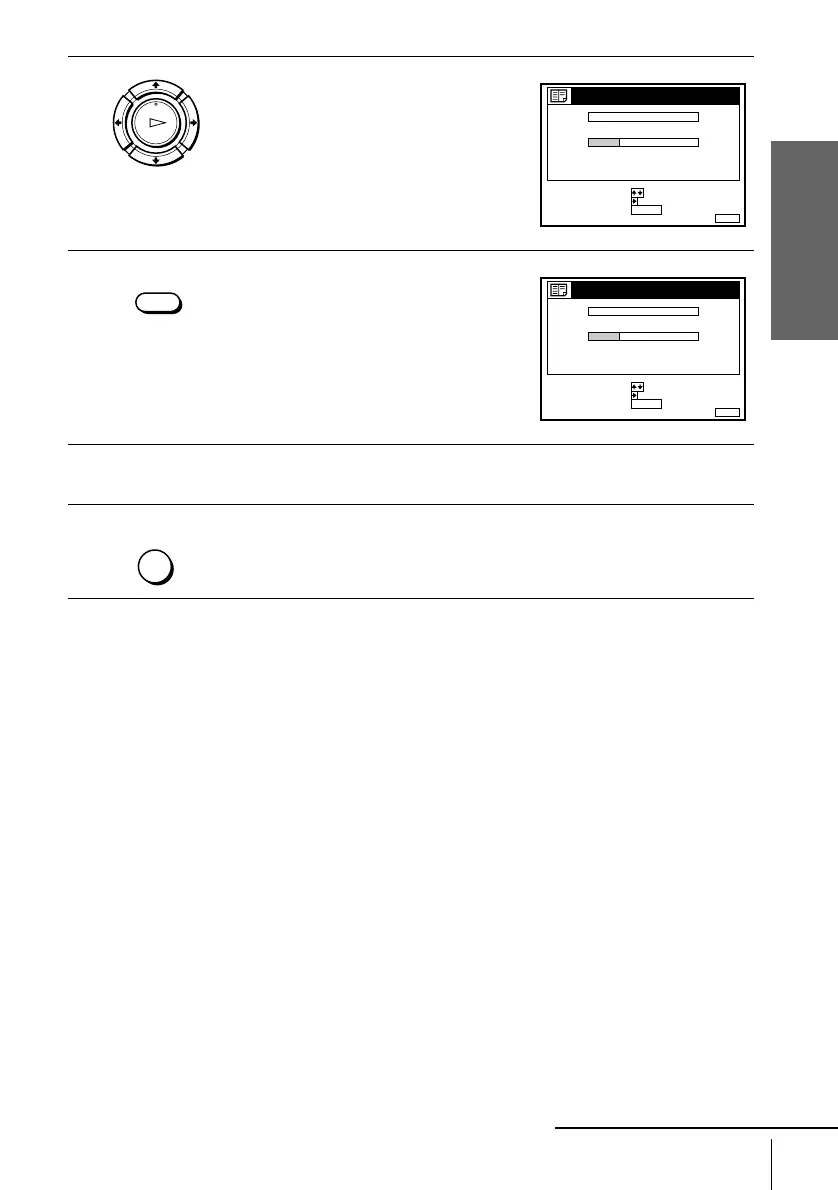
3
Press M/m to highlight the row which you
want to disable.
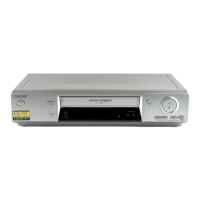
4
Press CLEAR.
The selected row will be cleared as shown
on the right.
5
Repeat steps 3 and 4 for any other programme positions you want to
disable.
6
Press MENU to exit the menu.
OK
PLAY
MENUEXIT :
CHANNEL LIST
PROG
1
2
3
4
5
AAB
CDE
FGH
C
C
C
C
1
0
5
0
2
3
6
9
NAME
CH
C
27
ERASE PROGRAM
MOVE PROGRAM
:
:
SELECT :
CLEAR
CLEAR
MENUEXIT :
CHANNEL LIST
PROG
1
2
3
4
5
AAB
CDE
FGH
C
C
C
1
0
0
2
3
9
NAME
CH
C
27
ERASE PROGRAM
MOVE PROGRAM
:
:
SELECT :
CLEAR
MENU
continued


 To Next Page