23
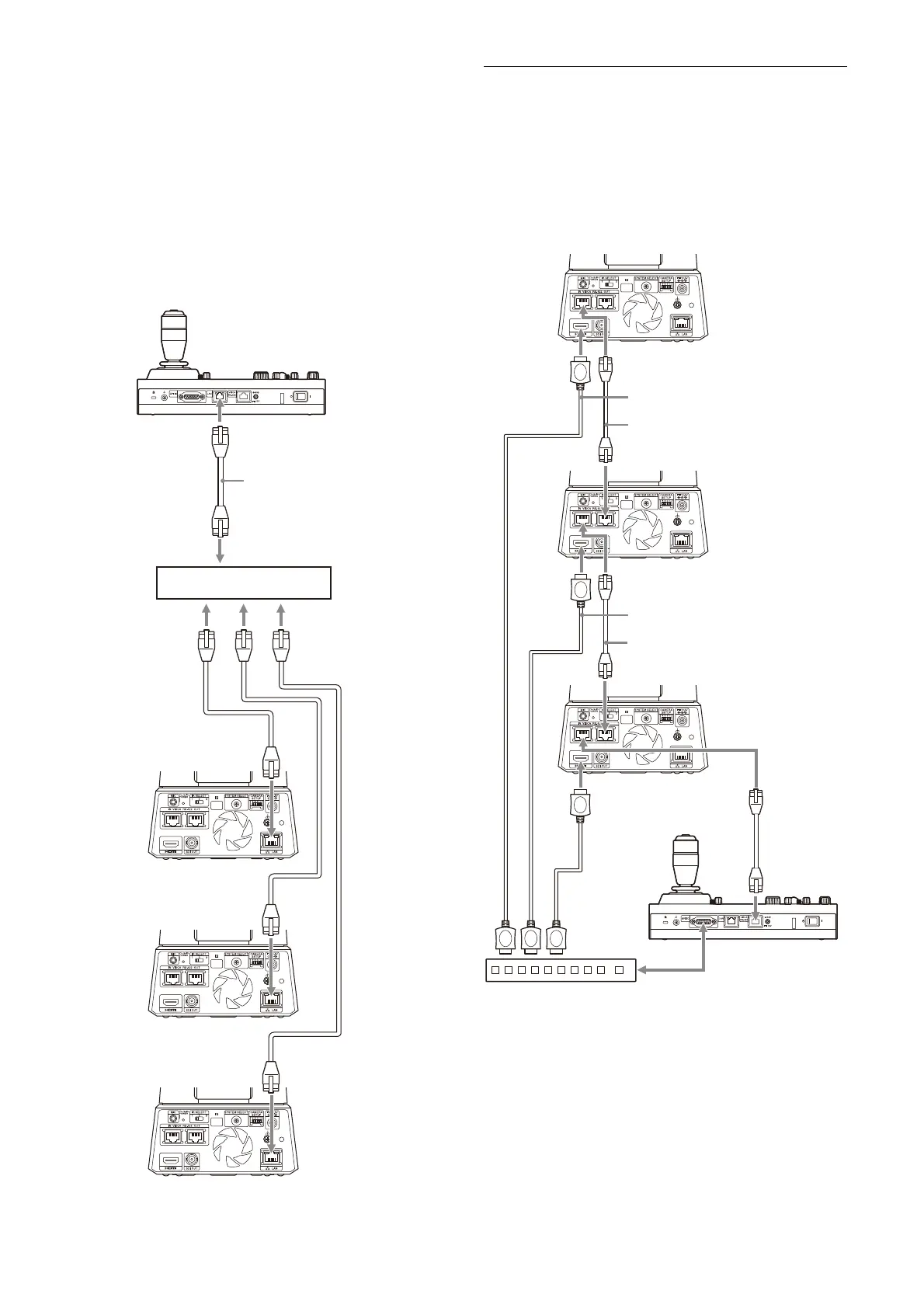
Connecting multiple cameras using VISCA over
IP
• When you connect multiple cameras to a single
re
mote controller or when you connect
multiple cameras to multiple remote
controllers with a computer, use a switching
hub for the connection.
• The camera network’s initial setting is “DHCP.”
Wh
en using with the DHCP, also connect a
router, which can resolve DHCP issues with the
hub. When a router is not used, turn off DHCP
and set the IP address.
* Use straight network cables.
Connecting a commercially
available video switcher
For 4K output (HDMI output only)
When you want to switch cameras, connect a
c
ommercially available video switcher.
For the connection to the video switcher, refer to
th
e operating instructions of the switcher.
* Use straight network cables.
Network cable
(commercially available)*
HUB
(commercially
available)
Network cable
(commercially
available)*
Network cable
(commercially
available)*
Network cable
(commercially
available)*
Network cable
(commercially available)*
Network cable
(commercially
available)*
HDMI cable
(not supplied)
Connecting control signals
Video switcher
Network cable
(commercially available)*
HDMI cable
(not supplied)
HDMI cable
(not supplied)



 To Next Page