90
4-4 CUE Menu
Chapter 4 Menu Settings
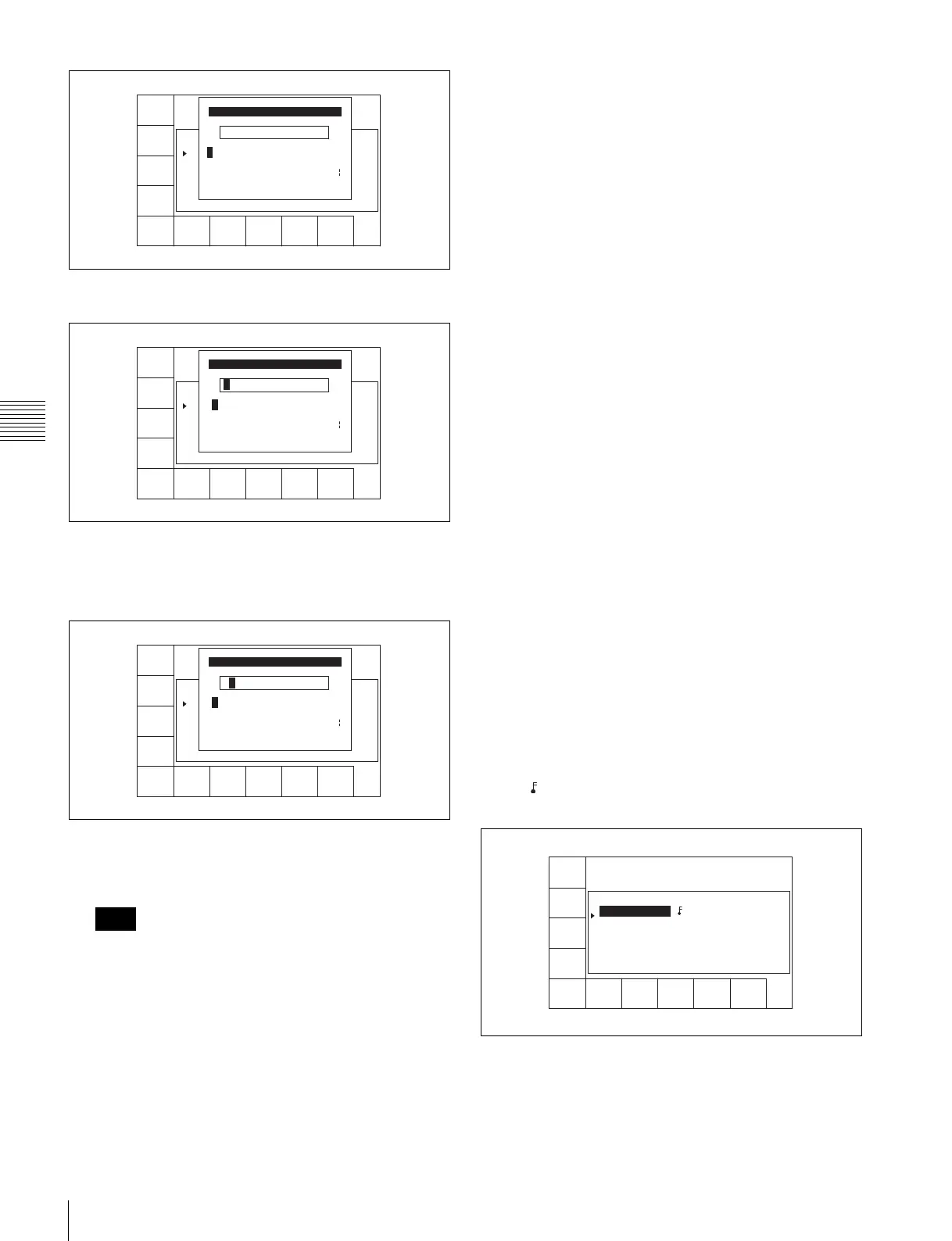
3
Press the cursor T or t button to select a character.
4
Press the [F7] (SET LETTER) button or the cursor
center button.
The selected character is entered.
5
Repeat steps 3 and 4 to enter more characters.
Up to 80 characters can be entered.
If excessive comment data are entered, the input of cue
point data may become disabled. To prevent this, press
the [F8] (TAPE INFO) button to check the available
memory.
To enter a space
Press the [F5] (SPACE) button.
If you enter a wrong character
Press the [F6] (BACK SPACE) button to go back.
Then re-enter the character.
To start the procedure over again
Press the [F9] (CANCEL) button to start again.
To change a character
Press the cursor R button to move the cursor to the
comment to be changed. Then press the cursor T or
t button to move the insertion position.
If the entered text is longer than the comment box
t or T appears to the left or right of the box.
6
Press the [F10] (SAVE/EXIT) button.
The screen that was on before the comment data was
changed is displayed again.
Prerolling to a cue point
1
Press the [F1] (CUE SCAN) button repeatedly to
specify the direction in which the cursor moves when
the PREROLL button is pressed.
Each press of the button changes the direction as
follows: FWD (forward) t REW (reverse) t
unspecified.
FWD: Pressing the PREROLL button causes the
cursor to move to the next line, and the VTR to
preroll to the time code on that line. Invalid time
codes are ignored.
REW: Pressing the PREROLL button causes the
cursor to move to the previous line, and the VTR
to preroll to the time code on that line. Invalid
time codes are ignored.
2
Press the PREROLL button.
Write-protecting cue point data
Press the cursor buttons to move the cursor to the line that
is to be write-protected. Then press the [F7] (PROTECT)
button. appears between the Time and Mrk columns to
indicate that the line (clip) is write-protected.
To cancel a write-protection
Press the [F7] (PROTECT) button. A message appears (in
the control panel display) requesting confirmation of
cancellation operation.
Note
SPACE SET
LETTER
CANCEL SAVE/
EXIT
BACK
SPACE
REC DATE[2003/02/25]
TITLE[ isplay Sample
No. Tape Format Duration
0 59i 1080 422 01:00:36:06 --
1 59i 1080 422 01:00:36:06 ---
EOS[01:01:02:08]
] Rest100%
_
A BCDEFGHIJKLMNOPQRSTUVWXYZ
abcdefghjiklmnopqrstuvwxyz
0123456789[]()<>@+-*=!?:;
COMMENT EDIT
$#%&,."\^_'/~ {} HD1D2CAM
'
SPACE SET
LETTER
CANCEL SAVE/
EXIT
BACK
SPACE
REC DATE[2003/02/25]
TITLE[ isplay Sample
No. Tape Format Duration
0 59i 1080 422 01:00:36:06 --
1 59i 1080 422 01:00:36:06 ---
EOS[01:01:02:08]
] Rest100%
abcdefghjiklmnopqrstuvwxyz
0123456789[]()<>@+-*=!?:;
COMMENT EDIT
$#%&,."\^_'/~ {} HD1D2CAM
'
A B CDEFGHIJKLMNOPQRSTUVWXYZ
SPACE SET
LETTER
CANCEL SAVE/
EXIT
BACK
SPACE
REC DATE[2003/02/25]
TITLE[ isplay Sample
No. Tape Format Duration
0 59i 1080 422 01:00:36:06 --
1 59i 1080 422 01:00:36:06 ---
EOS[01:01:02:08]
] Rest100%
abcdefghjiklmnopqrstuvwxyz
0123456789[]()<>@+-*=!?:;
COMMENT EDIT
$#%&,."\^_'/~ {} HD1D2CAM
'
A B CDEFGHIJKLMNOPQRSTUVWXYZ
B
CUE
SCAN
ENTRY
POINT
COMMNT
EDIT
CHANGE
DATA
DEL
POINT
PRO-
TECT
TAPE
INFO
CUENUM
POINT
WRITE/
EXIT
MARK
REC DATE[2003/02/25] EOS[01:01:24:15]
TITLE[ ] Rast100%
No. Time Mrk Tk Cut Scn
0 00:01:02:03 NG 00:01:01:03
1 --:--:--:-- KP --:--:--:--
2 00:03:04:03 OK @ 00:03:03:03
3 00:04:04:03 OK 00:04:03:03
4 00:05:05:03 NG 00:05:04:03
5 00:06:06:03 OK 00:06:05:03
6 --:--:--:--



 To Next Page