EasyManua.ls Logo

Sony SSC-DC593 - Connection Diagram; Camera Adjustment Commander

Sony SSC-DC593
72 pages
Print Icon
To Next Page IconTo Next Page
To Previous Page IconTo Previous Page
Loading...
3-2
SSC-DC593/DC593P/DC598P (E)
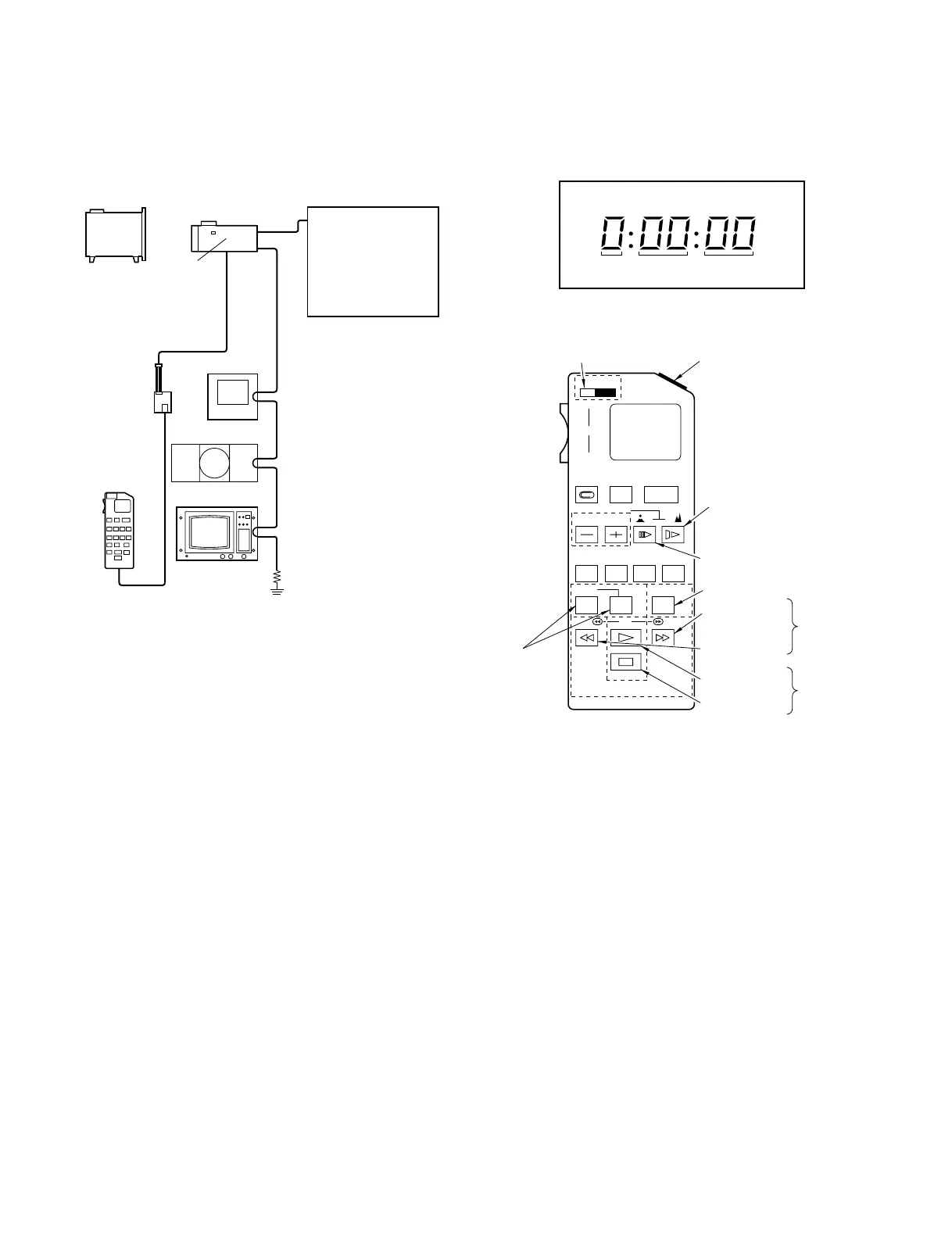
3-1-2. Connection Diagram 3-1-3. Camera Adjustment Commander
Pattern box
(PTB-500/700)
CAMERA
Waveform monitor
Camera
Adjustment
Commander
(J-6082-053-B)
Relay tool
(J-6432-830-A)
CN103
PR board
CN202
Connecting to a 12V DC Power Supply
MONITOR
OUT
CN104
DC 12V
Color monitor
75 Z termination
Vectorscope
Power Supply
DC593: AC24 V 60Hz
DC12 V
DC593P: AC24 V 50Hz
DC12 V
DC598P: AC220 to 240 V
50Hz
Data
display
Mode
display
LCD display of adjusting remote controller
HOLD
WIDE
ZOOM
TELE
START/
STOP
REC
REVIEW FOCUS
POWER
AUTO/MAN
EDIT SEARCH
COUNTER
RESET DISPLAY FRAME SLOW
REC
PAUSE
REW PB FF
STOP
Adjusting remote controller RM-95 (J-6082-053-B)
Slide switch
Initial data
writing button
Step forward button
Step reverse button
Data writing button
Mode display
up button
RM-95
Data up button
Data down
button
Mode display
down button
Adjusting mode
setting button
(pressed at the
same time)
Mode
display
change
button
Data
change
button

Table of Contents

Related product manuals