STR-DA5400ES
11
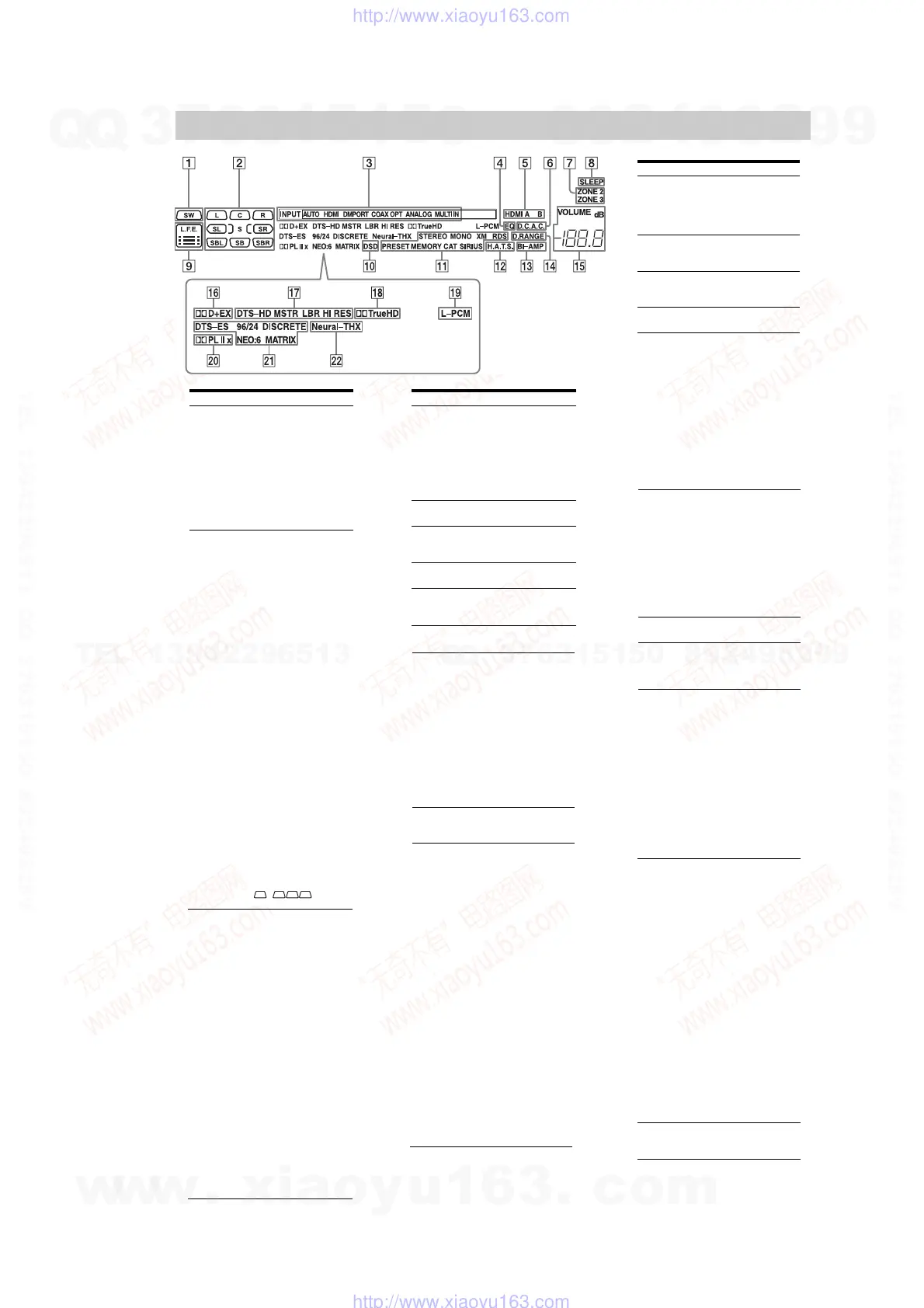
Indicators on the display
Name Function
" SW Lights up when subwoofer
is connected and the audio
signal is output from the
SUBWOOFER jack. While
this indicator lights up, the
receiver creates a
subwoofer signal based on
the L.F.E. signal in the disc
being played back or the
low frequency components
of the front channels.
# Playback
channel
indicators
The letters (L, C, R, etc.)
indicate the channels being
played back. The boxes
around the letters vary to
show how the receiver
downmixes the source
sound (based on the speaker
settings).
L Front Left
R Front Right
C Center (monaural)
SL Surround Left
SR Surround Right
S Surround (monaural or the
surround components
obtained by Pro Logic
processing)
SBL Surround Back Left
SBR Surround Back Right
SB Surround Back (the
surround back components
obtained by 6.1 channel
decoding)
Example:
Recording format (Front/
Surround): 3/2.1
Output channel: Surround
speakers are set to “NO.”
Sound Field: A.F.D. AUTO
LSW
SL
SR
CR
$ Input
indicators
Light up to indicate the
current input.
INPUT Lights up constantly with
either following the
corresponding indicators
that indicate the current
input status.
HDMI The receiver recognizes a
component connected via
an HDMI IN jacks.
DMPORT The DIGITAL MEDIA
PORT adapter is connected
and “DMPORT” is
selected.
MULTI IN The multi-channel input is
selected.
AUTO Lights up with the
corresponding indicators
that indicate the current
input when INPUT MODE
is set to “Auto.”
OPT Digital signal is input
through the OPTICAL jack.
ANALOG No digital signal is being
input. When INPUT
MODE is set to “Analog,”
or when the “2ch Analog
Direct” is being selected, it
also lights up.
% EQ Lights up when the
equalizer is activated.
& HDMI A B Lights up when the signals
are output from the HDMI
OUT A or B jack.
' D.C.A.C. Lights up when auto
calibration is activated.
( ZONE 2/
ZONE 3
Lights up while operation in
zone 2/zone 3 is being
enabled.
Name Function
) SLEEP Lights up when the sleep
timer is activated.
* L.F.E. Lights up when the disc
being played back contains
an L.F.E. (Low Frequency
Effects) channel and the
L.F.E. channel signal is
actually being reproduced,
the bars underneath the
letters light up to indicate
the level. Since the L.F.E.
signal is not recorded in all
parts of the input signal the
bar indication will fluctuate
(and may turn off) during
playback.
+ DSD Lights up when the receiver
is receiving DSD (Direct
Stream Digital) signals.
, Tuning
indicators
Lights up when the receiver
tunes in radio stations, or
satellite radio stations.
STEREO Stereo broadcast
MONO Monaural broadcast
XM
(U.S.A./
Canadian
model only)
The XM Mini Tuner and
Home Dock are connected
and “XM” is selected.
SIRIUS
(U.S.A./
Canadian
model only)
The SiriusConnect Home
tuner is connected and
“SIRIUS” is selected.
CAT
(U.S.A./
Canadian
model only)
The category mode is
selected during the satellite
radio operation.
RDS
(European
model only)
RDS information is
received.
PRESET The tuning mode is set to
the preset mode.
MEMORY A memory function, such as
Name Input, etc., is
activated.
- H.A.T.S.
(European
model only)
Lights up when the
H.A.T.S. (High quality
digital Audio Transmission
System) function is
activated.
. BI-AMP Lights up when surround
back speakers selection is
set to “BI-AMP.”
/ D.RANGE Lights up when dynamic
range compression is
activated.
0 VOLUME Displays the current
volume.
Name Function
1 Dolby
Digital
Surround
indicators
Lights up one of the
respective indicators when
the receiver is decoding the
corresponding Dolby
Digital format signals.
D Dolby Digital
D+ Dolby Digital Plus
D EX Dolby Digital Surround EX
Note
When playing a Dolby Digital
format disc, be sure that you
have made digital connections
and that INPUT MODE is not
set to “Analog.”
2 DTS-HD
indicators
Light up when the receiver
is decoding DTS-HD.
DTS-HD Lights up constantly with
the one of the following
indicators.
MSTR DTS-HD Master Audio
LBR DTS-HD Low Bit Rate
Audio
HI RES DTS-HD High Resolution
Audio
3 TrueHD Lights up when the receiver
is decoding Dolby TrueHD.
4 L-PCM Lights up when Linear
PCM (Pulse Code
Modulation) signals are
input.
5 Dolby
Pro Logic
indicators
Lights up one of the
respective indictors when
the receiver applies Dolby
Pro Logic processing to 2
channel signals in order to
output the center and
surround channel signals.
PL Dolby Pro Logic
PLII Dolby Pro Logic II
PLIIx Dolby Pro Logic IIx
Note
This indicator does not light
when either the center speaker
and surround speaker is not
connected.
6 DTS(-ES)
indicators
Light up when DTS or
DTS-ES signals are input.
DTS Lights up when the receiver
is decoding DTS signals.
Either 96/24 or NEO:6 also
lights up depending on the
input signal format or
decoding format.
96/24 DTS 96/24 (96 kHz/24 bit)
decoding
NEO:6 DTS Neo:6 Cinema/Music
DTS-ES Lights up with the either
following indicator
depending on the input
signal decoding format.
DISCRETE DTS-ES Discrete 6.1
MATRIX DTS-ES Matrix 6.1
Note
When playing a DTS format
disc, be sure that you have
made digital connections and
that INPUT MODE is not set to
“Analog.”
7 Neural-THX Lights up when the receiver
applies Neural-THX
processing to input signals.
COAX Digital signal is input
through the COAXIAL
jack.
w
w
w
.
x
i
a
o
y
u
1
6
3
.
c
o
m
Q
Q
3
7
6
3
1
5
1
5
0
9
9
2
8
9
4
2
9
8
T
E
L
1
3
9
4
2
2
9
6
5
1
3
9
9
2
8
9
4
2
9
8
0
5
1
5
1
3
6
7
3
Q
Q
TEL 13942296513 QQ 376315150 892498299
TEL 13942296513 QQ 376315150 892498299
http://www.xiaoyu163.com
http://www.xiaoyu163.com















 To Next Page