STR-DA5400ES
12
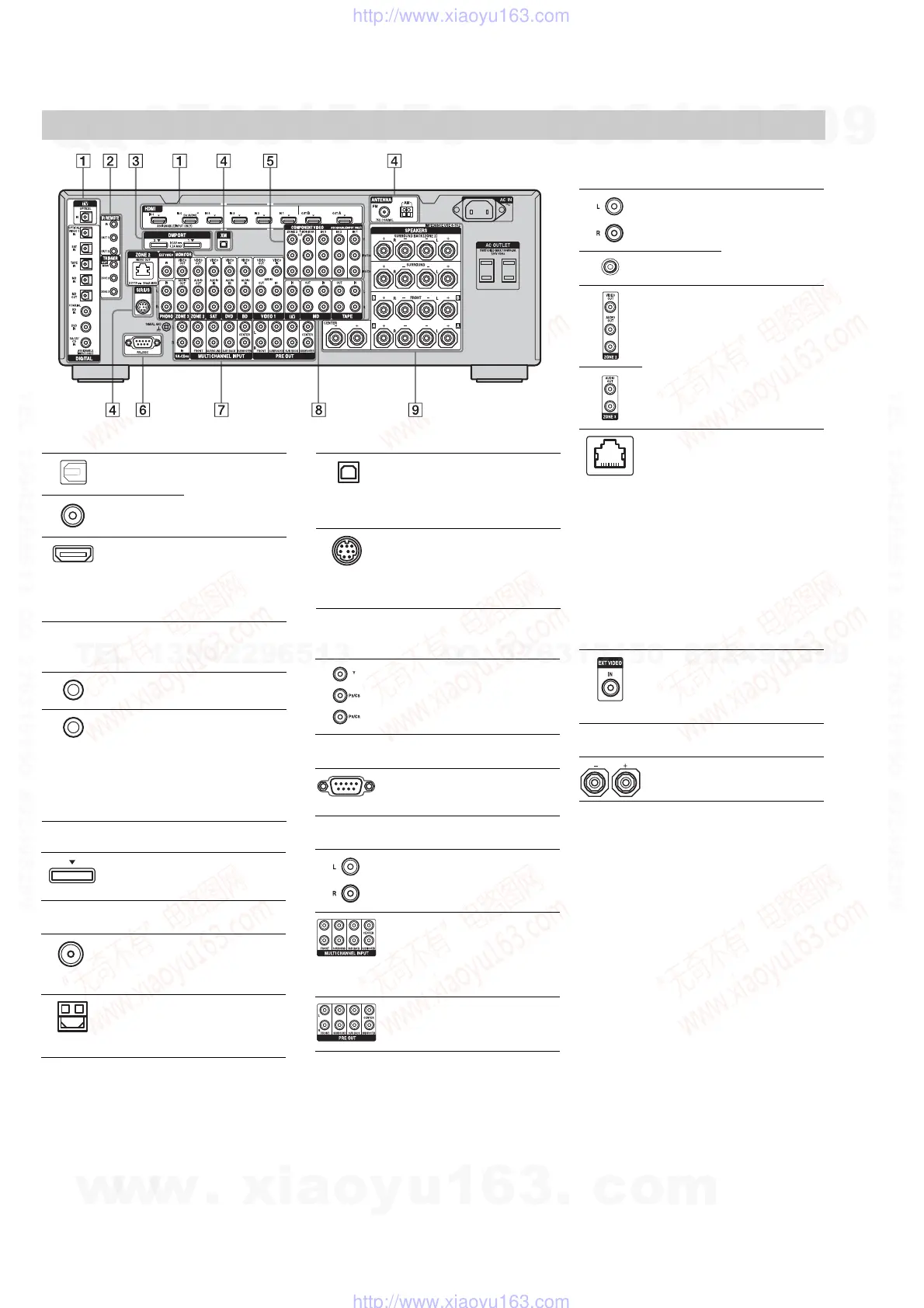
Rear panel
" DIGITAL INPUT/OUTPUT section
OPTICAL IN/
OUT jacks
Connect to a DVD
player, Super Audio
CD player, etc. The
COAXIAL jack
provides a better
quality sound.
COAXIAL IN
jacks
HDMI IN/
OUT* jacks
Connect to a DVD
player, Blu-ray Disc
Player, or a satellite
tuner. An image and
the sound are output
to TV or a projector.
# Control jacks for Sony equipment
and other external components
IR REMOTE
IN/OUT jacks
Connect an IR
repeater.
TRIGGER
OUT jacks
Connect to interlock
on/off of the power
supply of other 12V
TRIGGER
compliant
components, or the
amplifier/receiver of
zone 2 or zone 3.
XM jack Connects to the XM
Mini Tuner and
Home Dock (not
supplied).
(U.S.A./Canadian model
only)
SIRIUS jack Connects to a
SiriusConnect Home
tuner (not supplied).
(U.S.A./Canadian model
only)
* You can watch the selected input image when you
connect the HDMI OUT or MONITOR OUT jacks
to a TV. You can operate this receiver using a
GUI (Graphical User Interface).
& COMPONENT VIDEO INPUT/
OUTPUT section
Y, P
B
/C
B
, P
R
/
C
R
IN/OUT*
jacks
Connect to a DVD
player, TV, or a
satellite tuner.
' RS-232C port
Used for
maintenance and
service.
( AUDIO INPUT/OUTPUT section
AUDIO IN/
OUT jacks
Connect to a tape
deck or MD deck, etc.
MULTI
CHANNEL
INPUT jacks
Connect to a Super
Audio CD player or
DVD player with an
analog audio jack for
7.1 channel or 5.1
channel sound.
PRE OUT jacks Connect to an
external power
amplifier.
) VIDEO/AUDIO INPUT/OUTPUT
section
AUDIO IN/
OUT jacks
Connect to a VCR or
a DVD player etc..
VIDEO IN/
OUT* jacks
AUDIO OUT
jacks
VIDEO OUT
jack
Connect to the
component in zone 2
or zone 3.
ZONE 2
VIDEO OUT
jack
An RJ-45 jack used
to send a video signal
to the component in
zone 2. Use a CAT5
cable for the
connection. Used for
custom installation.
For information on
how to use this jack,
consult your dealer.
Attention
Do not use this jack
for an Ethernet LAN
connection. Doing so
may cause a
malfunction.
(U.S.A./Canadian model
only)
EXT VIDEO IN
jack
Connects to the
component when
you want to watch in
PIP (Picture in
Picture) window.
* SPEAKERS section
Connects to speakers.
$ DMPORT
Connect to a Sony
DIGITAL MEDIA
PORT adapter.
% ANTENNA section
FM ANTENNA
jack
Connects to the FM
wire antenna (aerial)
supplied with this
receiver.
AM
ANTENNA
jack
Connects to the AM
loop antenna (aerial)
supplied with this
receiver.
w
w
w
.
x
i
a
o
y
u
1
6
3
.
c
o
m
Q
Q
3
7
6
3
1
5
1
5
0
9
9
2
8
9
4
2
9
8
T
E
L
1
3
9
4
2
2
9
6
5
1
3
9
9
2
8
9
4
2
9
8
0
5
1
5
1
3
6
7
3
Q
Q
TEL 13942296513 QQ 376315150 892498299
TEL 13942296513 QQ 376315150 892498299
http://www.xiaoyu163.com
http://www.xiaoyu163.com















 To Next Page