MULTI CHANNEL AV RECEIVER
STR-DN1050/STR-DN850
Connecting the speakers in zone 2 (for STR-DN1050 only)
You can enjoy sound from a device connected to the receiver in a zone other than the main zone. For example, you can
watch a DVD in the main zone and listen to a CD in zone 2.
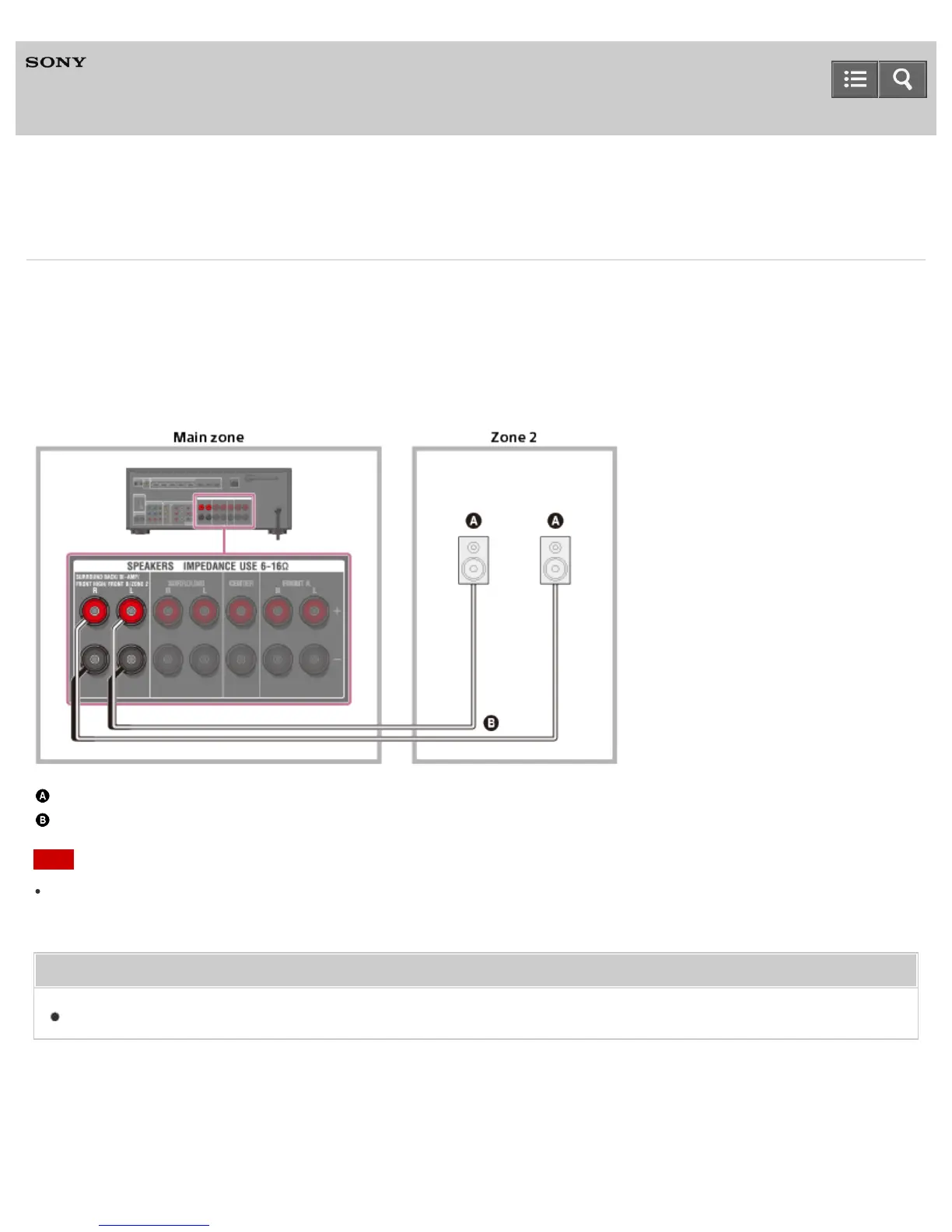
Connect each speaker as illustrated below.
Be sure to disconnect the AC power cord (mains lead) before connecting cables. For details on how to connect speaker
cables to the receiver, see “How to connect speaker cables.”
Speakers
Speaker cable (not supplied)
Note
When using this zone 2 connection, you need to set up the SPEAKERS SURROUND BACK/BI-AMP/FRONT
HIGH/FRONT B/ZONE 2 terminals. For details, see “Setting the speakers for zone 2 (for STR-DN1050 only).”
Related Topic
Notes on connecting cables
Notes on use
4-488-938-11(1)
Copyright 2014 Sony Corporation
Help Guide



 To Next Page