5.1CH Input Hookups
O
O
5'
c
"o
O
O
3
O
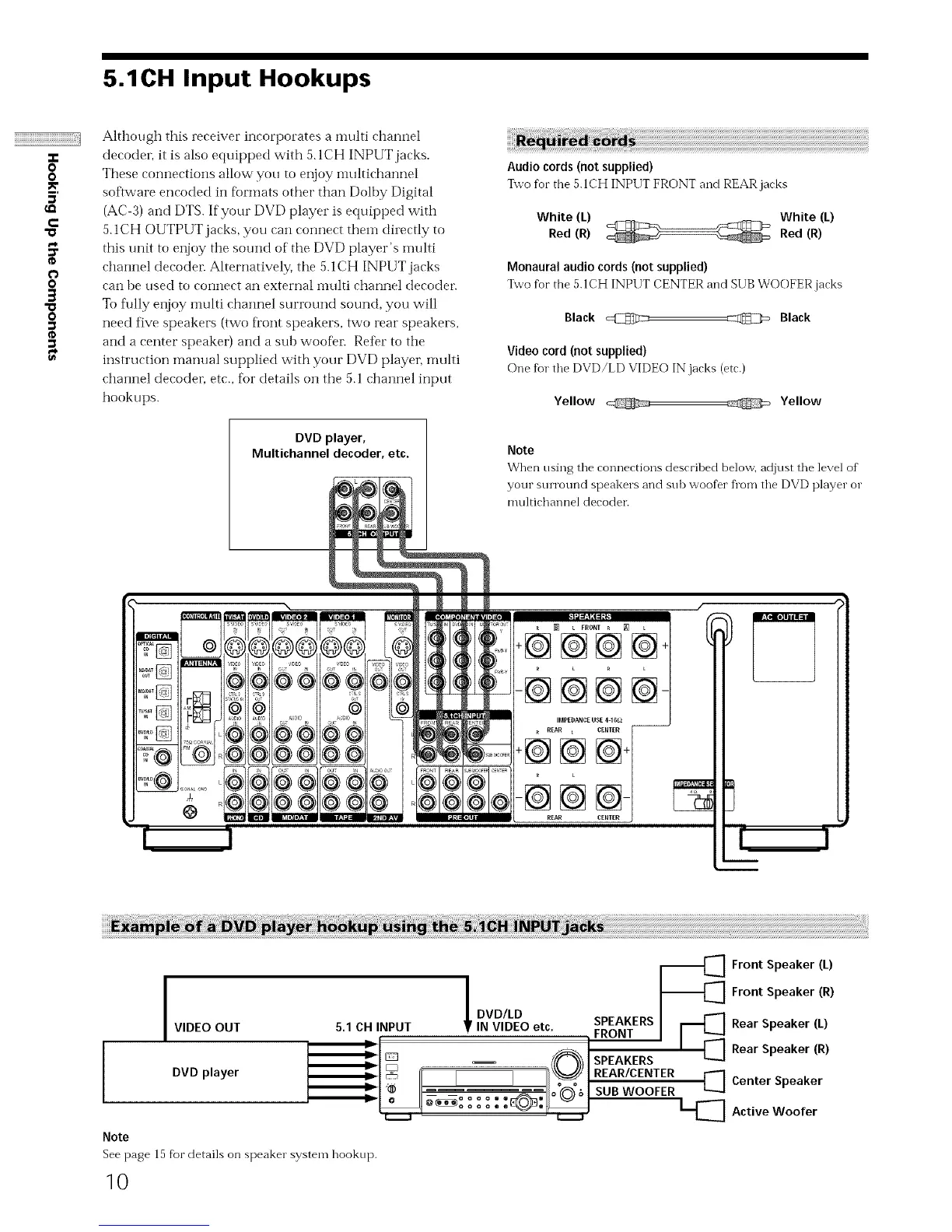
Although this receiver incorporates a nmlti channel
decodel, it is also equipped with 5.1CH INPUT jacks.
These connections allow you to enjoy imfltichannel
software encoded in f_rTnats other than Dolhy Digital
(AC-3) and DTS. If your DVD player is equipped with
5.1CH OUTPUT jacks, you can connect them directly to
this unit to enjoy the sound of the DVD player's nmlti
channel decodel_ Alternatively, ti_e 5. I CH INPUT jacks
can he used to connect an external inulti channel decodel_
To fully enjoy multi channel surround sound, you will
need five speakers (two ti'ont speakers, two rear speakers,
and a center speaker) and a sub woofer Refer to the
instruction manual supplied with your DVD player, nmlti
channel decodeL etc., for details on the 5.1 channel input
hookups.
DVD player,
Multichannel decoder, etc.
S
@
©
®
@
Audio cords (not supplied)
%vo for the 5.1CH INPUT FRONT and REAR jacks
White (L) ._¢_ .-_ White (L)
Red (R) _ Red (R)
Monaural audio cords (not supplied)
Two for the 5.1CH INPUT CENTER and SUB WOOFER jacks
Black @ _ Black
Video cord (not supplied)
One fur the DVD/LD VIDEO IN jacks (etc.)
Yellow Yellow
Note
When using the connections described belov[] adjust the level of
your sun'ound speakers and sub woofer fl'om the DVD player or
multichannel decoder.
[] t FRONT _ _ L
+@@@@
-@@@@
I
I
I DVD/LD
VIDEO OUT 5.1 CH INPUT IN VIDEO etc. SPEAKERS
FRONT
i°
I
SPEAKERS
DVD player _ REAR/CENTER
I SUB WOOFER
Note
See page 15 f}ar details on speaker system hookup.
-_[_] Front Speaker (L)
-_[_] Front Speaker (R)
[_ Rear Speaker (L)
Rear Speaker (R)
[_] Center Speaker
_[_ Active Woofer
10


 To Next Page