Front Panel Parts Description
r-
o
e_
o
"o
"R
p_
D.
¢0
3
$,
"R
o
"o
"R
e_
_HONSS
, ° ?
M_STSR_OLUMS
__':_ ....II10 ii(( ))/ 0
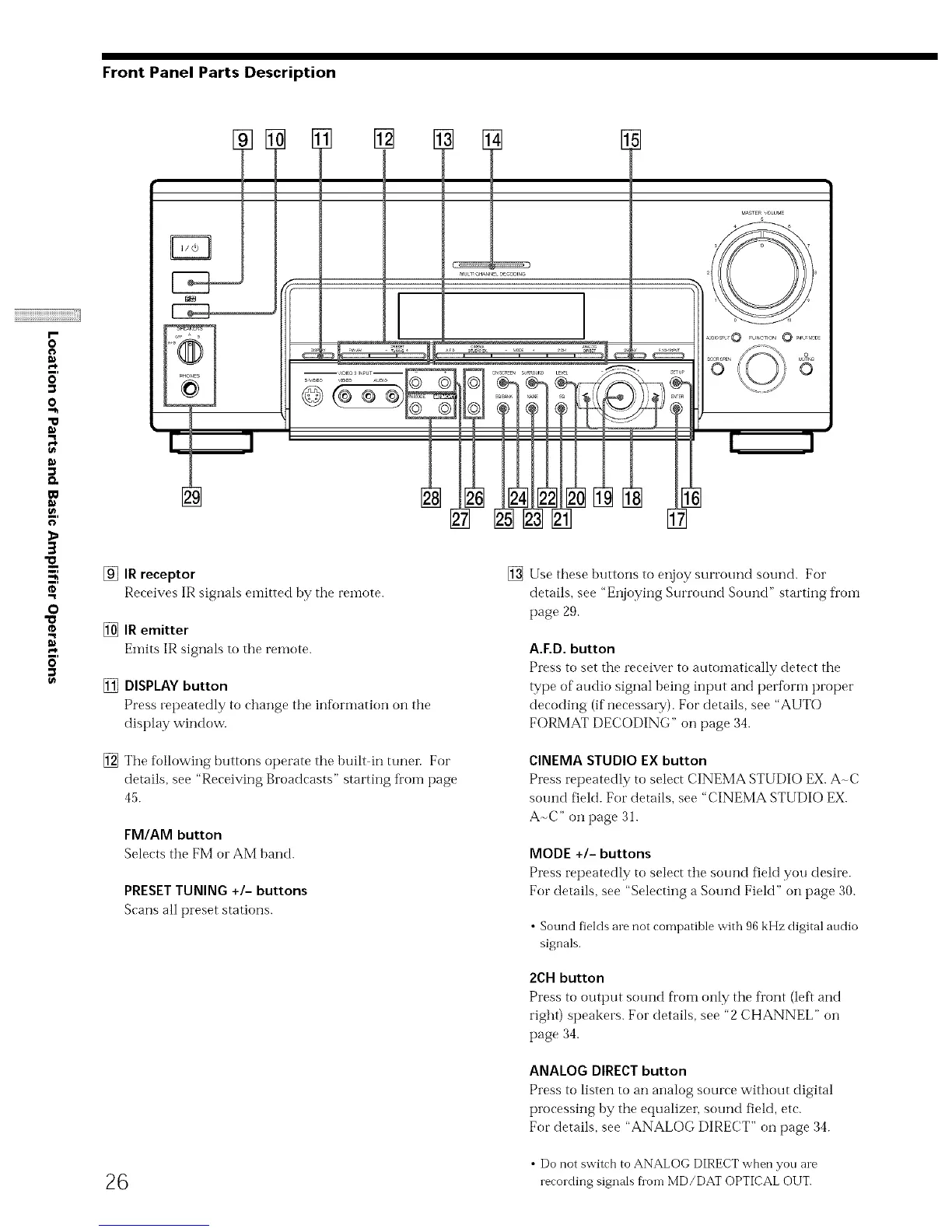
[_]IR receptor
Receives IR signals emittedby the remote.
[] IRemitter
Elnits IR signals to the remote.
[] DISPLAY button
Press repeatedly to change the information on the
display window.
[] The following buttons operate the built in tuner. For
details, see "Receiving Broadcasts" starting fl'oln page
45.
FM/AM button
Selects the FM or AM band.
PRESETTUNING+/- buttons
Scans all preset stations.
[] Use these buttons to enjoy surround sound. For
details, see "Enjoying Surround Sound" starting from
page 29.
A.ED. button
Press to set the receiver to automatically detect the
type of audio signal being input and pertbrm proper
decoding (if necessaw). For details, see "AUTO
FORMAT DECODING" on page 34.
CINEMASTUDIO EXbutton
Press repeatedly to select CINEMA STUDIO EX.A-C
sound fiekt. For details, see "CINEMA STUDIO EX.
A-C" on page 31.
MODE +/- buttons
Press repeatedly to select the sound field you desire.
For details, see "Selecting a Sound Field" on page 30.
• Sound fields are not compatible with 96 kHz digital andio
signals.
2CH button
Press to output sound fi'om only the front (left and
right) speakers. For details, see "2 CHANNEL" on
page 34.
ANALOG DIRECTbutton
Press to listen to an analog source without digital
processing by the equalizer, sound field, etc.
For details, see "ANALOG DIRECT" on page 34.
• Do not switch to ANALOG DIRECT when yon are
26 recording signals fi on-i MD/DAT OPTICAL OUT.



 To Next Page