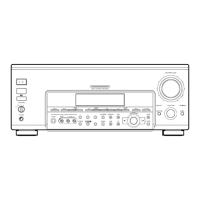
[] MULTI CHANNEL DECODING indicator
This indicator lights when tile unit is decoding signals
recorded in a imllti channel format.
[] 2ND AV button
Press repeatedly to select 2 channel (stereo) audio and
video signals fbr output to a stereo ainplifier in
another room (page 11).
Each press selects another audio and video source
(except PHONO) to be output fl'om tile ZND AV jacks.
"SOURCE" selects tile same program source as tile
nlain f\lnction controls.
• Even if 2ND AVis set to "SOURCE", tbe sound from front
speakers (L/R) is not output when tbe receiver is set to
5.1CH INPUT.
• Only signals fl'om components connected to the analog
inputs are output througb the 2ND AV OIIT jacks. No
signals are output from components connected to only the
digital inputs.
• When you use AUDIO SPLIT to assign a digital audio
input (fiorexample, DVD OPTICAL) to the main flmction
and set 2ND AV to "SOURCE", the analog audio signals of
tbe assigned audio (fiorexample, analog audio input of
DVD) is output flora the 2ND AVjacks.
[] SET UP button
Press to activate the setup mode, then use the cursor
buttons ([]) to select any of tile following parameters.
You call inake various settings using the jog dial (1_).
When you select You can
Speaker setup Specifk/the fl'ont, center, rear L/R, and
rear center speaker sizes, the rear L/R
speaker position, and whether or not you
are using a sub woofer (page 18).
Speaker Distance Specify the fl'ont, center_ rear L/R, and
rear center speaker distances and the trait
of measurement (page 20).
Crossover Specify the fl'ont, center, and rear L/R
fl'eqnency speaker bass crossover fleqnency (page
22).
LFE High Cut Select the cutoff fl'equency of the LFE
Frequency channel High Cut Filter (page 22).
Distance IInit Specify units f_orsetting speaker distance
(page 22).
5.1CH Visual Specify the video input to be used with
the audio signals fl'om the 5.1CH INPUT
jacks (page 55).
Digital Power Specify whether or not the system turns
Management off tbe power of the unnecessary digital
circuits automatically (page 55).
Video Power Specify whether or not the system turns
Management off the power of the unnecessat T video
circuits automatically (page 55).
Sound Field Link Set the automatic application of the
sound field to a program somce (page
55).
Auto Function Specify whether or not Sony components
connected via control A1 cords will turn
on or offwhen selected usii'_g the
ftmction buttons (page 55).
2 Way Remote Turn on or off response to remote signals
sent flora the 2way remote (page 56).
Command mode Set when you use the second remote in
tbe sub room (page 56).
Color System Select the TV color system of the monitor
(Except fur models (page 56).
of area code l IC
and TW)
OSD color Specify the color of the on screen display
(page 56).
* On!y u'hen rimspeaker isset to"SMALL" in rimspeakersetup
toaramete1:
[] ENTER button
Press to enter individual characters for tile preset
station and progral_l source names.
[] Cursor buttons (</>)
Press to select various speaker level, surround, and
equalizer parameters (etc.).
27
I"
o
o
w
3
$,
o
"0
¢D


 To Next Page