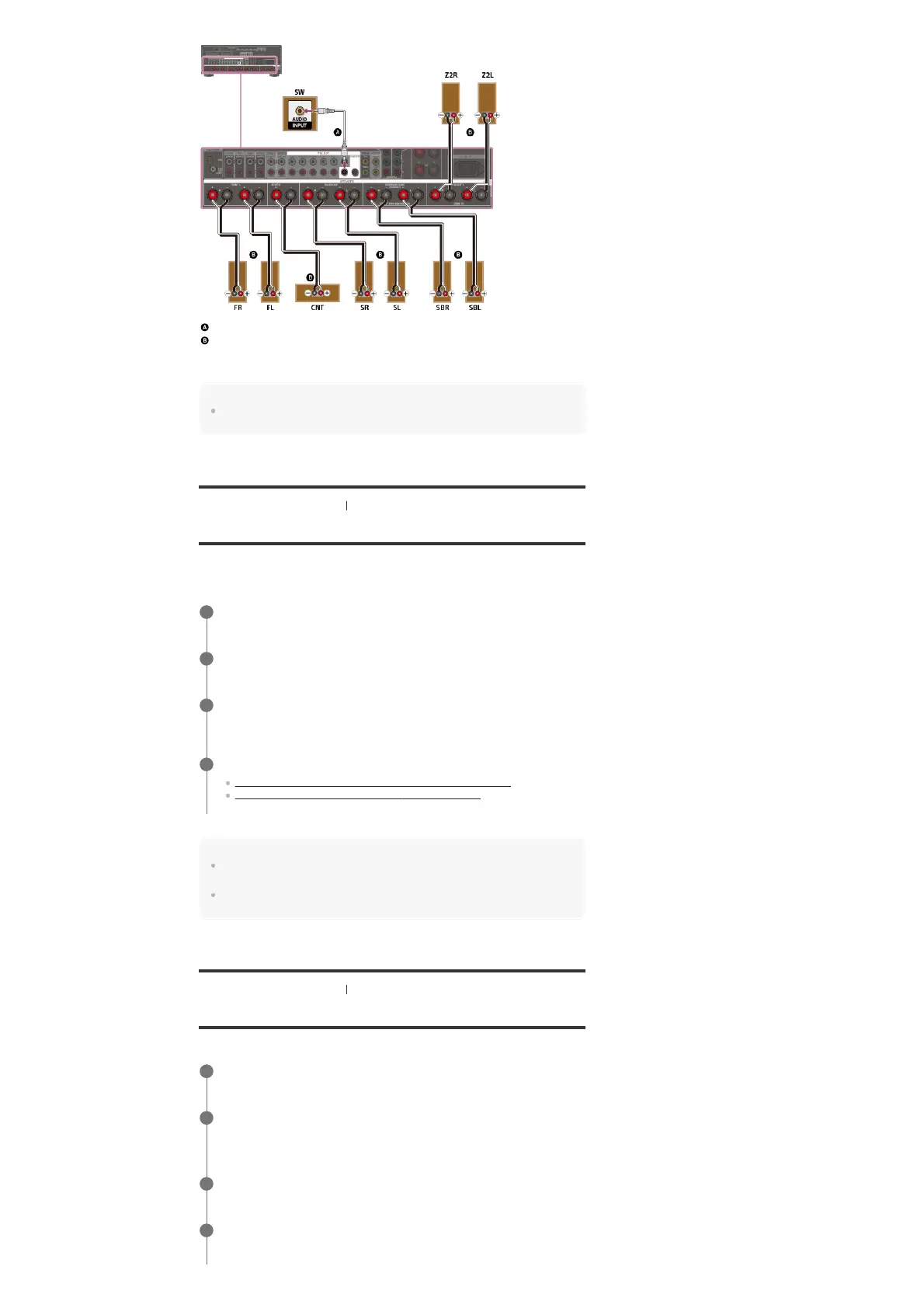
Monaural audio cable (not supplied)
Speaker cable (not supplied)
After you have made the Zone 2 speaker connection, set [Height1 SP Assign] to [Zone2] in the
[Speaker Setup] menu.
Note
After you have installed and connected your speakers, set the speaker pattern to [7.1] using
[Speaker Pattern] in the [Speaker Setup] menu.
[63] Using the Multi-Zone Features Enjoying sound from speakers located in other rooms
Assigning the speakers for Zone 2
You can assign the speakers installed in Zone 2 as Zone 2 speakers. Follow the procedure
below after connecting the speakers installed in Zone 2 to the SPEAKERS SURROUND BACK
(FRONT B/BI-AMP/ZONE 2) or HEIGHT 1 (ZONE 2) terminals of the receiver.
Note
If a speaker pattern with surround back speakers is set, you cannot set the SPEAKERS SURROUND
BACK (FRONT B/BI-AMP/ZONE 2) terminals for a bi-amplifier connection or a Zone 2 connection.
If a speaker pattern with height or overhead speakers (top front, top middle, top rear or Dolby Atmos
enabled speakers) is set, you cannot set [Height1 SP Assign] to [Zone2].
[64] Using the Multi-Zone Features Enjoying sound from speakers located in other rooms
Enjoying sound in Zone 2
You can enjoy sound from the receiver in Zone 2 by the following procedure.
Select [Setup] - [Speaker Setup] from the home menu.
1
Select [Speaker Pattern].
2
Set a speaker pattern without surround back speakers, or a speaker pattern without
height and overhead (top) speakers.
3
Assign the speaker terminals for Zone 2 in either of the following ways:
Assigning the surround back speaker terminals (
SB Speaker Assign)
Assigning the height1 speaker terminals (Height1 SP Assign)
4
Select [Zone Controls] - [Zone2 Power] from the home menu.
1
Select [On].
Zone 2 is activated.
2
Select [Zone Controls] - [Zone2 Input] from the home menu.
3
Select the source signals you want to output.
Select [SOURCE] if you want to listen to the same sound as main zone in Zone 2.
4



 To Next Page