18
Location and Function of Parts
Chapter 1 Overview
The OVER RANGE lamp may indicate an error or
warning. For details, see “Error/warning display by the
lamp” (page 18).
d ECO lamp
The color of the lamp changes according to the power
consumption status of the monitor. The color changes from
green to yellow to magenta in order of greater power
consumption. Decreasing the luminance of the screen by
adjusting brightness/contrast is recommended when the
lamp lights in yellow or magenta.
The lamp starts flashing rapidly approximately one minute
before the screen saver is activated. Flashing slows in
green when the screen saver starts.
The ECO lamp may indicate an error or warning. For
details, see “Error/warning display by the lamp”
(page 18).
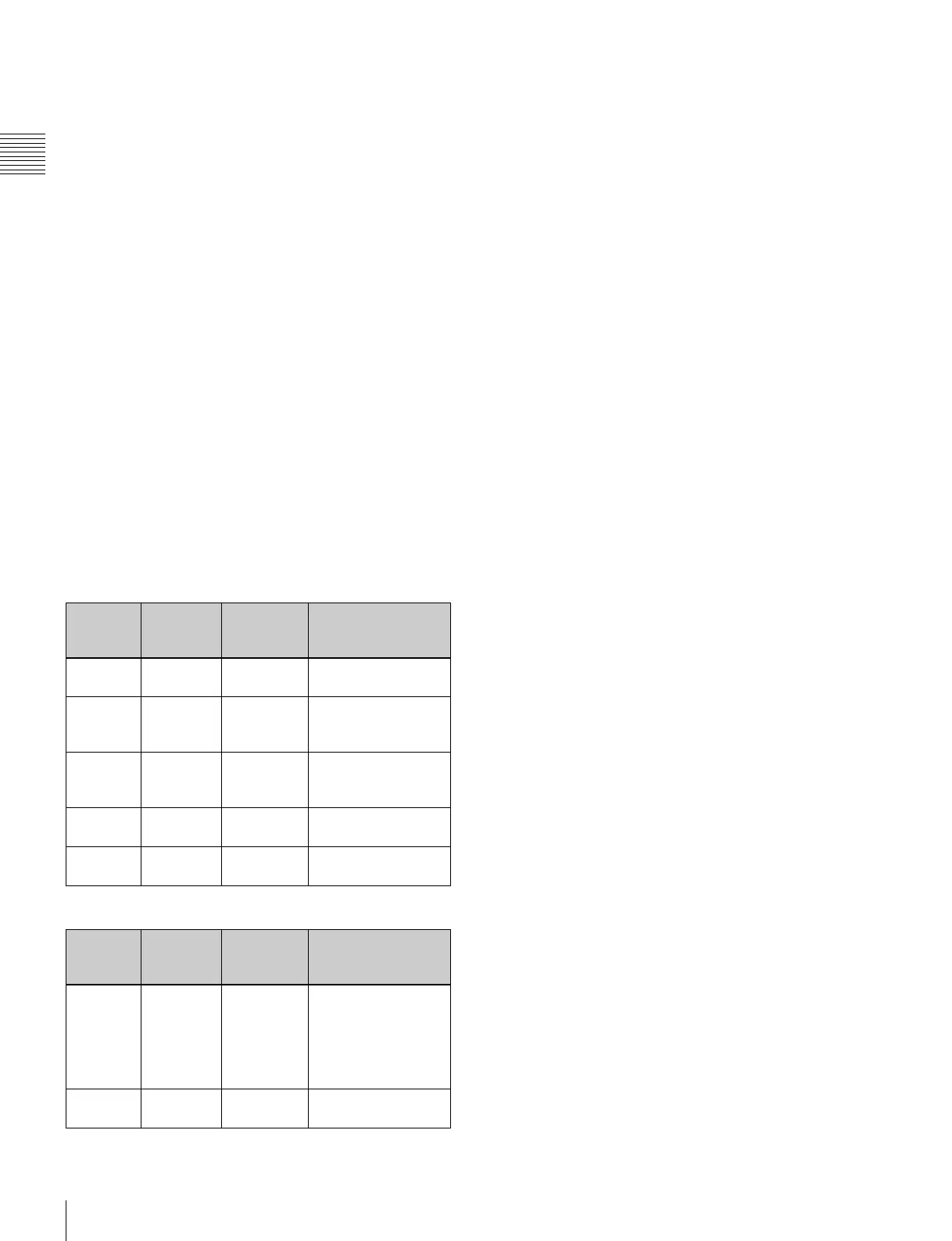
Error/warning display by the lamp
The OVER RANGE lamp, OPERATE lamp and/or ECO
lamp on the front panel may show an error or warning
while the monitor is being operated.
If the error or warning is shown, please contact your Sony
representative.
Error display
Warning display
–: Status except for error display.
ECO
lamp
OVER
RANGE
lamp
OPERATE
lamp
Symptoms
Lights in
yellow
Lights in
amber
Flashes in
red
The power in the
panel part is unusual.
Lights in
yellow
Flashes in
amber
Flashes in
red
The temperature in
the panel part is
unusual.
Flashes in
yellow
Lights in
amber
Flashes in
red
The ambient
temperature sensor is
unusual.
Lights in
magenta
Flashes in
amber
Flashes in
red
Fan error.
Flashes in
magenta
Lights in
amber
Flashes in
red
Device error.
ECO
lamp
OVER
RANGE
lamp
OPERATE
lamp
Symptoms
–
Flashes in
amber
–
The luminance is
reduced to protect the
panel from an
increase of
temperature in the
panel part.
–
Lights in
amber
–
Over range


 To Next Page