EasyManua.ls Logo

Sony Trinitron KV-20V80 - Connecting a DBS Receiver and a; VER Ice Ach Aiciee, Seaedaedcesteaulinnehegnadsiiaas

Sony Trinitron KV-20V80
35 pages
Print Icon
To Next Page IconTo Next Page
To Previous Page IconTo Previous Page
Loading...
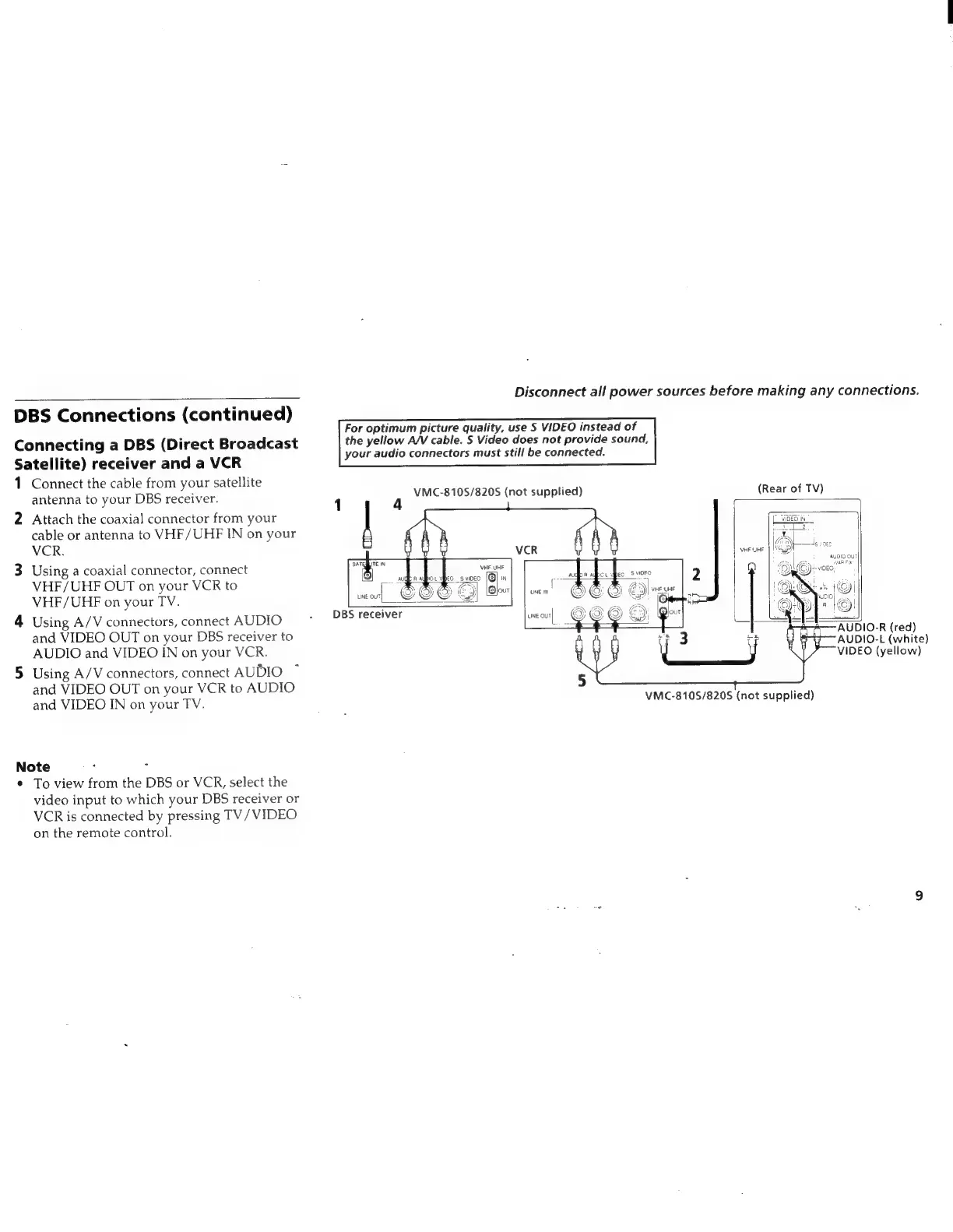
DBS
Connections
(continued)
Connecting
a
DBS
(Direct
Broadcast
Satellite)
receiver
and
a
VCR
1
2
Connect
the
cable
from
your
satellite
antenna
to
your
DBS
receiver.
Attach
the
coaxial
connector
from
your
cable
or
antenna
to
VHF/UHF
IN
on
your
VCR.
Using
a
coaxial
connector,
connect
VHF/UHF
OUT
on
your
VCR
to
VHF/UHF
on
your
TV.
Using
A/V
connectors,
connect
AUDIO
and
VIDEO
OUT
on
your
DBS
receiver
to
AUDIO
and
VIDEO
IN
on
your
VCR.
Using
A/V
connectors,
connect
AUDIO
and
VIDEO
OUT
on
your
VCR
to
AUDIO
and
VIDEO
IN
on
your
TV.
Note
°
;
To
view
from
the
DBS
or
VCR,
select
the
video
input
to
which
your
DBS
receiver
or
VCR
is
connected
by
pressing
TV/
VIDEO
on
the
remote
control.
Disconnect
all
power
sources
before
making
any
connections.
For
optimum
picture
quality,
use
S
VIDEO
instead
of
the
yellow
A/V
cable.
S
Video
does
not
provide
sound,
your
audio
connectors
must
still
be
connected.
VMC-810S/8205
(not
supplied)
(Rear
of
TV)
ALDIG
OUT
VHF.
UHF
WARES
bec
SVIDFO
1
“a
LINE
IN
i
veo
_s
video
eg
N
VA
WK
|QJour
DBS
receiver
une
our|
AUDIO-L
(white)
VIDEO
(yellow)
VMC-8105/820S
(not
supplied)