EasyManua.ls Logo

Sony Trinitron KV-20V80 - Additional Connections; Connecting a DVD Player; Connecting an Audio System

Sony Trinitron KV-20V80
35 pages
Print Icon
To Next Page IconTo Next Page
To Previous Page IconTo Previous Page
Loading...
Additional
Connections
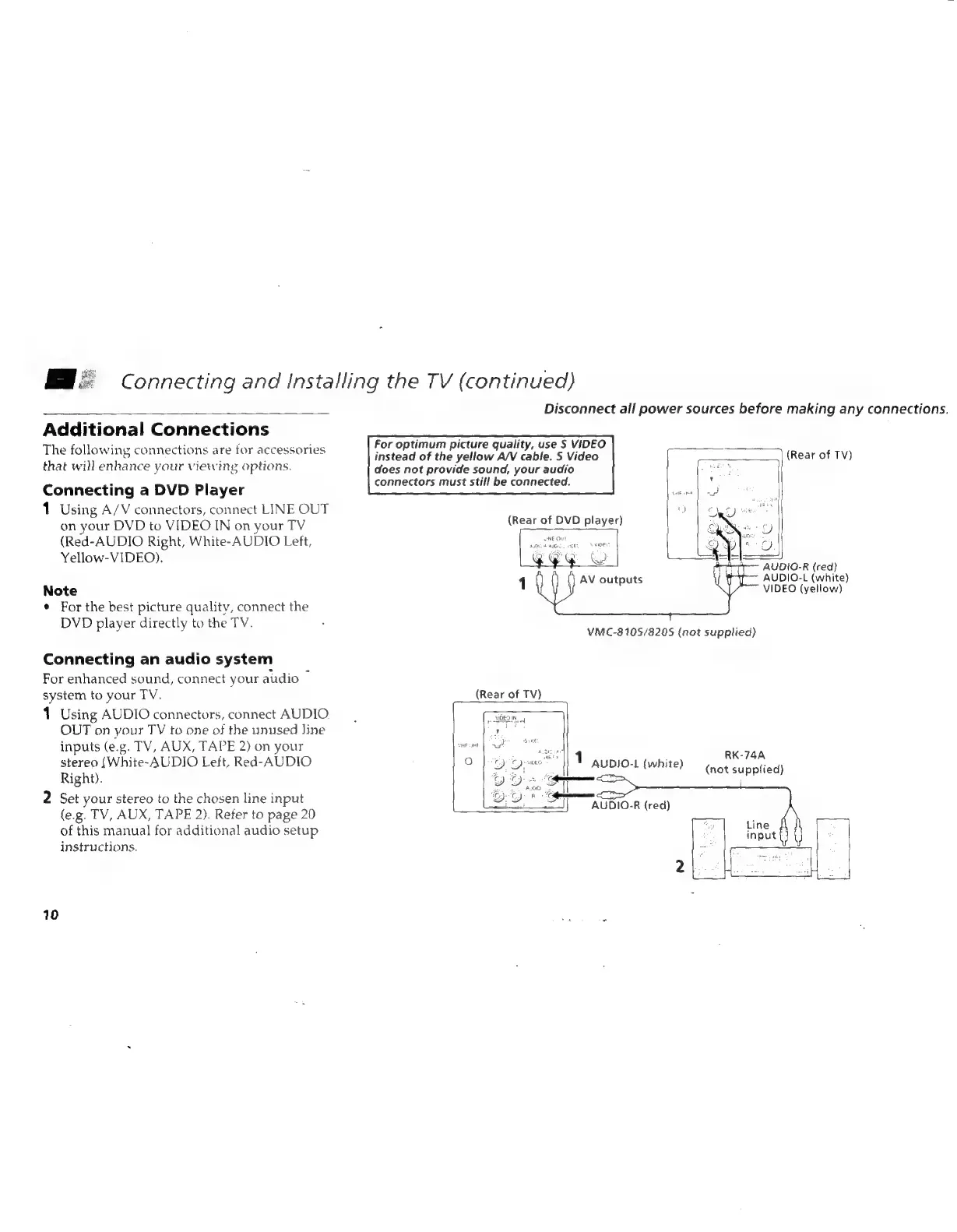
The
following
connections
are
for
accessories
that
will
enhance
your
viewing
options.
Connecting
a
DVD
Player
1
Using
A/V
connectors,
connect
LINE
OUT
on
your
DVD
to
VIDEO
IN
on
your
TV
(Red-AUDIO
Right,
White-AUDIO
Left,
Yellow-VIDEO).
Note
¢
For
the
best
picture
quality,
connect
the
DVD
player
directly
to
the
TV.
Connecting
an
audio
system
For
enhanced
sound,
connect
your
audio
~
system
to
your
TV.
1
Using
AUDIO
connectors,
connect
AUDIO
OUT
on
your
TV
to
one
of
the
unused
line
inputs
(e.g.
TV,
AUX,
TAPE
2)
on
your
stereo
(White-AUDIO
Left,
Red-AUDIO
Right).
2
Set
your
stereo
to
the
chosen
line
input
(e.g.
TV,
AUX,
TAPE
2).
Refer
to
page
20
of
this
manual
for
additional
audio
setup
instructions.
10
Connecting
and
Installing
the
TV
(continued)
Disconnect
all
power
sources
before
making
any
connections.
For
optimum
picture
quality,
use
S
VIDEO
instead
of
the
yellow
A/V
cable.
5
Video
does
not
provide
sound,
your
audio
connectors
must
still
be
connected.
(Rear
of
TV)
AUDIO-R
(red)
AUDIO-L
(white)
1
AV
outputs
VIDEO
(yellow)
VMC-810S/8205
(not
supplied)
(Rear
of
TV)
pp
-WREOIN
Tes
RK-74A
°
1
aupio-1
(white)
eet
Suntali
AUDIO-R
(red)