EasyManua.ls Logo

Sony Trinitron KV-20V80 - Editing Using MONITOR out

Sony Trinitron KV-20V80
35 pages
Print Icon
To Next Page IconTo Next Page
To Previous Page IconTo Previous Page
Loading...
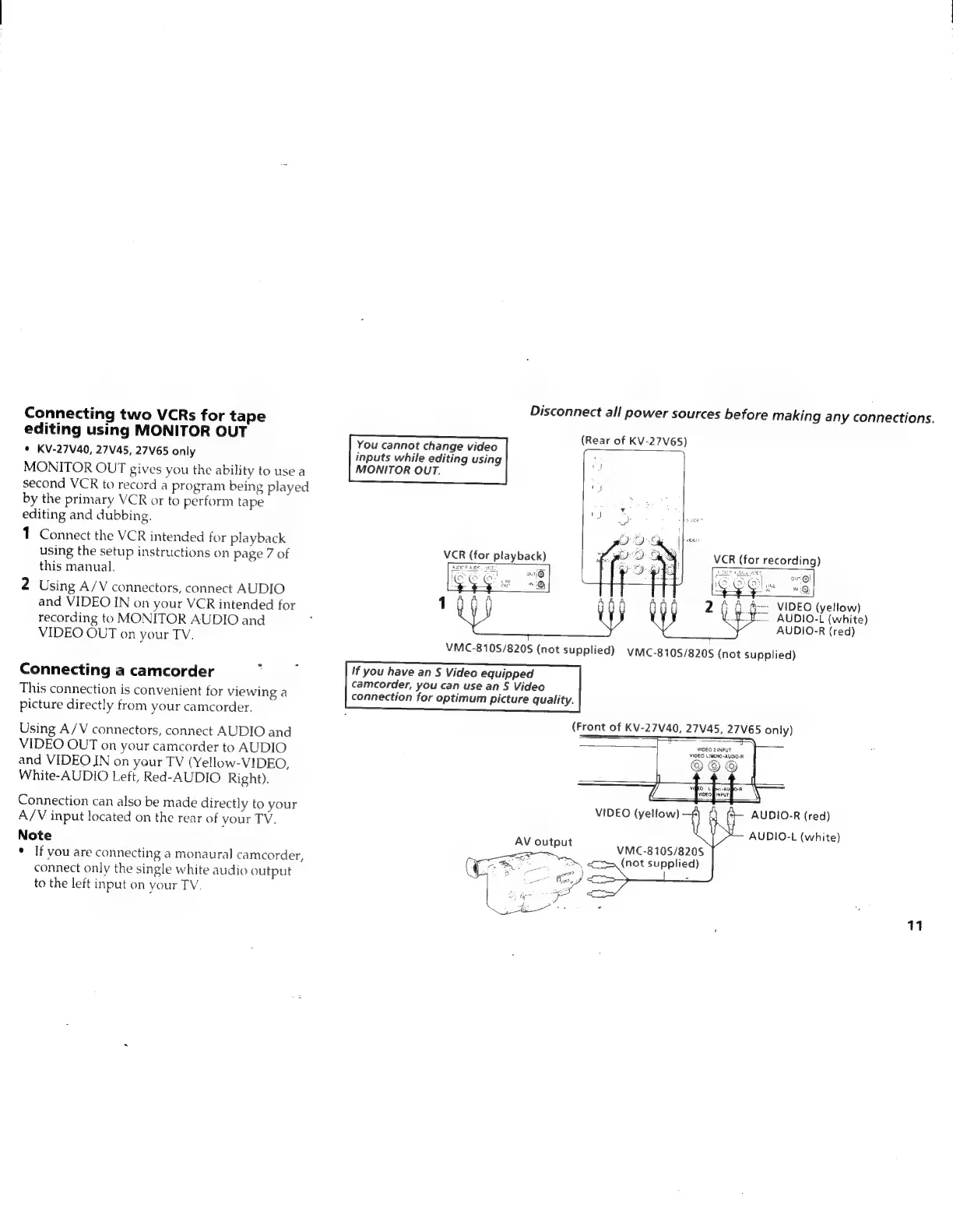
Connecting
two
VCRs
for
tape
editing
using
MONITOR
OUT
*
KV-27V40,
27V45,
27V65
only
MONITOR
OUT
gives
you
the
ability
to
use
a
second
VCR
to
record
a
program
being
played
by
the
primary
VCR
or
to
perform
tape
editing
and
dubbing.
1
Connect
the
VCR
intended
for
playback
using
the
setup
instructions
on
page
7
of
this
manual.
2
Using
A/V
connectors,
connect
AUDIO
and
VIDEO
IN
on
your
VCR
intended
for
recording
to
MONITOR
AUDIO
and
VIDEO
OUT
on
your
TV.
Connecting
a
camcorder
This
connection
is
convenient
for
viewing
a
picture
directly
from
your
camcorder.
Using
A/V
connectors,
connect
AUDIO
and
VIDEO
OUT
on
your
camcorder
to
AUDIO
and
VIDEO
JN
on
your
TV
(Yellow-VIDEO,
White-AUDIO
Left,
Red-AUDIO
Right).
Connection
can
also
be
made
directly
to
your
A/V
input
located
on
the
rear
of
your
TV.
Note
*
If
vou
are
connecting
a
monaural
camcorder,
connect
only
the
single
white
audio
output
to
the
left
input
on
your
TY,
Disconnect
all
power
sources
before
making
any
connections.
Rear
of
KV-27V65
You
cannot
change
video
(eon
OERY
aon
inputs
while
editing
using
MONITOR
OUT.
VCR
(for
playback)
VCR
(for
recording)
orig
:
)
'
2
—
VIDEO
(yellow)
ES
Aupio-t
(white)
AUDIO-R
(red)
If
you
have
an
S
Video
equipped
camcorder,
you
can
use
an
§
Video
connection
for
optimum
picture
quality.
ASDC?
Ae,
oe
(Front
of
KV-27V40,
27V45,
27V65
only)
VIDEO
2
INPUT
VIDEO
L(WONO-AUDIO-R
AUDIO-R
(red)
~
AUDIO-L
(white)
VMC-810S/8205
(not
supplied)
11