EasyManua.ls Logo

Sony Trinitron KV-20V80 - Programming the Remote

Sony Trinitron KV-20V80
35 pages
Print Icon
To Next Page IconTo Next Page
To Previous Page IconTo Previous Page
Loading...
the
MB
Operating
video
equipment
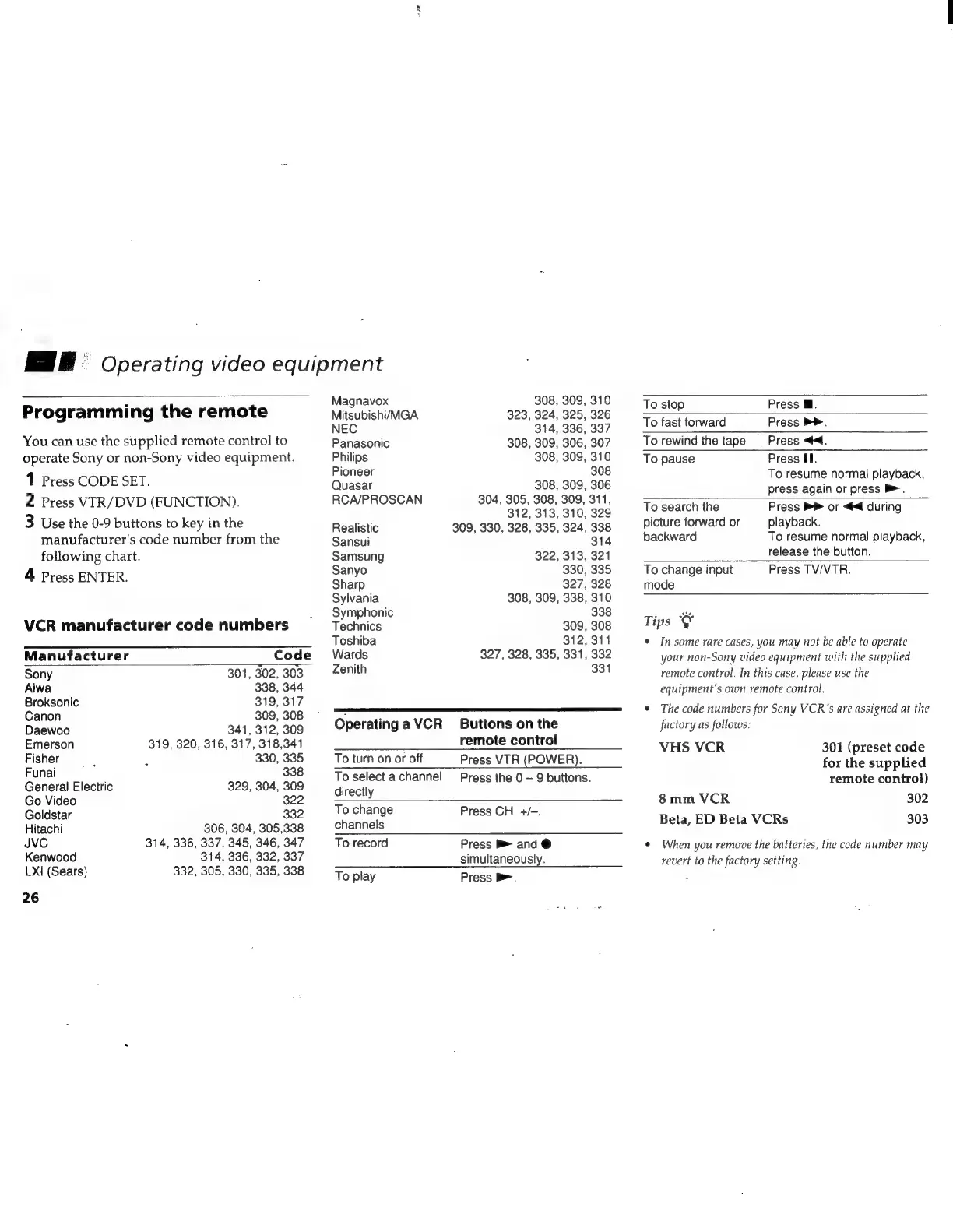
Programming
the
remote
You
can
use
the
supplied
remote
control
to
operate
Sony
or
non-Sony
video
equipment.
1
Press
CODE
SET.
2
Press
VIR/DVD
(FUNCTION).
3
Use
the
0-9
buttons
to
key
in
the
manufacturer's
code
number
from
the
following
chart.
4
Press
ENTER.
VCR
manufacturer
code
numbers
Manufacturer
Code
Sony
301,
302,
303
Aiwa
338,
344
Broksonic
319,
317
Canon
309,
308
Daewoo
341,
312,
309
Emerson
319,
320,
316,
317,
318,341
Fisher
330,
335
Funai
338
General
Electric
329,
304,
309
Go
Video
322
Goldstar
332
Hitachi
306,
304,
305,338
JVC
314, 336,
337,
345,
346,
347
Kenwood
314,
336, 332,
337
LX1
(Sears)
332, 305, 330, 335,
338
26
Magnavox
308,
309,
310
Mitsubishi/MGA
323, 324,
325,
326
NEC
314, 336,
337
Panasonic
308,
309, 306,
307
Philips
308, 309,
310
Pioneer
308
Quasar
308,
309,
306
RCA/PROSCAN
304, 305, 308, 309,
311,
312, 313,
310,
329
Realistic
309,
330, 328,
335,
324,
338
Sansui
314
Samsung
322,
313,
321
Sanyo
330,
335
Sharp
327,
328
Sylvania
308,
309,
338,
310
Symphonic
338
Technics
309,
308
Toshiba
312,
311
Wards
327,
328,
335,
331,
332
Zenith
331
Operating
a
VCR
_
Buttons
on
the
remote
control
To
turn
on
or
off
To
select
a
channel
directly
To
change
channels
Press
VTR
(POWER).
Press
the
0
~
9
buttons.
Press
CH
+/-.
To
record
To
play
Press
B
and
@
simultaneously.
Press
>.
To
stop
Press
Ml.
To
fast
forward
Press
PP.
To
rewind
the
tage
=
Press
<4.
To
pause
Press
El.
To
resume
normal
playback,
press
again
or
press
>.
To
search
the
picture
forward
or
backward
To
change
input
mode
Tips
Press
®
or
<4
during
playback.
To
resume
normal
playback,
release
the
button.
Press
TV/VTR.
¢
In
some
rare
cases,
you
may
not
be
able
to
operate
your
non-Sony
video
equipment
with
the
supplied
remote
control.
In
this
case,
please
use
the
equipment’s
own
remote
control.
©
The
code
numbers
for
Sony
VCR’s
are
assigned
at
the
factory
as
follows:
VHS
VCR
301
(preset
code
for
the
supplied
remote
control)
8
mm
VCR
302
Beta,
ED
Beta
VCRs
303
©
When
you
remove
the
batteries,
the
code
number
may
revert
to
the
factory
setting.

Related product manuals