EasyManua.ls Logo

Sony Trinitron KV-20V80 - VCR Connections.Eeessssssssssesesesssceessssieesesessssees; Connecting an Antenna;Cable TV; Connecting a VCR and TV Witha; System with a VCR Ween

Sony Trinitron KV-20V80
35 pages
Print Icon
To Next Page IconTo Next Page
To Previous Page IconTo Previous Page
Loading...
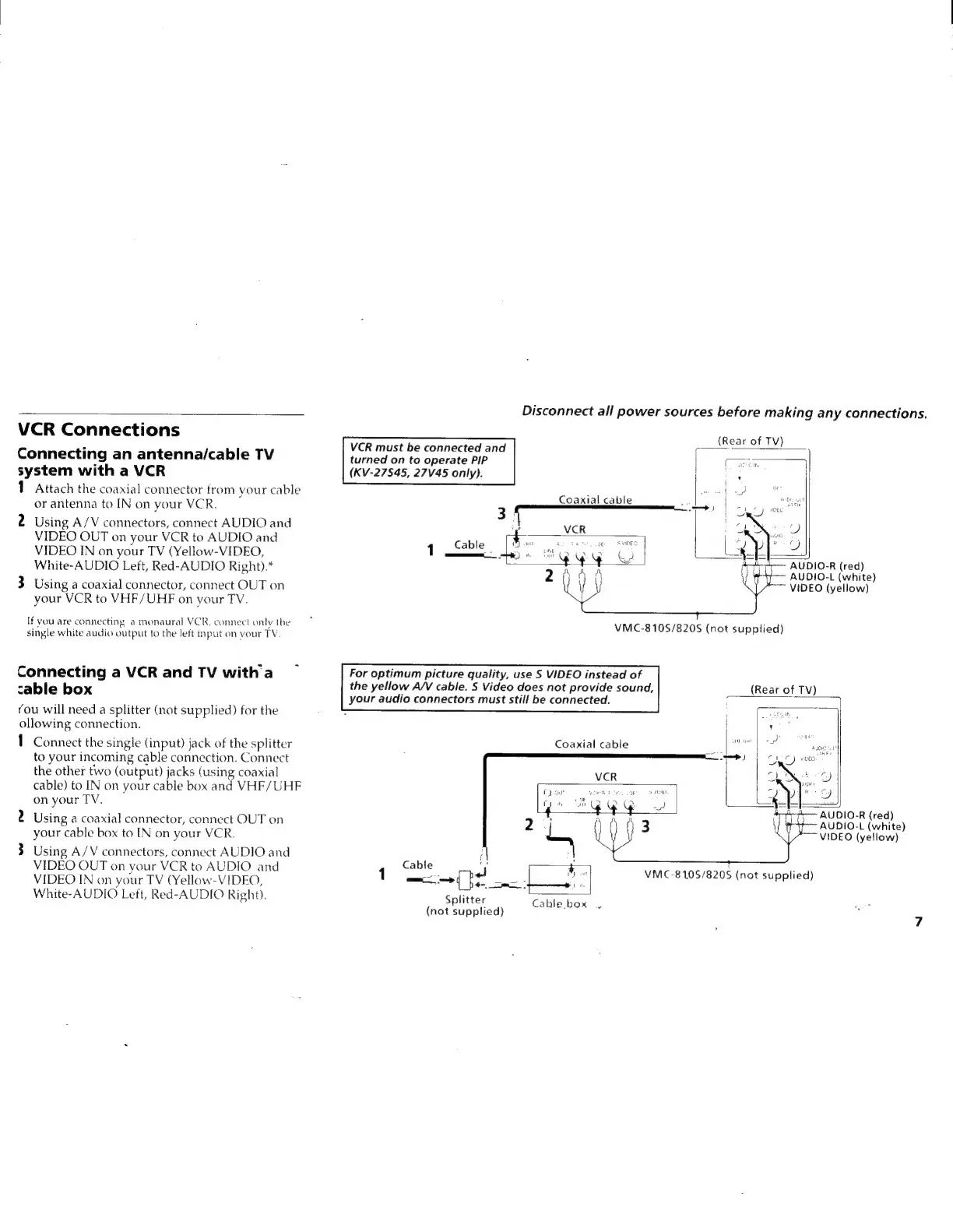
VCR
Connections
Connecting
an
antenna/cable
TV
system
with
a
VCR
1
Attach
the
coaxial
connector
from
your
cable
or
antenna
to
IN
on
your
VCR.
2
Using
A/V
connectors,
connect
AUDIO
and
VIDEO
OUT
on
your
VCR
to
AUDIO
and
VIDEO
IN
on
your
TV
(Yellow-VIDEO,
White-AUDIO
Left,
Red-AUDIO
Right).*
3
Using
a
coaxial
connector,
connect
OUT
on
your
VCR
to
VHF/UHF
on
your
TV.
If
vou
are
connecting
a
monaural
VCR,
connect
only
the
single
white
audio
output
to
the
left
input
on
your
TV
Connecting
a
VCR
and
TV
with
a
cable
box
You
will
need
a
splitter
(not
supplied)
for
the
ollowing
connection.
1
Connect
the
single
(input)
jack
of
the
splitter
to
your
incoming
cable
connection.
Connect
the
other
two
(output)
jacks
(using
coaxial
cable)
to
IN
on
your
cable
box and
VHF/UHF
on
your
TV.
2
Using
a
coaxial
connector,
connect
OUT
on
your
cable
box
to
[IN
on
your
VCR.
3
Using
A/V
connectors,
connect
AUDIO
and
VIDEO
OUT
on
your
VCR
to
AUDIO
and
VIDEO
IN
on
your
TV
(Yellow-VIDEO,
White-AUDIO
Left,
Red-AUDIO
Right).
Disconnect
all
power
sources
before
making
any
connections.
(Rear
of
TV)
VCR
must
be
connected
and
turned
on
to
operate
PIP
(KV-27S845,
27V45
only).
Coaxial
cable
3!
{
VCR
ics
1
Cable
Bans
tee
Svi0ES
|
—___
)
ite
“Qy
y
Qa
2AAA
AUDIO-R
(red)
—~
AUDIO-L
(white)
VIDEO
(yellow)
VMC-810S/820S
(not
supplied)
For
optimum
picture
quality,
use
S
VIDEO
instead
of
the
yellow
A/V
cable.
S
Video
does
not
provide
sound,
(Rear
of
TV)
your
audio
connectors
must
still
be
connected.
7
Coaxial
cable
}
AUDIO-R
(red)
2
AUDIO-L
(white)
=
~~VIDEO
(yellow)
Cable
:
eg
see
Splitter
Cable
box
2
(not
supplied)
VMC-8105/820S
(not
supplied)

Related product manuals