EasyManua.ls Logo

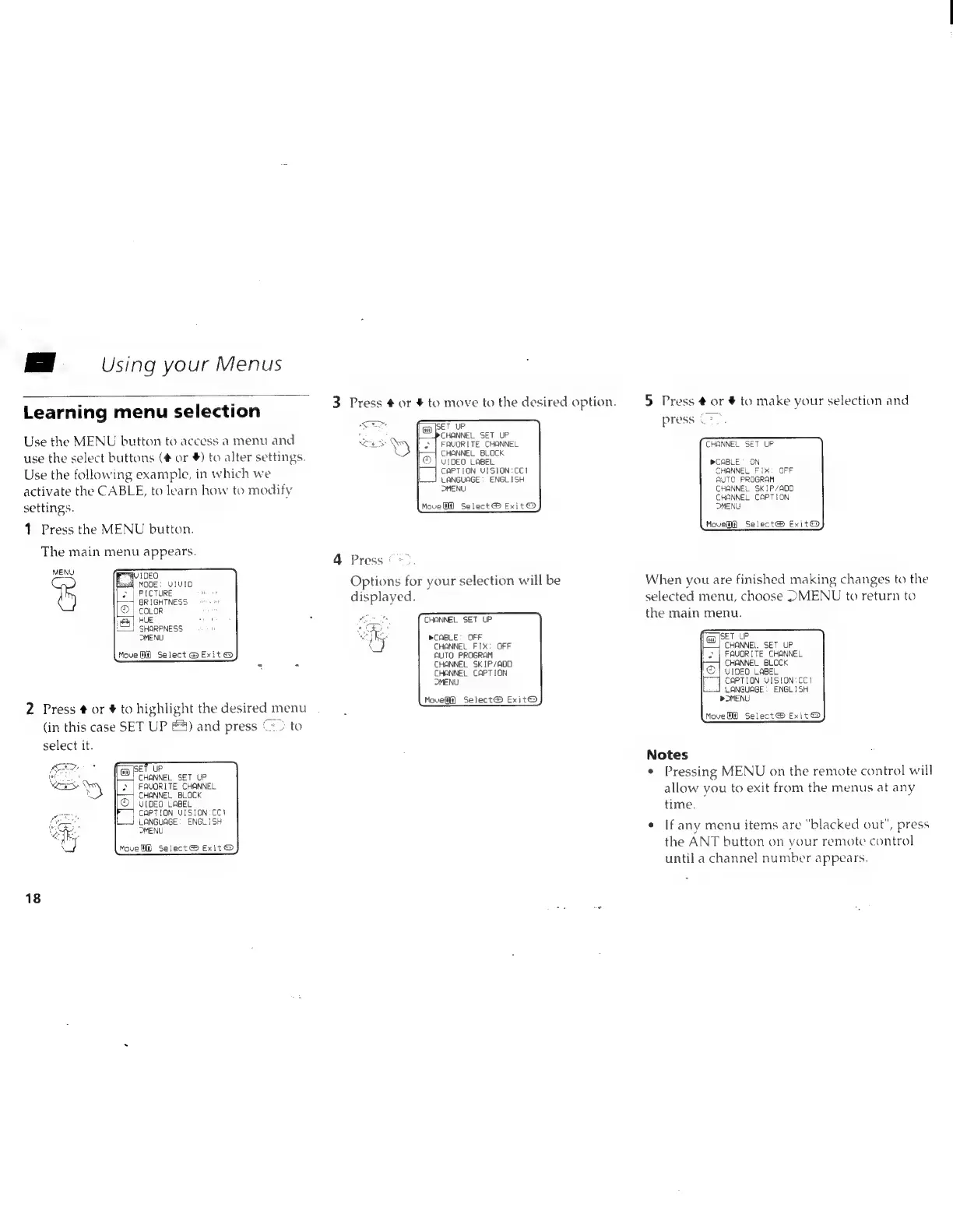
Sony Trinitron KV-20V80 - Using Your Menus

Sony Trinitron KV-20V80
35 pages
Print Icon
To Next Page IconTo Next Page
To Previous Page IconTo Previous Page
Loading...
||
Using
your
Menus
. .
3
Press
#
or
4
to
move
to
the
desired
option.
5
Press
#
or
#
to
make
your
selection
and
Learning
menu
selection
F
aa
ae
:
<=.
press
(oo.
Use
the
MENU
button
to
access
a
menu
and
wes
*,
Fool
caus
Te
EHONNEL:
COANE
SET
UP
XY
CHANNEL
BLOCK
use
the
select
buttons
(#
or
¥)
to
alter
settings.
Use
the
following
example,
in
which
we
activate
the
CABLE,
to
learn
how
to
modify
settings.
1
Press
the
MENU
button.
The
main
menu
appears.
VIDEO
LABEL
CAPTION
VISION:CCI
LANGUAGE:
ENGLISH
>MENU
»CABLE’
ON
CHANNEL
FIX:
OFF
AUTO
PROGRAM
CHANNEL
SKIP/ADD
CHANNEL
CAPTION
MENU
MoveW@
Select®
Exit
@
Move]
Select®
Exit@
4
Press
©*
>,
CHANNEL
FIX:
OFF
AUTO
PROGRAM
CHANNEL
SKIP/ADD
CHANNEL.
SET
UP
FAVORITE
CHANNEL
MENU
sl
AU
IDEO
: : :
aches
.
NODE:
UIUID
Options
for
your
selection
will
be
When
you
are
finished
making
changes
to
the
bay)
BRIGHTNESS
displayed.
selected
menu,
choose
DMENU
to
return
to
D
|
coLor
eR
HUE
zit
oo
it
TANNED
SET
UP
the
main
menu.
=}
SHARPNESS
”
eae
MENU
Oy
PCABLE:
OFF
a
SET
UP
\
Move
Mf)
Select
@
Exit
@
CHANNEL
BLOCK
CHANNEL
CAPTION
OMENU
Movelff]
Select®
Exit@
©
|
vrpeo
LABEL
CAPTION
VISION:CC1
LANGUAGE:
ENGLISH
>
OMENU
2
Press
#
or
#
to
highlight
the
desired
menu
(in
this
case
SET
UP
&4)
and
press
“<>
to
Move@@
Select®
Exit
@
select
it.
Notes
fam
SET
UP
eae
’
F
CHANNEL
SET
UP
¢
Pressing
MENU
on
the
remote
control
will
©
|
FAVORITE
CHANNEL
Fi
|
CHANNEL
BLOCK
allow
you
to
exit
from
the
menus
at
any
©
|
vtpEO
LABEL
time
‘
IF)
CAPTION
UISION:CC}
:
LANGUAGE:
ENGLISH
:
r
i“
OMENU
e
|f
any
menu
items
are
blacked
out",
press
Move
Select®
Exit@
the
ANT
button
on
vour
remote
control
until
a
channel
number
appears.
18