EasyManua.ls Logo

Sony Trinitron KV-20V80 - Cable Box Connections; Cable Box and Cable; Stasenien

Sony Trinitron KV-20V80
35 pages
Print Icon
To Next Page IconTo Next Page
To Previous Page IconTo Previous Page
Loading...
MME
connecting
and
Installing
the
TV
(continued)
Cable
Box
Connections
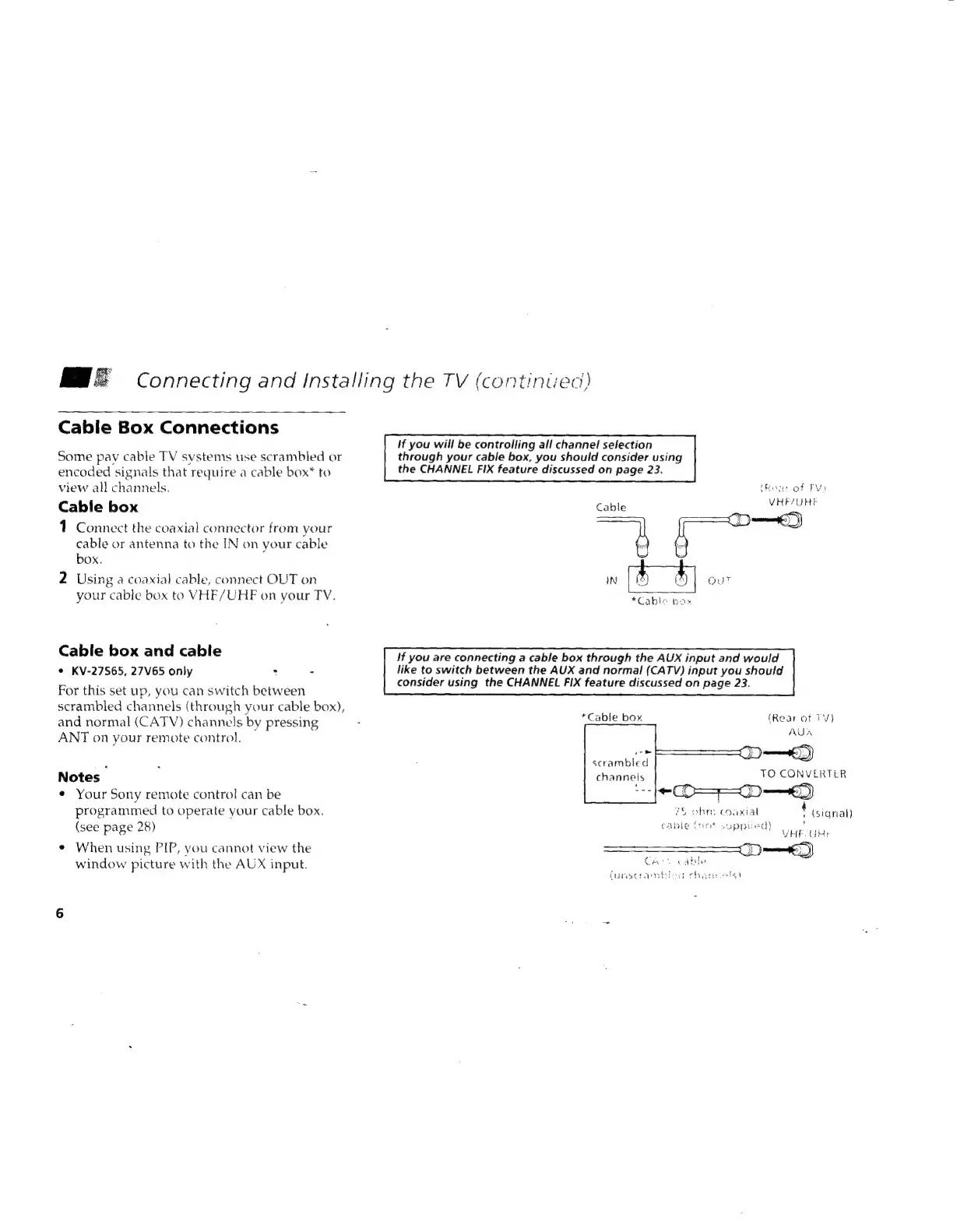
Some
pay
cable
TV
systems
use
scrambled
or
encoded
signals
that
require
a
cable
box*
to
view
all
channels.
Cable
box
1
Connect
the
coaxial
connector
from
your
cable
or
antenna
to
the
IN
on
your
cable
box.
2
Using
a
coaxial
cable,
connect
OUT
on
your
cable
box
to
VHF/UHF
on
your
TV.
Cable
box and
cable
¢
KV-27S65,
27V65
only
:
-
For
this
set
up,
you
can
switch
between
scrambled
channels
(through
your
cable
box),
and
normal
(CATV)
channels
by
pressing
ANT
on
your
remote
control.
Notes
¢
Your
Sony
remote
control
can
be
programmed
to
operate
your
cable
box.
(see
page
28)
*
When
using
PIP,
you
cannot
view
the
window
picture
with
the
AUX
input.
If
you
will
be
controlling
all
channel
selection
through
your
cable
box,
you
should
consider
using
the
CHANNEL
FIX
feature
discussed
on
page
23.
Rear
of
Tv)
VHF
AUHE
cp")
Cable
j
»
Bee
ae
hat
*Cable
box
if
you
are
connecting
a
cable
box
through
the
AUX
input
and
would
like
to
switch
between
the
AUX
and
normal
(CATV)
input
you
should
consider
using
the
CHANNEL
FIX
feature
discussed
on
page
23.
*Cable
box
(Rear
at
TV)
AUA
oc
scrambled
channels
TO
CONVERTER
-O=—D—«)
fG
ohn,
coaxial
+
(signal)
,
VEE
GH
=D)
Soca
bybe
cable
(not
supplied)
Can
funsceamb:
sa
cherie!
s)

Related product manuals