EasyManua.ls Logo

Sony Trinitron KV-20V80 - Using the AUDIO Menu

Sony Trinitron KV-20V80
35 pages
Print Icon
To Next Page IconTo Next Page
To Previous Page IconTo Previous Page
Loading...
Using
your
Menus
(continued)
2
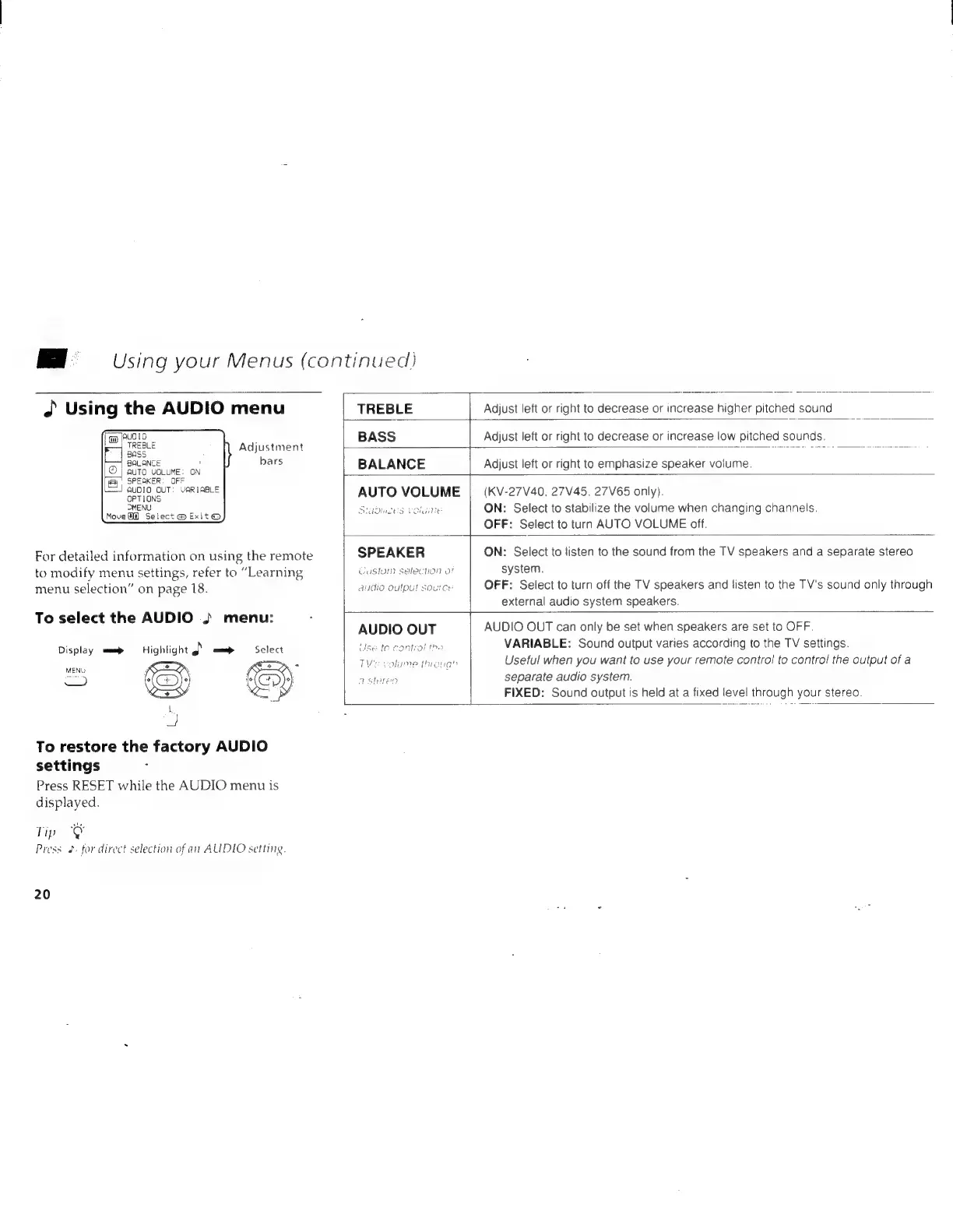
Using
the
AUDIO
menu
]AUO1O
TREBLE
F
|
pass
BALANCE
©
|
auto
VOLUME:
ON
By
SPEAKER:
OFF
QALOIO
OUT:
VARIABLE
Adjustment
bars
OPTIONS
MENU
Move
@@)
Select
@
Exit
@
For
detailed
information
on
using
the
remote
to
modify
menu
settings,
refer
to
“Learning
menu
selection”
on
page
18.
To
select
the
AUDIO
..
menu:
Display
am
Highlight
a
mal
MENU
os
Rey
1
oe
To
restore
the
factory
AUDIO
settings
Press
RESET
while
the
AUDIO
menu
is
displayed.
Tip
ey
Press
2.
for
direct
selection
of
an
AUDIO
settiig.
20
Adjust
left
or
right
to
decrease
or
increase
higher
pitched
sound
GuSlum
selecuon
or
audio
Output
source
AUDIO
Use
te
c9
OUT
Or
Hume
Puroug”
TREBLE
BASS
Adjust
left
or
right
to
decrease
or
increase
low
pitched
sounds.
BALANCE
Adjust
left
or
right
to
emphasize
speaker
volume.
AUTO
VOLUME
(KV-27V40,
27V45.
27V65
only).
Stadinces
Caluine
ON:
Select
to
stabilize
the
volume
when
changing
channels.
OFF:
Select
to
turn
AUTO
VOLUME
off.
SPEAKER
ON:
Select
to
listen
to
the
sound
from
the
TV
speakers
and
a
separate
stereo
system.
OFF:
Select
to
turn
off
the
TV
speakers
and
listen
to
the
TV's
sound
only
through
external
audio
system
speakers.
AUDIO
OUT
can
only
be
set
when
speakers
are
set
to
OFF.
VARIABLE:
Sound
output
varies
according
to
the
TV
settings.
Useful
when
you
want
to
use
your
remote
control
to
control
the
output
of
a
separate
audio
system.
FIXED:
Sound
output
is
held
at
a
fixed
level
through
your
stereo.

Related product manuals