EasyManua.ls Logo

Sony Trinitron KV-20V80 - Cable or Antenna Connections; Connecting Directly to Cable; Cable and Antenna; OF an ANCONA! Oo

Sony Trinitron KV-20V80
35 pages
Print Icon
To Next Page IconTo Next Page
To Previous Page IconTo Previous Page
Loading...
Cable
or
Antenna
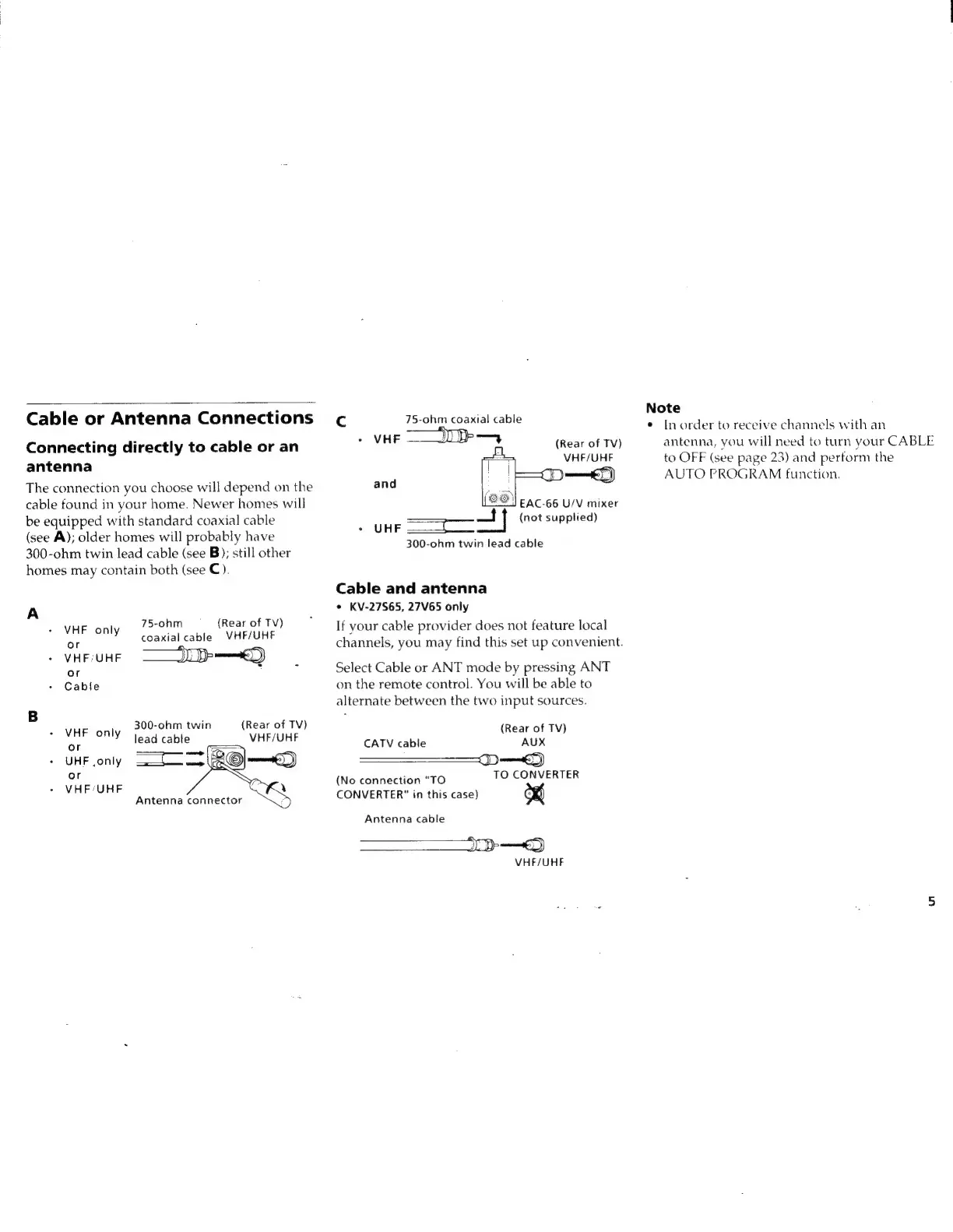
Connections
Connecting
directly
to
cable
or
an
antenna
The
connection
you
choose
will
depend
on
the
cable
found
in
your
home.
Newer
homes
will
be
equipped
with
standard
coaxial
cable
(see
A);
older
homes
will
probably
have
300-ohm
twin
lead
cable
(see
B);
still
other
homes
may
contain
both
(see
C).
A
75-ohm
(Rear
of
TV)
VHF
only
coaxial
cable
|
VHF/UHF
/
VHEIUHE
J
pe)
or
+
Cable
B
:
VHE
|
300-ohm
twin
{Rear
of
TV)
onlY
Jead
cable
VHF/UHF
«
UHF
only
or
+
VHFIUHF
Cc
75-ohm
coaxial
cable
+
VHE
(Rear
of
TV)
VHF/UHF
and
EAC-66
U/V
mixer
-
UHE
=e]
Me
veunpied)
300-ohm
twin
lead
cable
Cable
and
antenna
*
KV-27S65,
27V65
only
If
your
cable
provider
does
not
feature
local
channels,
you
may
find
this
set
up
convenient.
Select
Cable
or
ANT
mode
by
pressing
ANT
on
the
remote
control.
You
will
be
able
to
alternate
between
the
two
input
sources.
(Rear
of
TV)
AUX
J)
et)
TO
CONVERTER
CATV
cable
(No
connection
"TO
CONVERTER"
in
this
case)
Antenna
cable
oe
VHF/UHF
Note
¢
In
order
to
receive
channels
with
an
antenna,
you
will
need
to
turn
your
CABLE
to
OFF
(see
page
23)
and
perform
the
AUTO
PROGRAM
function.

Related product manuals