EasyManua.ls Logo

Sony Trinitron KV-20V80 - Page 17

Sony Trinitron KV-20V80
35 pages
Print Icon
To Next Page IconTo Next Page
To Previous Page IconTo Previous Page
Loading...
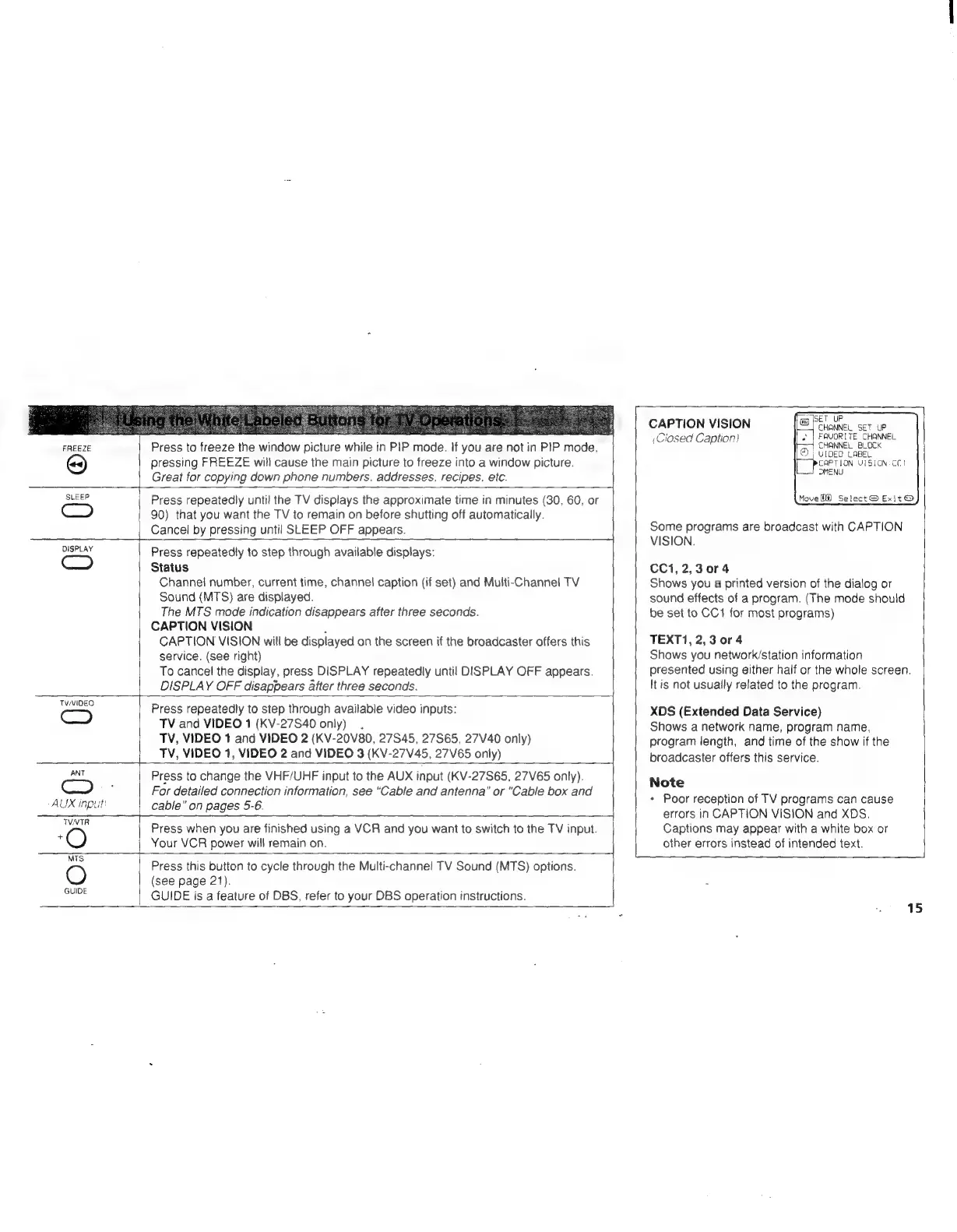
FREEZE
Press
to
freeze
the
window
picture
while
in
PIP
mode.
If
you
are
not
in
PIP
mode.
pressing
FREEZE
will
cause
the
main
picture
to
freeze
into
a
window
picture.
Great
for
copying
down
phone
numbers.
addresses,
recipes.
etc.
SLEEP
DISPLAY
TVMIDEO
Press
repeatedly
unti!
the
TV
displays
the
approximate
time
in
minutes
(30,
60,
or
90)
that
you
want
the
TV
to
remain
on
before
shutting
off
automatically.
Cancel
by
pressing
until
SLEEP
OFF
appears.
Press
repeatedly
to
step
through
available
displays:
Status
Channel
number,
current
time,
channel
caption
(if
set)
and
Multi-Channel
TV
Sound
(MTS)
are
displayed.
The
MTS
made
indication
disappears
after
three
seconds.
CAPTION
VISION
.
CAPTION
VISION
will
be
displayed
on
the
screen
if
the
broadcaster
offers
this
service.
(see
right)
To
cancel
the
display,
press
DISPLAY
repeatedly
until
DISPLAY
OFF
appears.
DISPLAY
OFF
disappears
after
three
seconds.
Press
repeatedly
to
step
through
available
video
inputs:
TV
and
VIDEO
1
(KV-27S40
only).
TV,
VIDEO
1
and
VIDEO
2
(KV-20V80,
27845,
27S65,
27V40
only)
_|_TV,
VIDEO
1,
VIDEO
2
and
VIDEO
3
(KV-27V45,
27V65
only)
ANT
C2
AUX
inpul
Press
to
change
the
VHF/UHF
input
to
the
AUX
input
(KV-27S65,
27V65
only).
For
detailed
connection
information,
see
“Cable
and
antenna”
or
"Cable
box
and
cable”
on
pages
5-6.
TVNTR
‘O
Press
when
you
are
finished
using
a
VCR
and
you
want
to
switch
to
the
TV
input.
Your
VCR
power
will
remain
on.
MTS
GUIDE
Press
this
button
to
cycle
through
the
Multi-channel
TV
Sound
(MTS)
options.
(see
page
21).
GUIDE
is
a
feature
of
DBS,
refer
to
your
DBS
operation
instructions.
CAPTION
VISION
,Ciosed
Caption)
fan)
ISET
UP
CHANNEL
SET
UP
FAVORITE
CHANNEL
CHANNEL
BLOCK
©}
VIDEO
LABEL
[perez
ion
VISION:
CCI
MENU
Move
Hf)
Select
@
Exit
@
Some
programs
are
broadcast
with
CAPTION
VISION.
CC1,
2,3
0r4
Shows
you
a
printed
version
of
the
dialog
or
sound
effects
of
a
program.
(The
mode
should
be
set
to
CC1
for
most
programs)
TEXT1,
2,3
0r4
Shows
you
network/station
information
presented
using
either
half
or
the
whole
screen.
It
is
not
usuaily
related
to
the
program.
XDS
(Extended
Data
Service)
Shows
a
network
name,
program
name,
program
length,
and
time
of
the
show
if
the
broadcaster
offers
this
service.
Note
*
Poor
reception
of
TV
programs
can
cause
errors
in
CAPTION
VISION
and
XDS.
Captions
may
appear
with
a
white
box
or
other
errors
instead
of
intended
text.
15